







Question: C++data structure problem Image components labeling by using rat in the maze and Lee's wire. A digitized image is an m x m matrix of
C++data structure problem
Image components labeling by using rat in the maze and Lee's wire.
A digitized image is an m x m matrix of pixels.
-> pixel is a word invented from "picture element
In a binary image, each pixel is either 0 or 1.
-> A 0 pixel represents image background, while a 1 represents a pixel on
an image component.
-> We will refer to pixels whose value is 1 as component pixels.
Two pixels are adjacent if one is to the left, above, right, or below the other.
Two component pixels that are adjacent are pixels of the same image
component.
The objective of component labeling is to label the component pixels so
that
two pixels get the same label
if and only if
they are pixels of the same image component.
The components are determined by scanning the pixels by rows, from top
to bottom, and within each row by columns, from left to right.
When an unlabeled component pixel is encountered, it is given a component
identifier/label (new color). Labels are assigned starting with 2, because 1
denotes foreground and 0 denotes background.
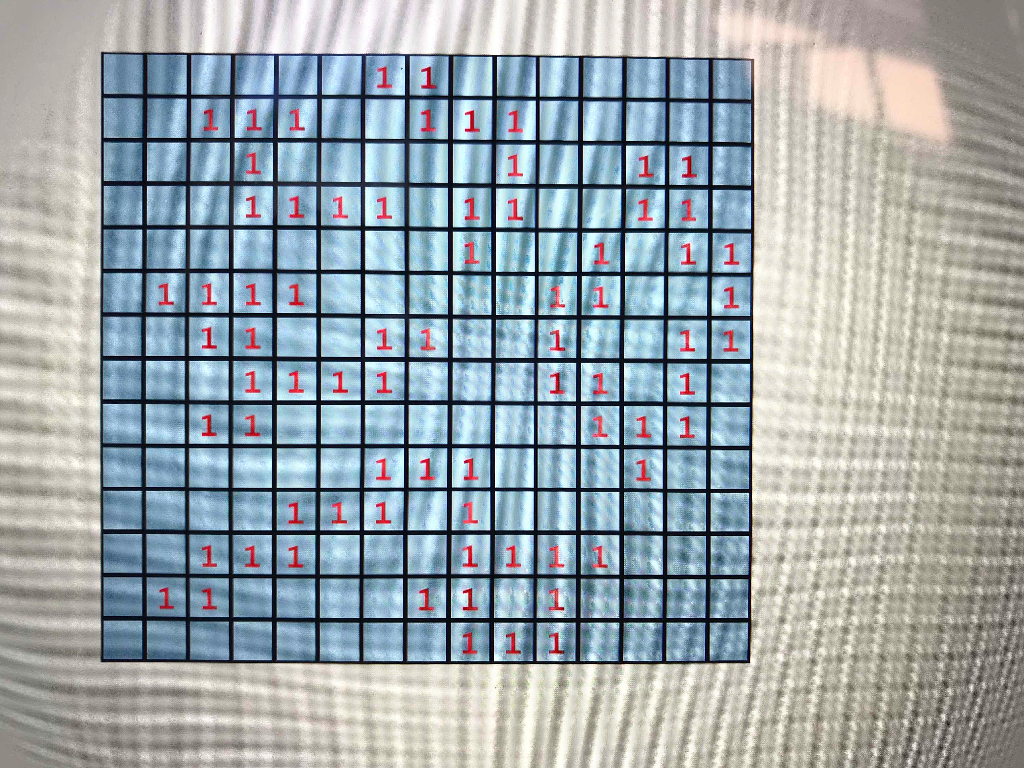
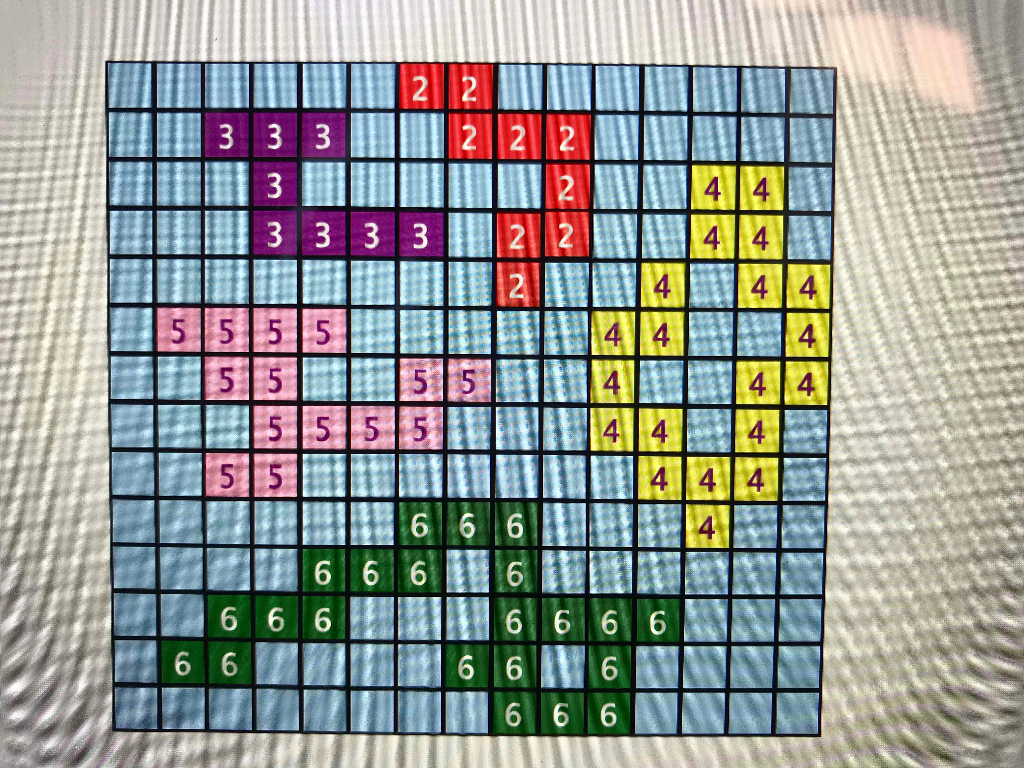
See starter code...
Your task is to complete the labelComponents() method and implement this program, using either Depth First Search or Breadth First Search. Submit source code and output corresponding to the given input
// componentLabeling .cpp
// image component labeling
#include
#include "make2dArray.h"
#include "arrayQueue.h"
#include "position.h"
using namespace std;
// global variables
int **pixel;
int size; // number of rows and columns in the image
// functions
void welcome()
{// Not yet implemented.
}
void inputImage()
{// Input the image.
cout
cin >> size;
// create and input the pixel array
make2dArray(pixel, size + 2, size + 2);
cout
for (int i = 1; i
for (int j = 1; j
cin >> pixel[i][j];
}
void labelComponents()
{// Label the components.
//
// Add Your Code Here
//
}
void outputImage()
{// Output labeled image.
cout
for (int i = 1; i
{
for (int j = 1; j
cout
cout
}
}
void main()
{
welcome();
inputImage();
labelComponents();
outputImage();
}
1 11 1111 11 1 1 1 1 le 7 HA 1 1 III 111 TE 1 |1|11 333 222 3333 |4||414] 5||5|5| 1515 ||5| |5|5 15|5| 666 666 6666 666 | 666 6 6
Step by Step Solution
There are 3 Steps involved in it

Get step-by-step solutions from verified subject matter experts
 Study Help