







Question: Change to your Assignment directory. Create a new subdirectory called asn3 (all in lowercase) and change to that new directory. Create a new subdirectory called
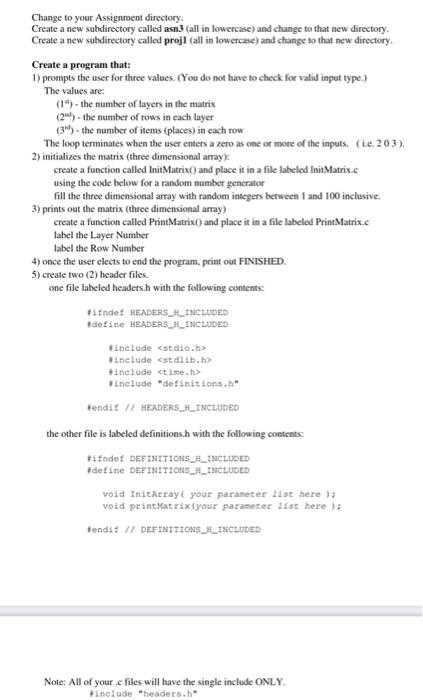
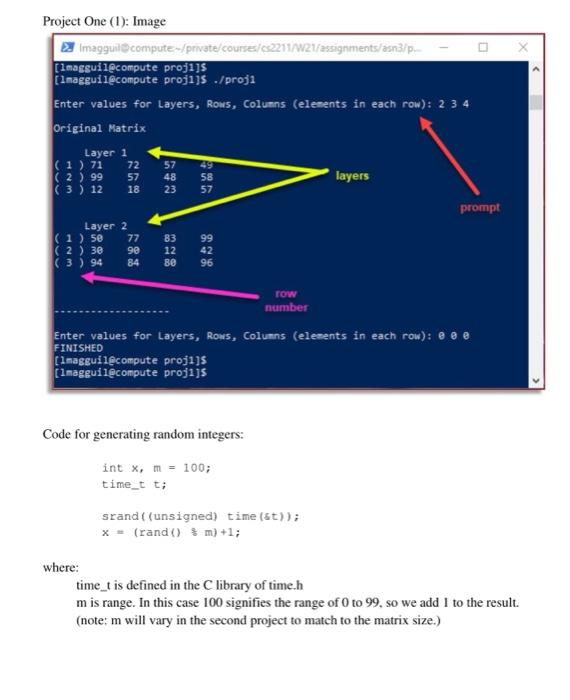
Change to your Assignment directory. Create a new subdirectory called asn3 (all in lowercase) and change to that new directory. Create a new subdirectory called projl (all in lowercase) and change to that new directory Create a program that: 1) prompts the user for three values. (You do not have to check for valid input type.) The values are: (1") - the number of layers in the matrix (2)-the number of rows in each layer (34) - the number of items (places) in each row The loop terminates when the user enters a zero as one or more of the inputs. (t.e. 203). 2) initializes the matrix (three dimensional array: create a function called InitMatrix ) and place it in a file labeled Init Matrix.c using the code below for a random number generator fill the three dimensional array with random integers between 1 and 100 inclusive. 3) prints out the matrix (three dimensional array) create a function called PrintMatrix() and place it in a file labeled PrintMatrix.c label the Layer Number label the Row Number 4) once the user elects to end the program, print out FINISHED. 5) create two (2) header files. one file labeled headers.h with the following contents #ifndef HEADERS_H_INCLUDED define HEADERS_L_INCLUDED #include
Step by Step Solution
There are 3 Steps involved in it

Get step-by-step solutions from verified subject matter experts
 Study Help