







Question: class DLNode: # modelling a node with doubly-linked def __init__(self, inValue=None, inPrev=None, inNext=None): # constructor self.value = inValue # the node data value, default None
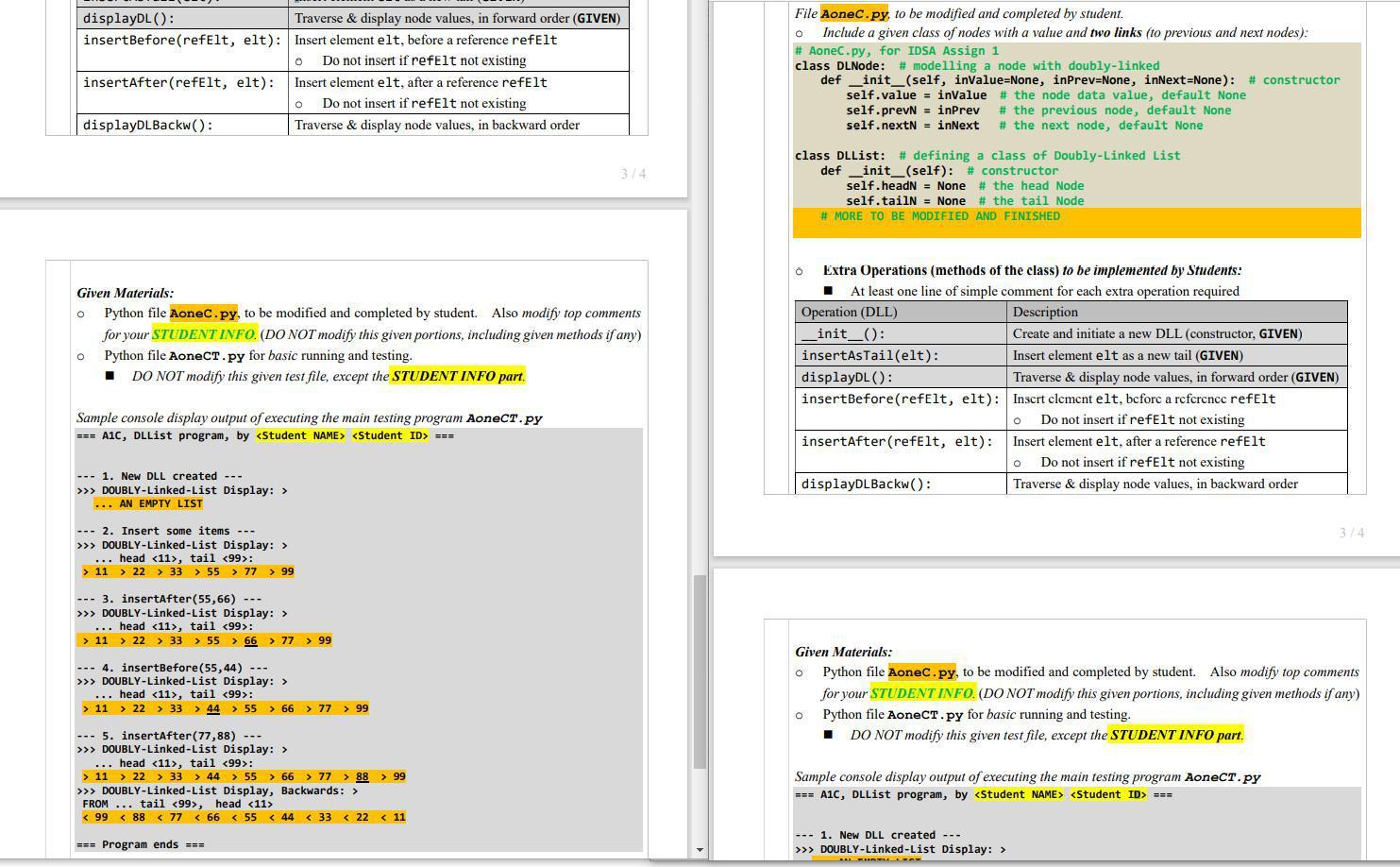
class DLNode: # modelling a node with doubly-linked def __init__(self, inValue=None, inPrev=None, inNext=None): # constructor self.value = inValue # the node data value, default None self.prevN = inPrev # the previous node, default None self.nextN = inNext # the next node, default None
class DLList: # defining a class of Doubly-Linked List def __init__(self): # GIVEN: constructor self.headN = None # the head Node self.tailN = None # the tail Node def insertAsTail(self, inValue): # GIVEN: insert a new node value, as the new tail if self.headN==None: # case of empty DLL newTailN = DLNode(inValue) # create new Node self.headN = newTailN # link new (Tail) Node self.tailN = self.headN else: newTailN = DLNode(inValue, self.tailN) # create a new (Tail) Node, set its previous node as the current Tail self.tailN.nextN = newTailN # current Tail, links next node as new (Tail) Node self.tailN = newTailN # update Tail Node to the new one
def displayDL(self): # GIVEN: traverse & display node values, in forward order print(f">>> DOUBLY-Linked-List Display: >") if self.headN==None: # case of empty list print(" ... AN EMPTY LIST"); return else: # show head value and tail value of list print(f" ... head ," f" tail :") curN = self.headN while curN!= None: # show data values in the whole list print(f" > {curN.value} ", end='') curN = curN.nextN print()
###################### STUDNET's WORK ###################### # simple comment HERE def insertBefore(self, refValue, newV): # insert a new node, BEFORE the ref Node (value) pass # TO BE MODIFIED AND COMPLETED # simple comment HERE def insertAfter(self, refValue, newV): # insert a new node, AFTER the ref Node (value) pass # TO BE MODIFIED AND COMPLETED
# simple comment HERE def displayDLBackw(self): print(f">>> DOUBLY-Linked-List Display, Backwards: >") pass # TO BE MODIFIED AND COMPLETED
displayDL(): Traverse & display node values, in forward order (GIVEN) insertBefore(refelt, elt): Insert element elt, before a reference refelt Do not insert if refelt not existing insertAfter (refelt, elt): Insert element elt, after a reference refelt Do not insert if refElt not existing displayDLBackw(): Traverse & display node values, in backward order File Aonec.py, to be modified and completed by student. Include a given class of nodes with a value and two links (to previous and next nodes): # Aonec.py, for IDSA Assign 1 class DLNode: # modelling a node with doubly-linked def __init__(self, invalue=None, inPrev=None, inNext=None): # constructor self.value = inValue # the node data value, default None self.prevN = inPrev # the previous node, default None self.next = inNext # the next node, default None O 314 class DLList: # defining a class of Doubly-Linked List def __init__(self): # constructor self.headN = None # the head Node self.tailN = None # the tail Node # MORE TO BE MODIFIED AND FINISHED o o Given Materials: Python file Aonec.py, to be modified and completed by student. Also modify top comments for your STUDENT INFO. (DO NOT modify this given portions, including given methods if any) Python file AoneCT.py for basic running and testing. DO NOT modify this given test file, except the STUDENT INFO part. O Extra Operations (methods of the class) to be implemented by Students: At least one line of simple comment for each extra operation required Operation (DLL) Description _init_(): Create and initiate a new DLL (constructor, GIVEN) insertAsTail(elt): Insert element elt as a new tail (GIVEN) displayDL(): Traverse & display node values, in forward order (GIVEN) insertBefore(refelt, elt): Insert clcment elt, before a reference refelt Do not insert if refelt not existing insertAfter (refelt, elt): Insert element elt, after a reference refelt Do not insert if refElt not existing displayDL Backw(): Traverse & display node values, in backward order o Sample console display output of executing the main testing program Aonect.py === A1C, DLList program, by
Step by Step Solution
There are 3 Steps involved in it

Get step-by-step solutions from verified subject matter experts
 Study Help