







Question: Clearly Visual Basic: Programming with Microsoft Visual Basic 2012 Page 608-609 Exercise 3: INTERMEDIATE: INTERMEDIATE 8 Open the Carpet Haven Solution (Carpet Haven Solution.sln) file
Clearly Visual Basic: Programming with Microsoft Visual Basic 2012
Page 608-609 Exercise 3: INTERMEDIATE: INTERMEDIATE 8
Open the Carpet Haven Solution (Carpet Haven Solution.sln) file contained in the ClearlyVB2012\Chap26\Carpet Haven Solution folder (The image in the picture box was downloaded from the Open Clip Art Library at http://openclipart.org.) a. Add a new class file named Rectangle.vb to the project. The Rectangle class should contain two attributes: the rectangles length and its width. It should also contain a default constructor and a method that calculates and returns the rectangles area. Code the Rectangle class. Save the solution and then close the Rectangle.vb window. b. Open the forms Code Editor window. The btnCalc_Click procedure should display the required number of square yards needed to carpet a room and the carpet cost. Code the procedure. c. Save the solution and then start and test the application. (Hint: If the rooms length and width measurements are 9 feet and 8.5 feet, respectively, the number of square yards is 8.5. If the price per square yard is $9.50, the carpet cost is $80.75.) Close the Code Editor window and then close the solution.
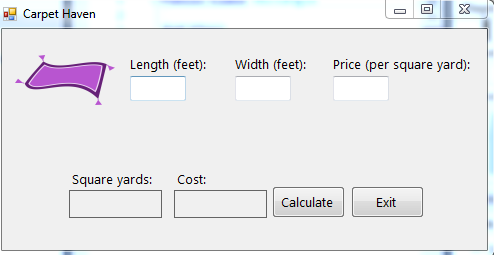
I already added Rectangle.vb to the project, Now we need the coding part.
Carpet Haven Length (feet): Width (feet): Price (per square yard): Square yards: Cost Calculate Exit
Step by Step Solution
There are 3 Steps involved in it

Get step-by-step solutions from verified subject matter experts
 Study Help