







Question: I am a beginner using Visual Studio (Basic) for my coding program. This exercise is from Microsoft Visual Basic 2015 RELOADED book, Chapter 10, exercise
I am a beginner using Visual Studio (Basic) for my coding program. This exercise is from "Microsoft Visual Basic 2015 RELOADED" book, Chapter 10, exercise #26, page 544.
Here is the exercise:
Open the Tax Solution (Tax Solution.sln) file contained in the VbReloaded2015\ Chap10\Tax Solution folder. The interface provides a text box and a combo box for entering a sales amount and a tax rate, respectively. The calcButton_Click procedure should remove the percent sign and the space that precedes it from the tax rate before using the rate to calculate the sales tax. Finish coding the procedure. Save the solution and then start the application. Close the solution. (1, 6)
Here is the existing code:
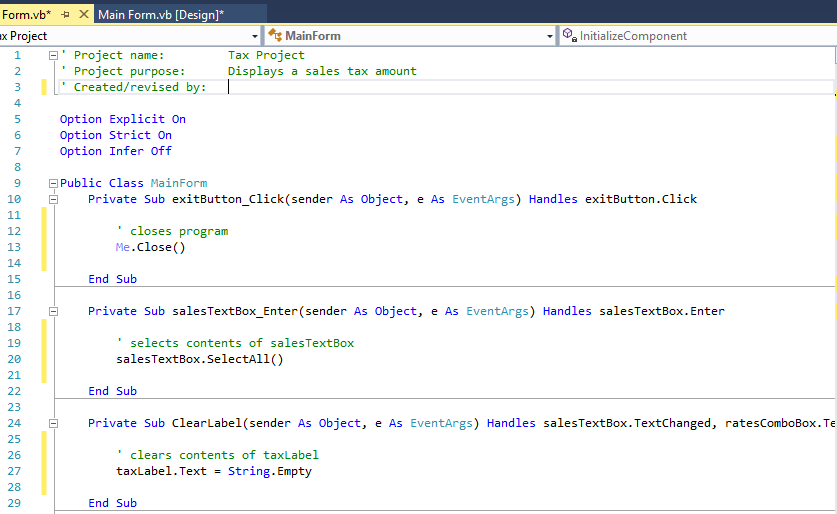
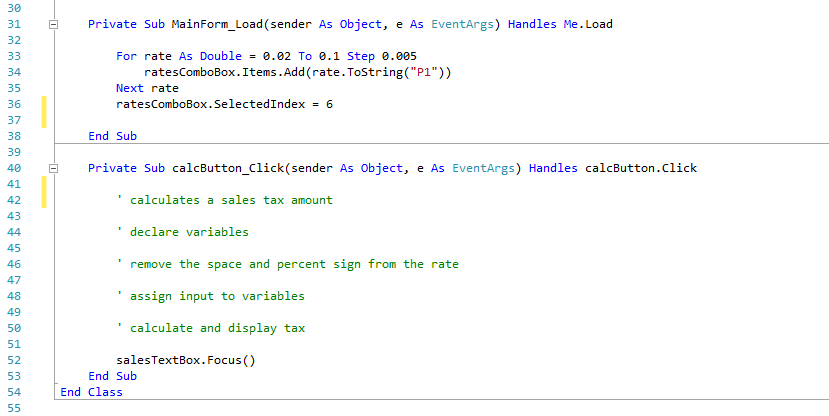
Here is the Interface:
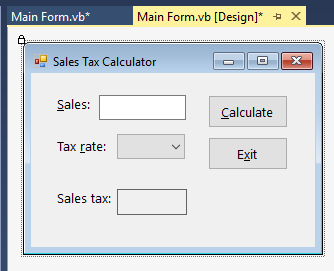
The box to the right of "Tax rate:" is a ComboBox with rates 2% To 10% Step 0.005 The box to the right of "Sales:" is a TextBox. The box to the right of "Sales tax:" is a Label.
All the Options need to stay as is. I believe all that needs to be worked out are LINES 42 - 51 (lines with comments and no code). Thank you so much for your help and work! And again I am a beginner at this using Visual Basic.
Forma,vb X Main Form.vb [Design] Sa InitializeComponent x Project MainForm E' Project name: Tax Project Project purpose Displays a sales tax amount 3 I Created/revised by I 5 Option Explicit on Option Strict On Option Infer off 9 Public Class MainForm 10 El Private sub exitButton sende As object, e As EventArgs) H exitButton.click andles 11 closes program 12 Me Close 13 14 End Sub 15 16 17 El Private sub salesTextBox Enter (sender As object, e As EventArgs) Handles salesTextBox.Enter 18 selects contents of salesT 19 sales TextBox SelectAll() 20 21 End Sub 22 23 24 E Private sub abel (sender As object, e As Event Args) H salesTextBox. Text Changed ratesComboBox. andles Te 25 clears contents of taxLabel 26 tax Label Text string. Empty 27 28 End Sub 29
Step by Step Solution
There are 3 Steps involved in it

Get step-by-step solutions from verified subject matter experts
 Study Help