







Question: Configure Device IPv4 and Security Settings Step 2: Configure host computers. After configuring each host computer, record the host network settings with the ipconfig lall
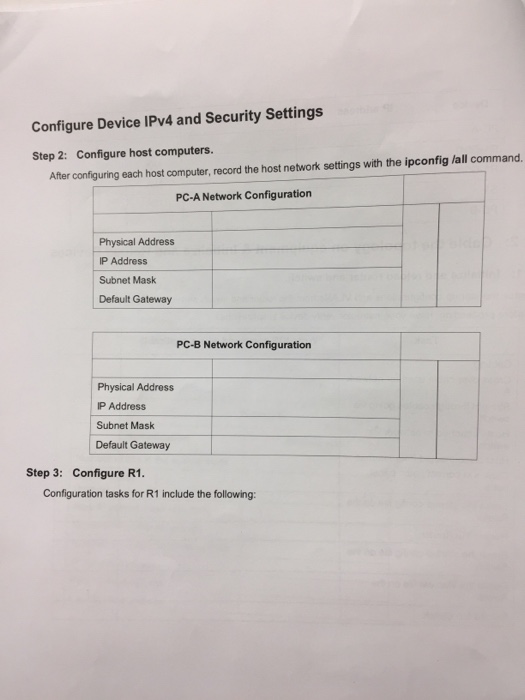
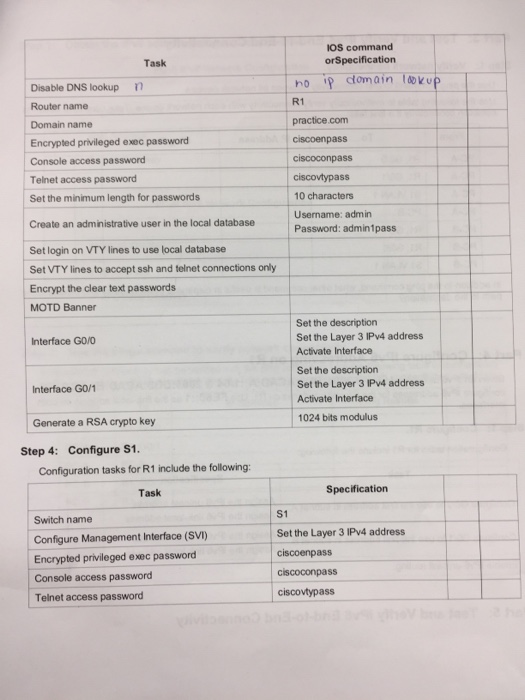
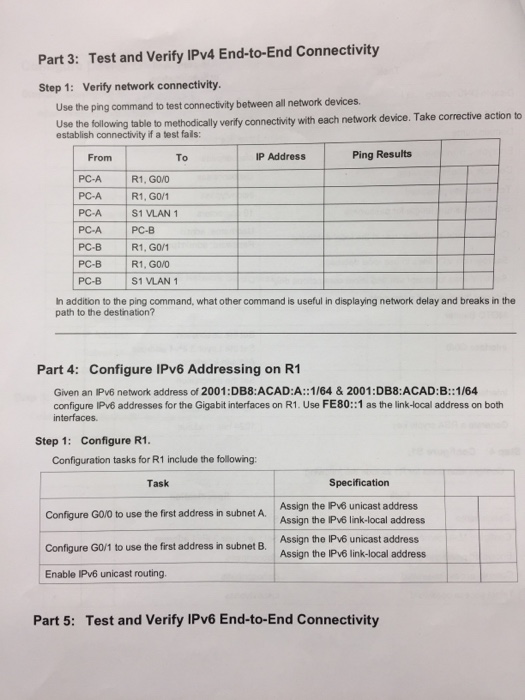
Configure Device IPv4 and Security Settings Step 2: Configure host computers. After configuring each host computer, record the host network settings with the ipconfig lall command. PC-A Network Configuration Physical Address P Address Subnet Mask Default Gateway PC-B Network Configuration Physical Address IP Address Subnet Mask Default Gateway Step 3: Configure R1. Configuration tasks for R1 include the following: Configure Device IPv4 and Security Settings Step 2: Configure host computers. After configuring each host computer, record the host network settings with the ipconfig lall command. PC-A Network Configuration Physical Address P Address Subnet Mask Default Gateway PC-B Network Configuration Physical Address IP Address Subnet Mask Default Gateway Step 3: Configure R1. Configuration tasks for R1 include the following
Step by Step Solution
There are 3 Steps involved in it

Get step-by-step solutions from verified subject matter experts
 Study Help