







Question: Configure ssh on switch for remote use on switcho PcO: ip address 192.168.10.10 Pcl: ip address 192.168.10.8 Fao Fa0/1 Fa0/2 Fa0/2 PC-PT PCO 2960-24TT Switcho
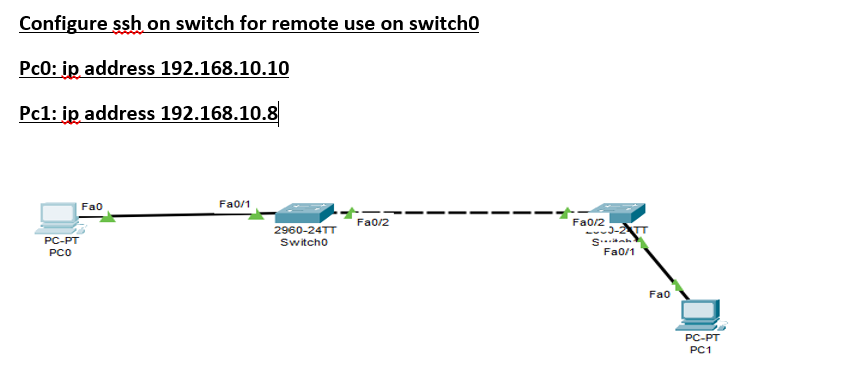
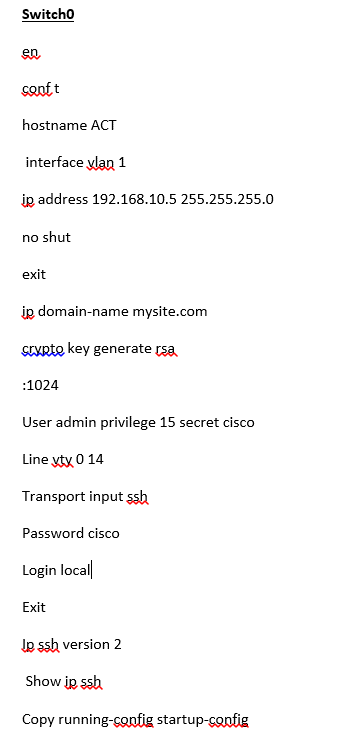
Configure ssh on switch for remote use on switcho PcO: ip address 192.168.10.10 Pcl: ip address 192.168.10.8 Fao Fa0/1 Fa0/2 Fa0/2 PC-PT PCO 2960-24TT Switcho --- Fa0/1 Fao PC-PT PC1 Switcho en conft hostname ACT interface vlan 1 ip address 192.168.10.5 255.255.255.0 no shut exit in domain-name mysite.com scxpte key generate rsa. :1024 User admin privilege 15 secret cisco Line vtx 0 14 Transport input ssh Password cisco Login locall Exit lp ssh version 2 Show ip ssh Copy running-soofig startup-config Configure ssh on switch for remote use on switcho PcO: ip address 192.168.10.10 Pcl: ip address 192.168.10.8 Fao Fa0/1 Fa0/2 Fa0/2 PC-PT PCO 2960-24TT Switcho --- Fa0/1 Fao PC-PT PC1 Switcho en conft hostname ACT interface vlan 1 ip address 192.168.10.5 255.255.255.0 no shut exit in domain-name mysite.com scxpte key generate rsa. :1024 User admin privilege 15 secret cisco Line vtx 0 14 Transport input ssh Password cisco Login locall Exit lp ssh version 2 Show ip ssh Copy running-soofig startup-config
Step by Step Solution
There are 3 Steps involved in it

Get step-by-step solutions from verified subject matter experts
 Study Help