







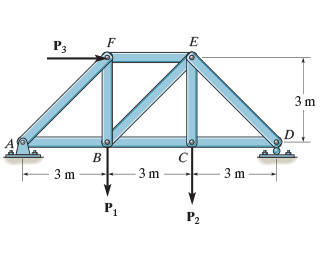
Question: Consider the truss shown in ( Figure 1 ) . Set P 1 P 1 = 6 kNkN , P 2 P 2 = 9
Consider the truss shown in Figure Set PP kNkN PP kNkN PP kNkN
Figure
of
Part A
Determine the force in member BCBC of the truss and state if this member is in tension or compression.
Express your answer to three significant figures and include the appropriate units. Enter negative value in the case of compression and positive value in the case of tension.
Activate to select the appropriates template from the following choices. Operate up and down arrow for selection and press enter to choose the input value typeActivate to select the appropriates symbol from the following choices. Operate up and down arrow for selection and press enter to choose the input value type
FBCFBC
kN
SubmitPreviousAnswersRequestAnswer
Incorrect; Try Again; attempts remaining
Part B
Determine the force in member BEBE of the truss and state if this member is in tension or compression.
Express your answer to three significant figures and include the appropriate units. Enter negative value in the case of compression and positive value in the case of tension.
Activate to select the appropriates template from the following choices. Operate up and down arrow for selection and press enter to choose the input value typeActivate to select the appropriates symbol from the following choices. Operate up and down arrow for selection and press enter to choose the input value type
FBEFBE
nothingnothing
SubmitRequestAnswer
Part C
Determine the force in member EFEF of the truss and state if this member is in tension or compression.
Express your answer to three significant figures and include the appropriate units. Enter negative value in the case of compression and positive value in the case of tension.
Activate to select the appropriates template from the following choices. Operate up and down arrow for selection and press enter to choose the input value typeActivate to select the appropriates symbol from the following choices. Operate up and down arrow for selection and press enter to choose the input value type
FEFFEF
nothingnothing
Step by Step Solution
There are 3 Steps involved in it
1 Expert Approved Answer
Step: 1 Unlock

Question Has Been Solved by an Expert!
Get step-by-step solutions from verified subject matter experts
Step: 2 Unlock
Step: 3 Unlock
 Study Help