







Question: Create a loan amorization vba code using for statements or do statements to calculate payment numbers, Prinicpal before payment, interest payment, paid on principal, and
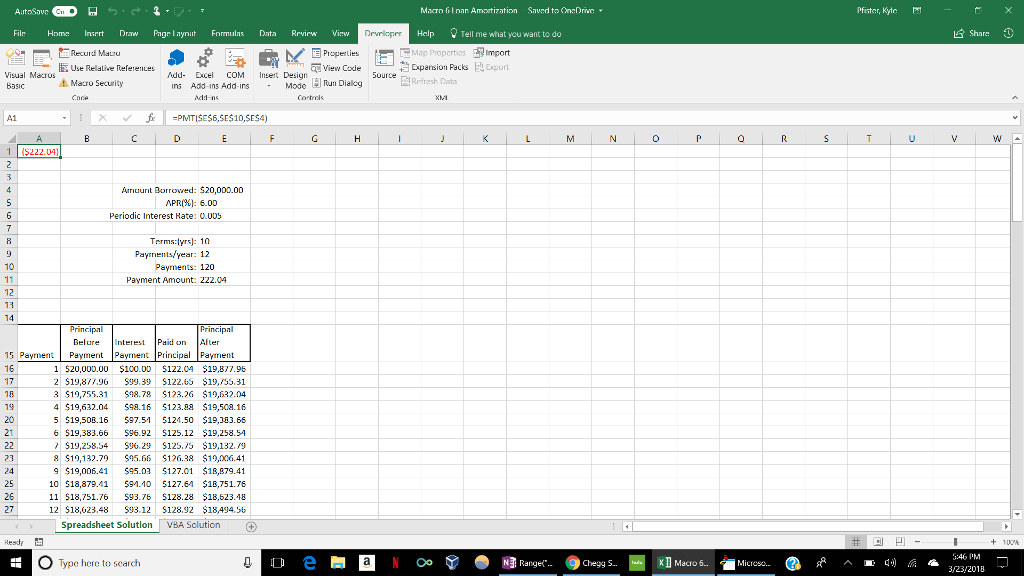
Create a loan amorization vba code using for statements or do statements to calculate payment numbers, Prinicpal before payment, interest payment, paid on principal, and principal before payment and insert the values into a spreadsheet. I have a picture attached with a spreadsheet solution and I need to create a vba solution for the spreadsheet. Please recreate it in this format. thanks. This is the code that I am having problems with as well in the second picture. 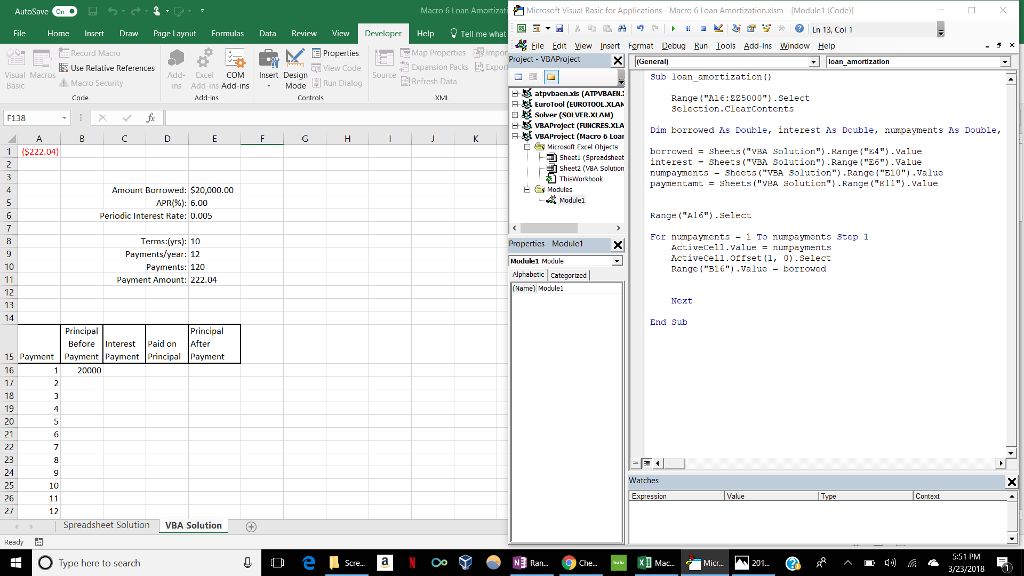
AutoSaws GDA File Home Insert 5. I.2 : Draw Page Laynt Formulas T E Recuid Mauro B8 Data Review Victw Derlepper M D Properties - - Insert Design - Mode un Dialog N ban avies Code - Visual Macros Basic E Use Relative References Macro Security S dd- Ecel COM In Add-ins Add-ins addns Source Cortes F138 Macro floar Amortizat Microsoft Visual Basic for Applications Macro 6 loan Amortization.xlsm - (Module1 (Code)] EN - % 2 6 4 9 - I a V & $ * @ Ln 13, Col 1 Help I Tell me what * Eile Edit View Insert Format Letug Run Tools Add-Ins Window Help Map Properties impo Project - VBAProject XI General) Expansion Packs E Export - loan_amortization Refresh Data Sub loan_ar.Ortization 1) BS atpvbaen.xls (ATPVBAEN. Range("B16:125000").Select A e EuroTool (EUROTOOL.XLAR Selection. ClearContents Dy solver (SOLVER.XLAM) GK VBAProject (FUNCRES.XLA Dim borrowed Is Double, interest As Double, ni..payments As Double, J R E VHAProject (Macro 6 Loan E Microsoft Excel Objects borrowed = Sheets("VBA Solution").Range("4").Value | F9 Shest(Spreadsheet interest - Sheets("VBA Solution") .Range("E6").Value FP sheetz (VHA Solution numpaytmonts - Shoots ("VBA Solution") .Range("B10").valus 1 ThisWorkbook payment.amt. = streets ("vea solution") .Range("B11").Value EEN Modi - Module Range("Al6").Select A 1. (S222.04) F G H I Un A Amount Burrowed: $20,000.00 APR(%): 6.00 Periodic Interest Rate: 0.005 on N o X Terms:(yrs): 10 Payments/year: 12 Payments: 120 Payment Amount: 222.04 e For numpay.ents - 1 To n payments Step 1 ActiveCce11.Value = numpayments IctiveCell. Ofset (1, 0).Select Range("B16").Value - borrowed Properties Modulci Mondule1 Module Mphabetc Categories | (Name) Module: 13 Next End Sub Principal Before Interest Payment Payment 20000 Paid on Principal Principal After Payment 1. nt 19 & ANNARR Watches Expressic 27 Spreadsheet Solution VBA Solution a Resd 4 0 Type here to search O e 1 Sere. a N o T O NI ran. Che. XI Mac. 1 Micr.. N 201.. G R A E a 3/23/2018 3 AutoSaws GDA File Home Insert 5. I.2 : Draw Page Laynt Formulas T E Recuid Mauro B8 Data Review Victw Derlepper M D Properties - - Insert Design - Mode un Dialog N ban avies Code - Visual Macros Basic E Use Relative References Macro Security S dd- Ecel COM In Add-ins Add-ins addns Source Cortes F138 Macro floar Amortizat Microsoft Visual Basic for Applications Macro 6 loan Amortization.xlsm - (Module1 (Code)] EN - % 2 6 4 9 - I a V & $ * @ Ln 13, Col 1 Help I Tell me what * Eile Edit View Insert Format Letug Run Tools Add-Ins Window Help Map Properties impo Project - VBAProject XI General) Expansion Packs E Export - loan_amortization Refresh Data Sub loan_ar.Ortization 1) BS atpvbaen.xls (ATPVBAEN. Range("B16:125000").Select A e EuroTool (EUROTOOL.XLAR Selection. ClearContents Dy solver (SOLVER.XLAM) GK VBAProject (FUNCRES.XLA Dim borrowed Is Double, interest As Double, ni..payments As Double, J R E VHAProject (Macro 6 Loan E Microsoft Excel Objects borrowed = Sheets("VBA Solution").Range("4").Value | F9 Shest(Spreadsheet interest - Sheets("VBA Solution") .Range("E6").Value FP sheetz (VHA Solution numpaytmonts - Shoots ("VBA Solution") .Range("B10").valus 1 ThisWorkbook payment.amt. = streets ("vea solution") .Range("B11").Value EEN Modi - Module Range("Al6").Select A 1. (S222.04) F G H I Un A Amount Burrowed: $20,000.00 APR(%): 6.00 Periodic Interest Rate: 0.005 on N o X Terms:(yrs): 10 Payments/year: 12 Payments: 120 Payment Amount: 222.04 e For numpay.ents - 1 To n payments Step 1 ActiveCce11.Value = numpayments IctiveCell. Ofset (1, 0).Select Range("B16").Value - borrowed Properties Modulci Mondule1 Module Mphabetc Categories | (Name) Module: 13 Next End Sub Principal Before Interest Payment Payment 20000 Paid on Principal Principal After Payment 1. nt 19 & ANNARR Watches Expressic 27 Spreadsheet Solution VBA Solution a Resd 4 0 Type here to search O e 1 Sere. a N o T O NI ran. Che. XI Mac. 1 Micr.. N 201.. G R A E a 3/23/2018 3
Step by Step Solution
There are 3 Steps involved in it

Get step-by-step solutions from verified subject matter experts
 Study Help