







Question: Create a new Java project called animation Below is the picture the SampleAnimationStarter. Rename the SampleAnimationStarter class to Shapes in the class definition and inside
Create a new Java project called animation
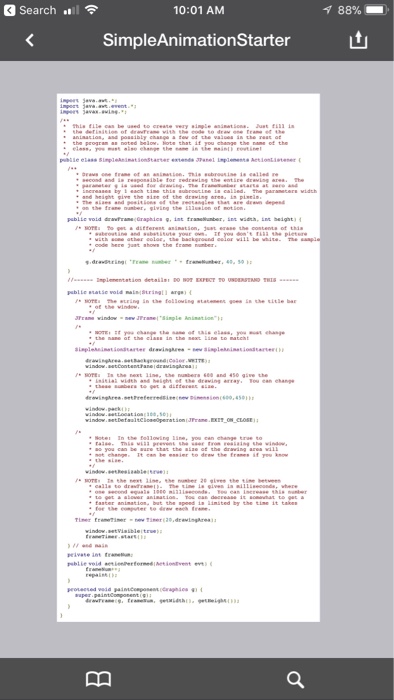
Below is the picture the SampleAnimationStarter.
Rename the SampleAnimationStarter class to Shapes in the class definition and inside the main function (there are three total places it needs to be replaced).
Modify the drawFrame function to do the following :
(a) Draw a blue rectangle somewhere on the screen, with side lengths of 100 and 200 pixels. (b) Draw a red circle somewhere on the screen with radius 50 pixels
(c) Print the text Hello World on the display in black letters.
(d) Make sure none of the above elements overlap (for now).
Make your Hello World text scroll to the right until it is completely off the screen, then start back on the left edge, scrolling to the right again, and repeating.
Make a second copy of the SampleAnimationStarter.java in the project and give it a name other than Shapes. Use this to try drawing a more complicated image (smiley face, tree, cloud, etc.) using only the basic methods of the Graphics object.
Move your code to draw the shape into a subroutine with a void return type, and taking a single parameter of type Graphics. Then call the subroutine from within drawFrame to draw your image. You may also pass the frameNumber, width, and height if you use them to compute your image.
Take a screen-shot of your graphical output (either with the Print Screen key or the windows Clipper tool) to be turned in with the lab.
Search 10:01 AM 88% SimpleAnimationStarter he title ba 4s0 i can e 33 conds Search 10:01 AM 88% SimpleAnimationStarter he title ba 4s0 i can e 33 conds
Step by Step Solution
There are 3 Steps involved in it
1 Expert Approved Answer
Step: 1 Unlock

Question Has Been Solved by an Expert!
Get step-by-step solutions from verified subject matter experts
Step: 2 Unlock
Step: 3 Unlock
 Study Help