







Question: Create an android app using android studio. Layout Project In this project, you are to create a layout that looks like the following screenshots both
Create an android app using android studio.
Layout Project
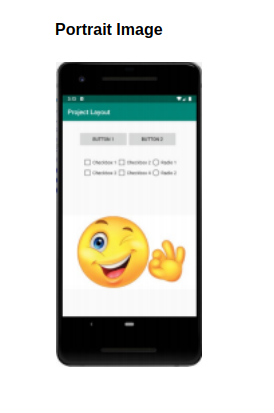
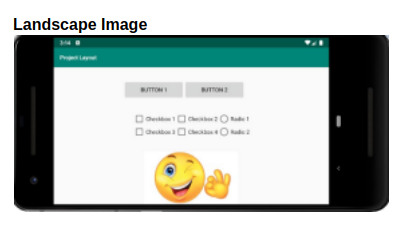
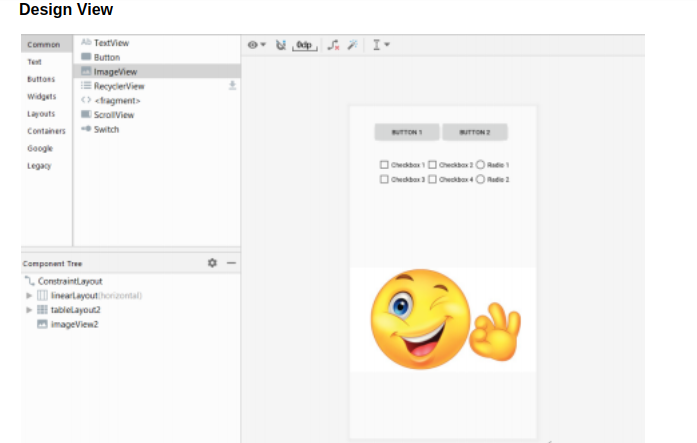
In this project, you are to create a layout that looks like the following screenshots both portrait and landscape. You can use whatever image you want. You also are to have no warnings and you must use a linear layout for the buttons, table layout for checkboxes and radio buttons, constraint layout for the image. All components will be in a constraint layout.
NOTE: You will get a warning that the buttons should be borderless. To set a style for the button like the screenshot enter style="@style/Widget.AppCompat.Button.Small" for each button.
Portrait Image
Landscape Image
Design View
Portrait Image Landscape Image BUTTON Davulage Hau 40 mua Design View Common Text Buttons Widgets Layouts Containers Google Lego A TextView Button ImageView RecyclerView > fragment ScrollView Switch BUTTON Crew Rule Cabos Cabos Rutie Componente ConstraintLayout I linearLayout Horizontal) tablelayout2 imageView2 Portrait Image Landscape Image BUTTON Davulage Hau 40 mua Design View Common Text Buttons Widgets Layouts Containers Google Lego A TextView Button ImageView RecyclerView > fragment ScrollView Switch BUTTON Crew Rule Cabos Cabos Rutie Componente ConstraintLayout I linearLayout Horizontal) tablelayout2 imageView2
Step by Step Solution
There are 3 Steps involved in it

Get step-by-step solutions from verified subject matter experts
 Study Help