







Question: Create Java code for the following program: Calculator Program docx (Protected View) - Microsoft Word cial use View ick for more details. | Enable Editing
Create Java code for the following program:
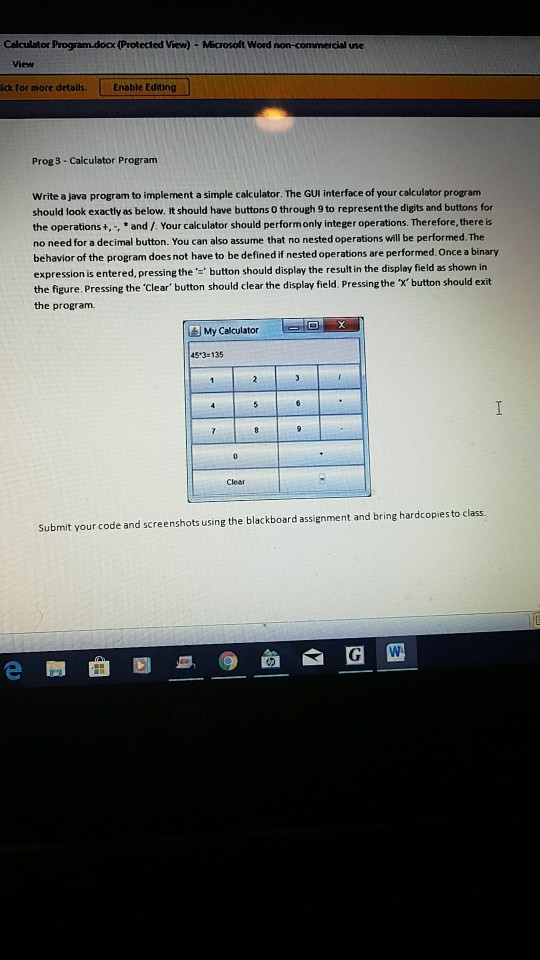
Calculator Program docx (Protected View) - Microsoft Word cial use View ick for more details. | Enable Editing Prog 3-Calculator Program Write a java program to implement a simple calculator. The GUI interface of your calculator program should look exactly as below. It should have buttons 0 through 9 to represent the digits and buttons for the operations+,,and /. Your calculator should performonly integer operations. Therefore, there is no need for a decimal button. You can also assume that no nested operations will be performed. The behavior of the program does not have to be defined if nested operations are performed. Once a binary expression is entered, pressing the button should display the result in the display field as shown in the figure.Pressing the 'Clear' button should clear the display field. Pressing the x'button should exit the program. My Calculator 45 3-135 Clear Submit your code and screenshots using the blackboard assignment and bring hardcopies to class. e
Step by Step Solution
There are 3 Steps involved in it

Get step-by-step solutions from verified subject matter experts
 Study Help