







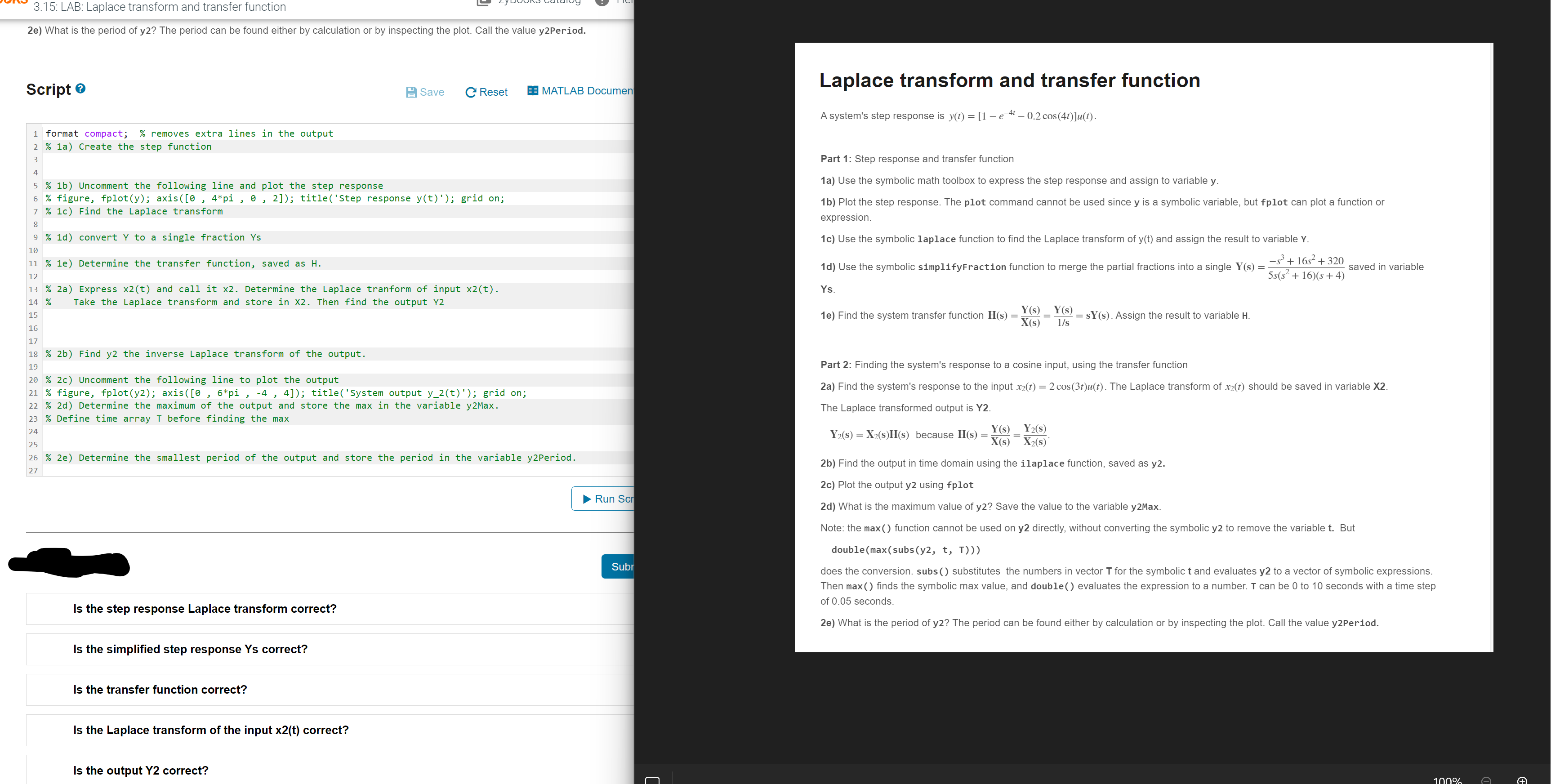
Question: CREATE MATLAB SCRIPT PLS ASAP WILL RATE A system's step response is PICTURE LOOK CAREFULLY STEPS ARE BELOW FOR MAT LAB Part 1 : Step
CREATE MATLAB SCRIPT PLS ASAP WILL RATE A system's step response is PICTURE LOOK CAREFULLY STEPS ARE BELOW FOR MAT LAB Part : Step response and transfer function
a Use the symbolic math toolbox to express the step response and assign to variable y
b Plot the step response. The plot command cannot be used since y is a symbolic variable, but fplot can plot a function or expression.
c Use the symbolic laplace function to find the Laplace transform of yt and assign the result to variable Y
d Use the symbolic simplifyFraction function to merge the partial fractions into a single saved in variable Ys
e Find the system transfer function Assign the result to variable H
Part : Finding the system's response to a cosine input, using the transfer function
a Find the system's response to the input The Laplace transform of should be saved in variable X
The Laplace transformed output is Y
because
b Find the output in time domain using the ilaplace function, saved as y
c Plot the output y using fplot
d What is the maximum value of y Save the value to the variable yMax.
Note: the max function cannot be used on y directly, without converting the symbolic y to remove the variable t But doublemaxsubsy t T
does the conversion. subs substitutes the numbers in vector T for the symbolic t and evaluates y to a vector of symbolic expressions. Then max finds the symbolic max value, and double evaluates the expression to a number. T can be to seconds with a time step of seconds.
e What is the period of y The period can be found either by calculation or by inspecting the plot. Call the value yPeriod. HINTS ARE IN GREEN PLS HELP
Step by Step Solution
There are 3 Steps involved in it
1 Expert Approved Answer
Step: 1 Unlock

Question Has Been Solved by an Expert!
Get step-by-step solutions from verified subject matter experts
Step: 2 Unlock
Step: 3 Unlock
 Study Help