



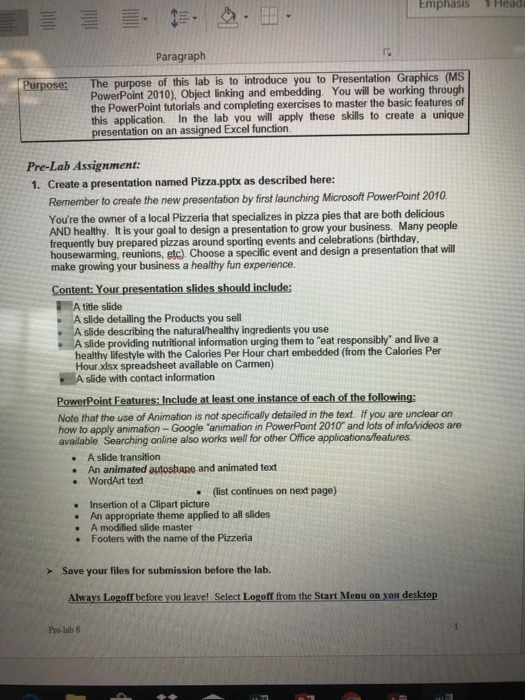
Question: Create power point 2016 and match with Excel follows this information Emphasis Head Paragraph Purpose:The purpose of this lab is to introduce you to Presentation
 Create power point 2016 and match with Excel follows this information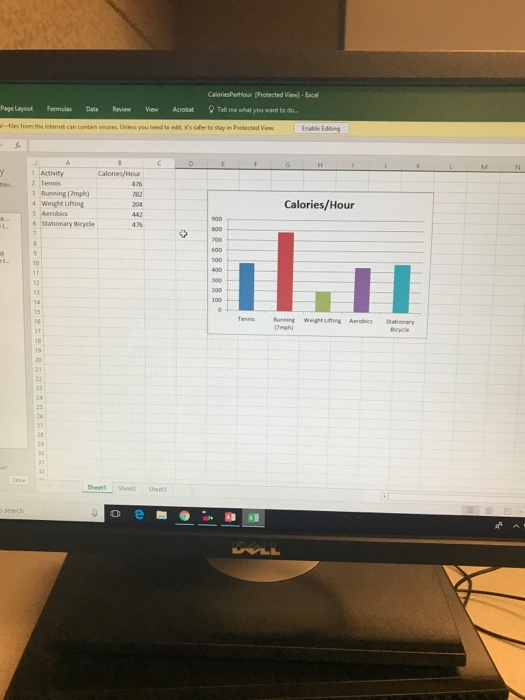
Emphasis Head Paragraph Purpose:The purpose of this lab is to introduce you to Presentation Graphics (MS PowerPoint 2010), Object inking and embedding You will be working through the PowerPoint tutorials and completing exercises to master the basic features of this application. In the lab you will apply these skills to create a unique function Pre-Lab Assignment: 1. Create a presentation named Pizza.pptx as described here: Remember to create the new presentation by first launching Microsoft PowerPoint 2010 You're the owner of a local Pizzeria that specializes in pizza pies that are both delicious AND healthy. It is your goal to design a presentation to grow your business. Many people frequently buy prepared pizzas around sporting events and celebrations (birthday housewarming, reunions, etc). Choose a specific event and design a presentation that will make growing your business a healthy fun experience. Content: Your presentation slides should include: A title slide A slide detailing the Products you sell A slide describing the natural/healthy ingredients you use . A slide providing nutritional information urging them to 'eat responsibly and livea healthy lifestyle with the Calories Per Hour chart embedded (from the Calories Per Hour.xlsx spreadsheet available on Carmen) slide with contact information Note that the use of Animation is not specifically detailed in the text. If you are unclear on how to apply animation- Google 'animation in PowerPoint 2010 and lots of infavideos are available Searching online also works well for other Office applications/features . A slide transition . An animated autosbape and animated text . WordArt text (list continues on next page) Insertion of a Clipart picture An appropriate theme applied to all slides A modified slide master Footers with the name of the Pizzeria . Save your files for submission before the lab. Always Logoff before you leavel Select Logoff from the Start Menu on you desktop Pre-lab 6 Emphasis Head Paragraph Purpose:The purpose of this lab is to introduce you to Presentation Graphics (MS PowerPoint 2010), Object inking and embedding You will be working through the PowerPoint tutorials and completing exercises to master the basic features of this application. In the lab you will apply these skills to create a unique function Pre-Lab Assignment: 1. Create a presentation named Pizza.pptx as described here: Remember to create the new presentation by first launching Microsoft PowerPoint 2010 You're the owner of a local Pizzeria that specializes in pizza pies that are both delicious AND healthy. It is your goal to design a presentation to grow your business. Many people frequently buy prepared pizzas around sporting events and celebrations (birthday housewarming, reunions, etc). Choose a specific event and design a presentation that will make growing your business a healthy fun experience. Content: Your presentation slides should include: A title slide A slide detailing the Products you sell A slide describing the natural/healthy ingredients you use . A slide providing nutritional information urging them to 'eat responsibly and livea healthy lifestyle with the Calories Per Hour chart embedded (from the Calories Per Hour.xlsx spreadsheet available on Carmen) slide with contact information Note that the use of Animation is not specifically detailed in the text. If you are unclear on how to apply animation- Google 'animation in PowerPoint 2010 and lots of infavideos are available Searching online also works well for other Office applications/features . A slide transition . An animated autosbape and animated text . WordArt text (list continues on next page) Insertion of a Clipart picture An appropriate theme applied to all slides A modified slide master Footers with the name of the Pizzeria . Save your files for submission before the lab. Always Logoff before you leavel Select Logoff from the Start Menu on you desktop Pre-lab 6
Step by Step Solution
There are 3 Steps involved in it

Get step-by-step solutions from verified subject matter experts