







Question: Create table Customers ( CustomerId int primary key identity(1,1), FirstName nvarchar(50), LastName nvarchar(50), Phone char(11),
Create table Customers ( CustomerId int primary key identity(1,1), FirstName nvarchar(50), LastName nvarchar(50), Phone char(11), Email nvarchar(256) ) Create table Stores ( StoreId int primary key identity(1,1), StoreName varchar(150), Phone char(11), Email nvarchar(256), AddressId int, Manager nvarchar(25) ) create table Barista ( BaristaId int primary key identity(1,1), FirstName nvarchar(20), LastName nvarchar(30), ManagerId int, ) Create table Products ( ProductId int primary key identity(1,1), ProductName nvarchar(50), ProductDescription nvarchar(256), CurrentPrice decimal(7,2), UnitOfMeasure varchar(50) ) Create table suppliers ( SupplierId int primary key identity(1,1), SupplierName varchar(150), Email nvarchar(256), Phone varchar(12), StartDate datetime, Active bit ) Create table Orders ( OrderId int primary key Identity(1,1), StoreId int, CustomerId int, BaristaId int, OrderDate dateTime, PaymentType varchar(50), PaymentAmount decimal(7,2), Tax decimal(7,2), Total decimal (7,2) ) create table OrderProducts ( OrderProductId int primary key identity(1,1), OrderId int foreign key references Orders(OrderId), ProductId int foreign key references Products(ProductId), Price decimal(7,2), Quantity int Check (Quantity > 0) )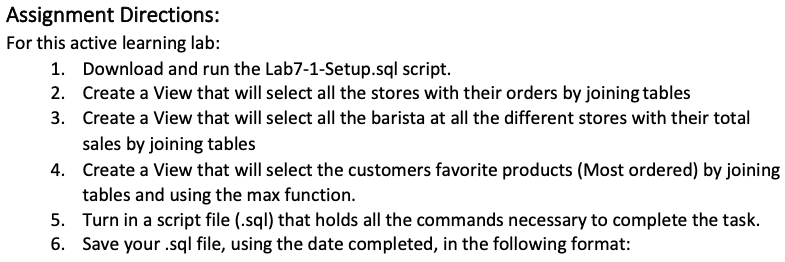
Assignment Directions: For this active learning lab: 1. Download and run the Lab7-1-Setup.sql script. 2. Create a View that will select all the stores with their orders by joining tables 3. Create a View that will select all the barista at all the different stores with their total sales by joining tables 4. Create a View that will select the customers favorite products (Most ordered) by joining tables and using the max function. 5. Turn in a script file (.sql) that holds all the commands necessary to complete the task. 6. Save your .sql file, using the date completed, in the following format:
Step by Step Solution
There are 3 Steps involved in it

Get step-by-step solutions from verified subject matter experts
 Study Help