



Question: Create the following network on cisco packet tracer. Complete the following the task. 1. Use the network 192.168.XY.0 subnet mask 255.255.255.0 to assign IP Addresses
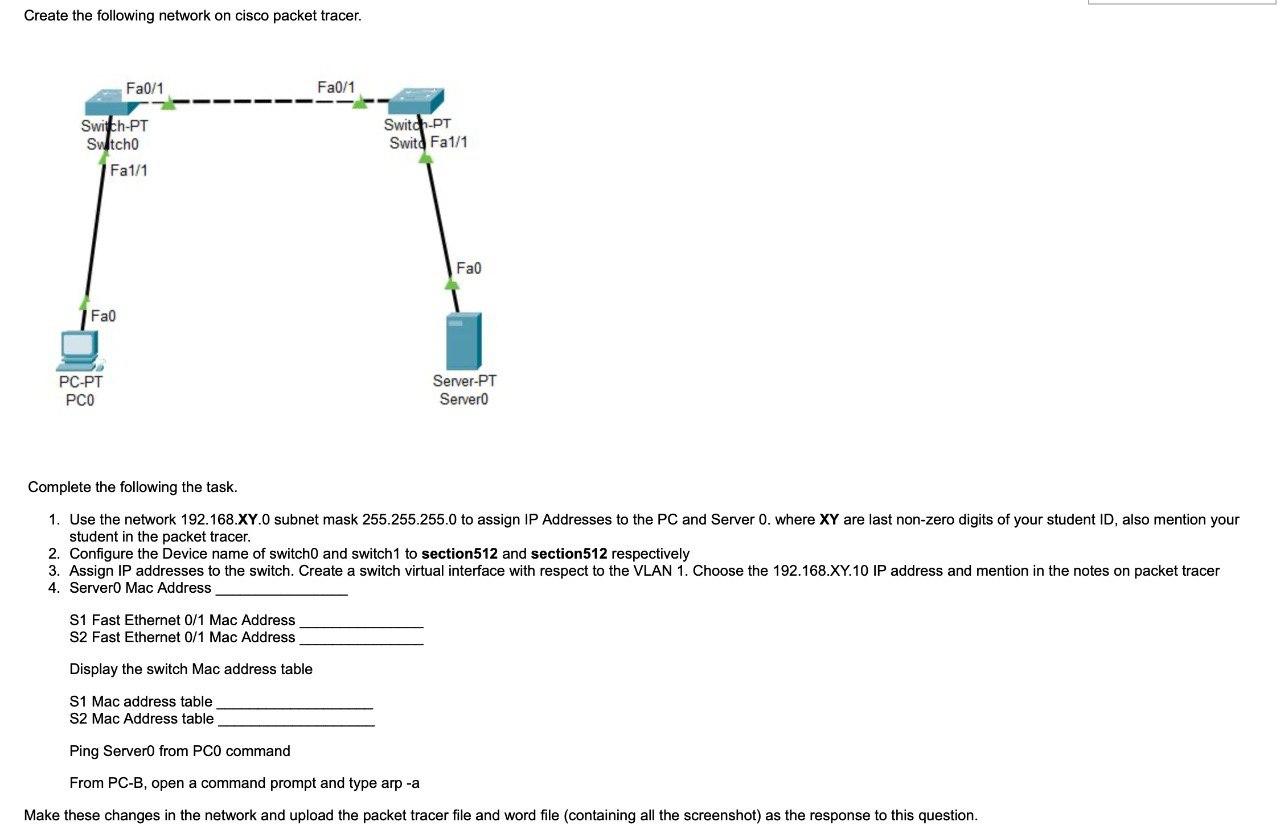
Create the following network on cisco packet tracer. Complete the following the task. 1. Use the network 192.168.XY.0 subnet mask 255.255.255.0 to assign IP Addresses to the PC and Server 0 . where XY are last non-zero digits of your student ID, also mention your student in the packet tracer. 2. Configure the Device name of switch0 and switch1 to section512 and section 512 respectively 3. Assign IP addresses to the switch. Create a switch virtual interface with respect to the VLAN 1. Choose the 192.168.XY.10 IP address and mention in the notes on packet tracer 4. Server0 Mac Address S1 Fast Ethernet 0/1Mac Address S2 Fast Ethernet 0/1Mac Address Display the switch Mac address table S1 Mac address table S2 Mac Address table Ping Server0 from PC0 command From PC-B, open a command prompt and type arp -a Make these changes in the network and upload the packet tracer file and word file (containing all the screenshot) as the response to this
Step by Step Solution
There are 3 Steps involved in it

Get step-by-step solutions from verified subject matter experts