







Question: CSC 131: Basic GUI Lab 6 When the user pressed the first button, the program should use the data in the Fahrenheit field to compute
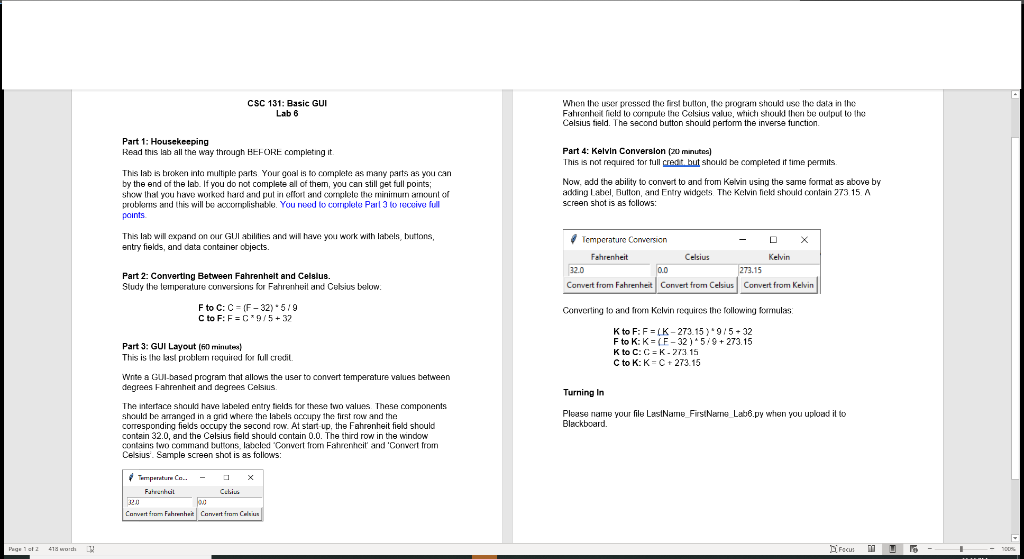
CSC 131: Basic GUI Lab 6 When the user pressed the first button, the program should use the data in the Fahrenheit field to compute the Celsius value, which shouk thor be output to the Celsius field. The second button should perform the inverse function. Part 1: Housekeeping Read this lab all the way through HEFORE completing it This labis broken inta multiple parts Your goal is to complete as many parts as you can by the end of the lab. If you do not complete all of them, you can still get full points; show that you have worked hard and put in effort and conclele the minimum amount of problems and this will be accomplishable. You need to corriplele Paul to receive full points Part 4: Kelvin Conversion (20 minutes) This is not required for full credit but should be completed it time permits Now, add the ability to convert to and from Kelvin using the same format as above by adkling Label, Button, and Entry widgets The Kelvin field should contain 273 15 A screen shot is as follows: This lab will expand on our Gulabilities and will have you work with labels, buttons, entry fields, and data container objects. Temperature Conwersion - Fahrenheit Celsius Kelvin 220 0.0 273.15 Convert from Fahrenheit Convert from Celsius Convert from Kelvin Part 2: Converting Between Fahrenheit and Celsius. Study the temperature conversions for Fahrenheit and Celsius below. F to C: C = (F-32). 5/9 C to F: F=C 9/5+32 Converting to and from Kelvin requires the following formulas Part 3: GUI Layout (60 minutes) This is the best problem required for full credil K to F:F=(K-273.15) 9/5-32 Fto K: K=(-32) 5/9 + 273.15 K to C: C = K -273 15 C to K: KNC + 273.15 Turning in Wnte a GUI-based program that allows the user to convert temperature values between degrees Fahrenheit and degrees Celsius The interface should have labeled entry fields for these two values These components should be arranged in a grid where the labels accupy the first row and the corresponding fields occupy the second row. At start-up, the Fahrenheit field should contain 32.0, and the Celsius field should contain 0.0. The third row in the window contains two command buttons labeled Convert from Fahrenheit' and 'Convert from Celsius. Sample screen shot is as follows: Please name your file LastName_FirstNarne Lab36.py when you upload it to Blackboard. Temperature Co. Fatechi ou Convert from Fahrenheit Convert from Calvin Page 102 418 with 1 procu 00
Step by Step Solution
There are 3 Steps involved in it

Get step-by-step solutions from verified subject matter experts
 Study Help