





Question: CSIS 123 C++ Programming Fundamentals Assign02-OutputManipulation Output Stream Manipulation and Formatting Create this Windows console program in a suitable folder. Name the Project Assign02-OutputManipulation Do
 CSIS 123 C++ Programming Fundamentals Assign02-OutputManipulation Output Stream Manipulation and Formatting

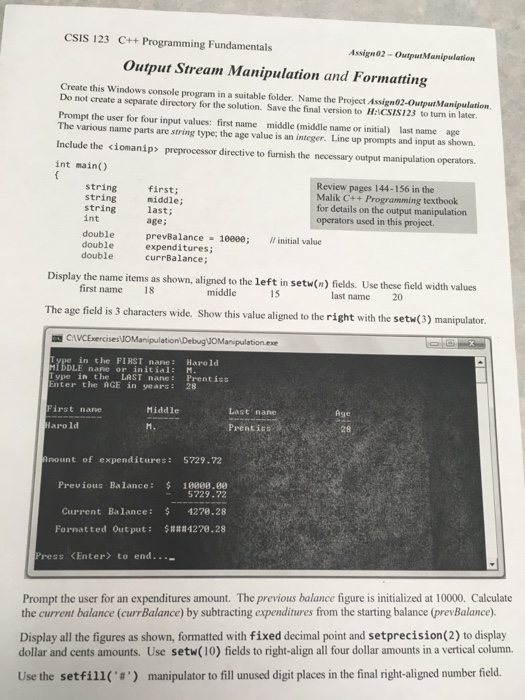
CSIS 123 C++ Programming Fundamentals Assign02-OutputManipulation Output Stream Manipulation and Formatting Create this Windows console program in a suitable folder. Name the Project Assign02-OutputManipulation Do not create a separate directory for the solution. Save the final version to H:ICSIS123 to turn in later Prompt the user for four input values: first name middle (middle name or initial) last name age The various name parts are string type; the age value is an integer. Line up prompts and input as shown Include the preprocessor directive to furnish the necessary output manipulation operators. int main(O Review pages 144-156 in the Malik C++ Programming textbook for details on the output manipulation operators used in this project. string first; string string last; int middle; age; expenditures; double prevBalance 10000; initial value double double currBalance; Display the name items as shown, aligned to the left in setw(n) fields. Use these field width values first name 18 middle 15 last name 20 The age field is 3 characters wide. Show this value aligned to the right with the setw(3) manipulator. CAVCExercisesuoManpulationDebugyoManipulationexe in the FIRST nane: Harold MDDLE nane or initial Type in the LAST nane: Prentiss Enter the AGE in years 28 : M Last nane PrentisS irst nane Middle Age Harold 28 no unt of expenditures: 5729.72 Prev ious Balance: 1008. 5729.72 Current Balance: 1278.28 Formatted Output: $###4278.28 ress to end..._ Prompt the user for an expenditures amount. The previous balance figure is initialized at 10000. Calculate the current balance (currBalance) by subtracting expenditures from the starting balance (prevBalance Display all the figures as shown, formatted with fixed decimal point and setprecision(2) to display dollar and cents amounts. Use setw(10) fields to right-align all four dollar amounts in a vertical column. Use the setfill('#') manipulator to fill unused digit places in the final right-aligned number field

Step by Step Solution

There are 3 Steps involved in it

1 Expert Approved Answer
Step: 1 Unlock blur-text-image
Question Has Been Solved by an Expert!

Get step-by-step solutions from verified subject matter experts

Step: 2 Unlock
Step: 3 Unlock

Students Have Also Explored These Related Databases Questions!