







Question: do this through putty and show it in black window putty PC1 PC2 S1 VLAN 10,20 S2 Equipment (per group of two): o Cisco 2960/3560
do this through putty and show it in black window putty
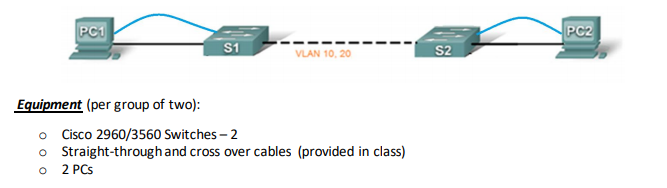
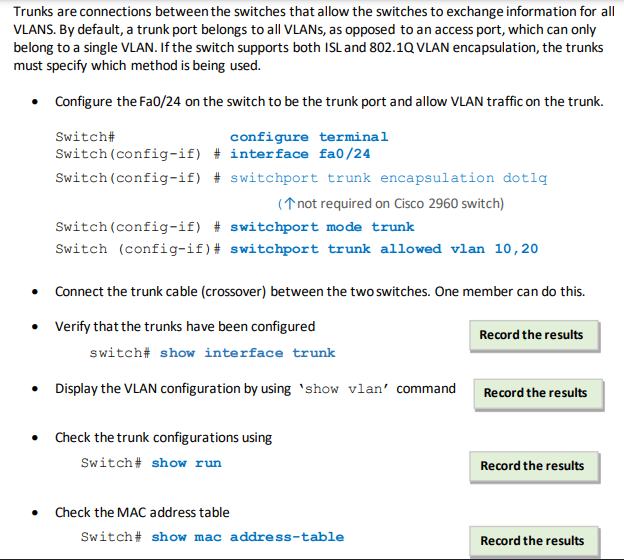
PC1 PC2 S1 VLAN 10,20 S2 Equipment (per group of two): o Cisco 2960/3560 Switches - 2 Straight-through and cross over cables (provided in class) 2 PCS O Trunks are connections between the switches that allow the switches to exchange information for all VLANS. By default, a trunk port belongs to all VLANs, as opposed to an access port, which can only belong to a single VLAN. If the switch supports both ISL and 802.1Q VLAN encapsulation, the trunks must specify which method is being used. Configure the Fa0/24 on the switch to be the trunk port and allow VLAN traffic on the trunk. Switch configure terminal Switch(config-if)# interface fa0/24 Switch(config-if) # switchport trunk encapsulation dotlq (1 not required on Cisco 2960 switch) Switch(config-if) # switchport mode trunk Switch (config-if)# switchport trunk allowed vlan 10, 20 Connect the trunk cable (crossover) between the two switches. One member can do this. Verify that the trunks have been configured Record the results switch# show interface trunk Display the VLAN configuration by using 'show vlan' command Record the results Check the trunk configurations using Switch# show run Record the results Check the MAC address table Switch# show mac address-table Record the results
Step by Step Solution
There are 3 Steps involved in it

Get step-by-step solutions from verified subject matter experts
 Study Help