







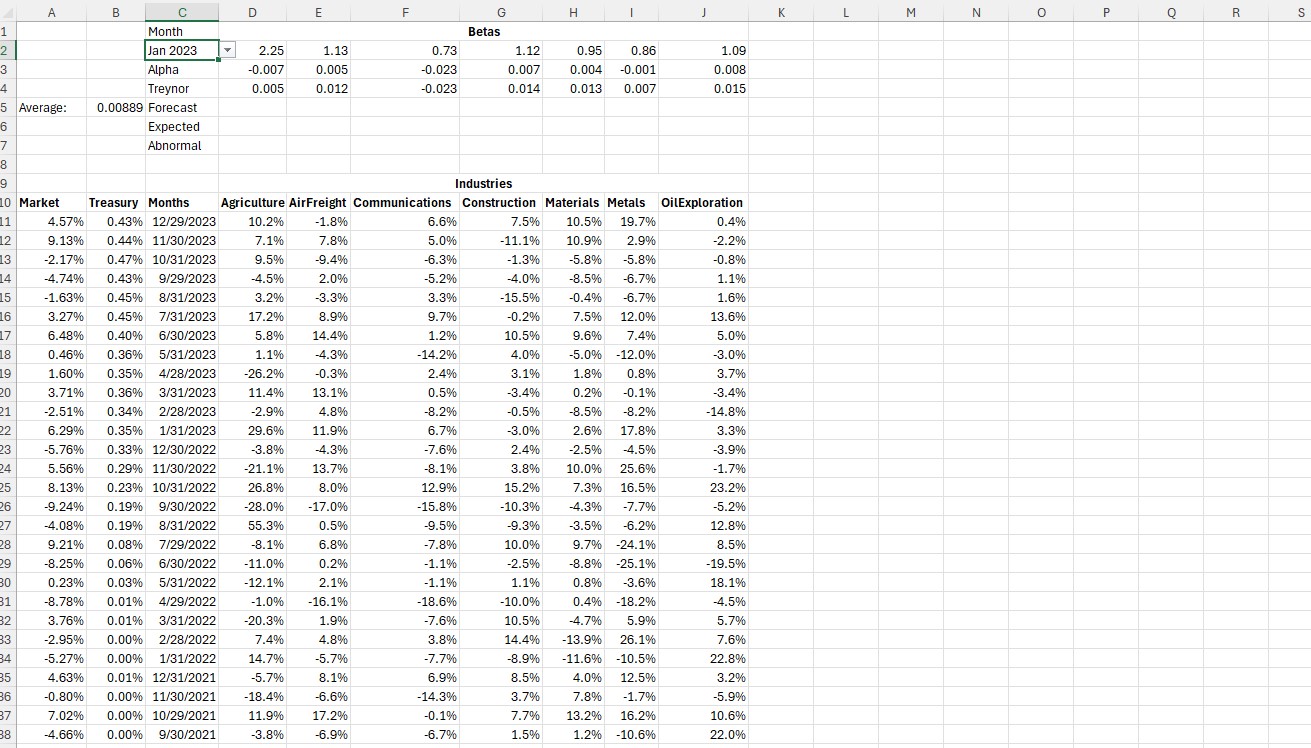
Question: Excel , help please Step 1 : Create a formula for Cell A 5 that forecasts the Market s rate of return for the month
Excel help please
Step : Create a formula for Cell A that forecasts the Markets
rate of return for the month selected in Cell C based on the five
years immediately preceding it
Step : Create a formula for Cell A that shows the Markets rate
of return for the month selected in Cell C
Step : Create a formula for Cell B that forecasts the Treasurys
rate of return for the month selected in Cell C
Step : Create a formula for Cell B that shows the Treasurys rate
of return for the month selected in Cell C
Step : To receive full credit, these formulas must adjust
automatically for any of the twelve possible months in Cell C
Step : Make the formatting display for the returns
: Abnormal Returns
Step : Create a formula for Cell D that uses the beta, Cell D
and the forecasted rates of return for the market and treasury, Cells
A:B to forecast the return for the industry in Cell D
Step : Create a formula for Cell D that uses the beta, Cell D
and the forecasted rates of return for the market and treasury, Cells
A:B to forecast the return for the industry in Cell D
Step : Create a formula for Cell D that computes the abnormal
return for the industry in Cell D in the month selected in Cell C
Step : To receive full credit, these formulas must adjust
automatically for any of the twelve possible months in Cell C
Step : Make the formatting display for the returns
Step by Step Solution
There are 3 Steps involved in it
1 Expert Approved Answer
Step: 1 Unlock

Question Has Been Solved by an Expert!
Get step-by-step solutions from verified subject matter experts
Step: 2 Unlock
Step: 3 Unlock
 Study Help