







Question: Grader - Instructions Excel 2019 Project YO19_Excel_Ch10_Prepare - Expansion Analysis Part B 1.0 Project Description: Bary Cheney, the Golf Course Manager at the Red Bluff
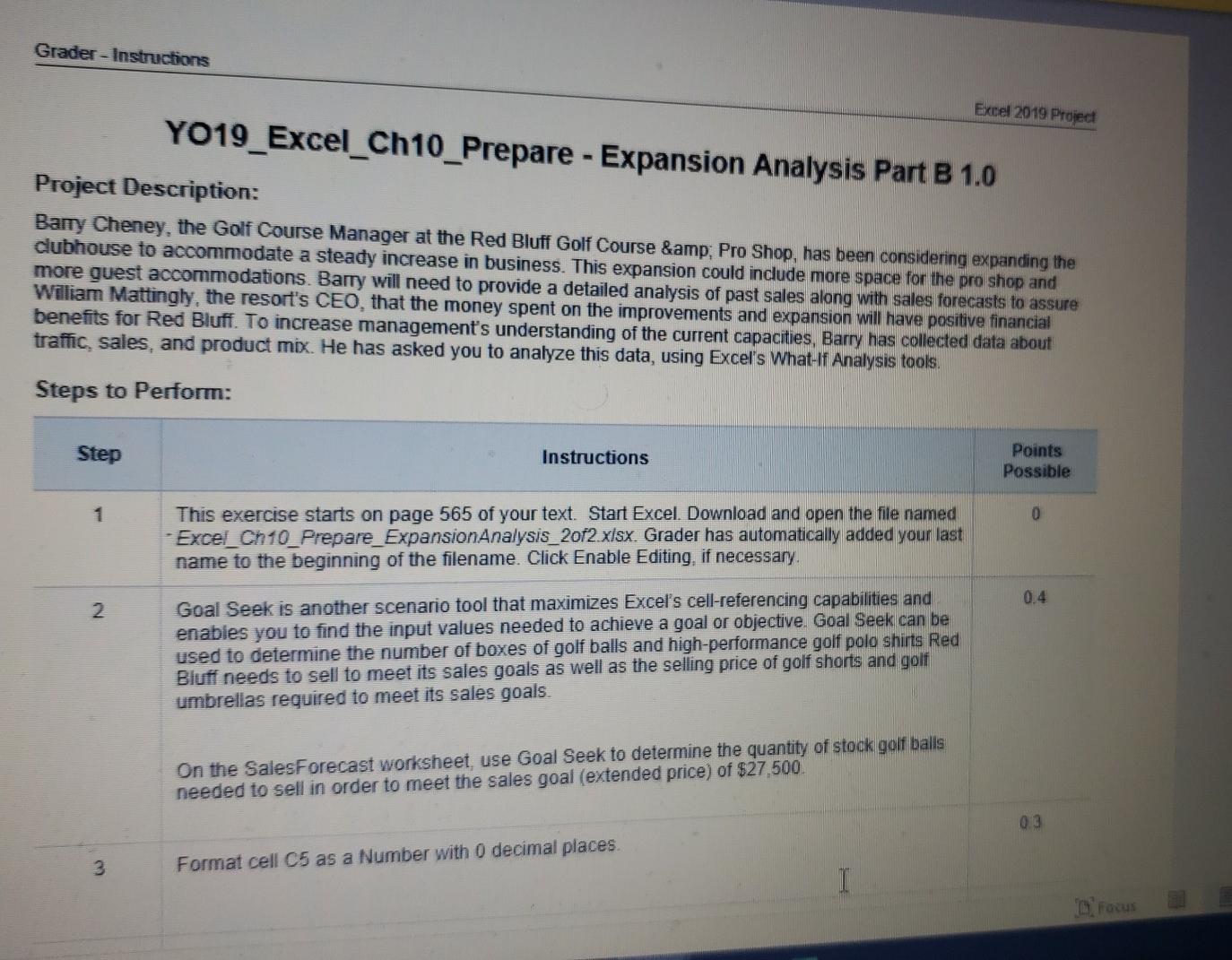
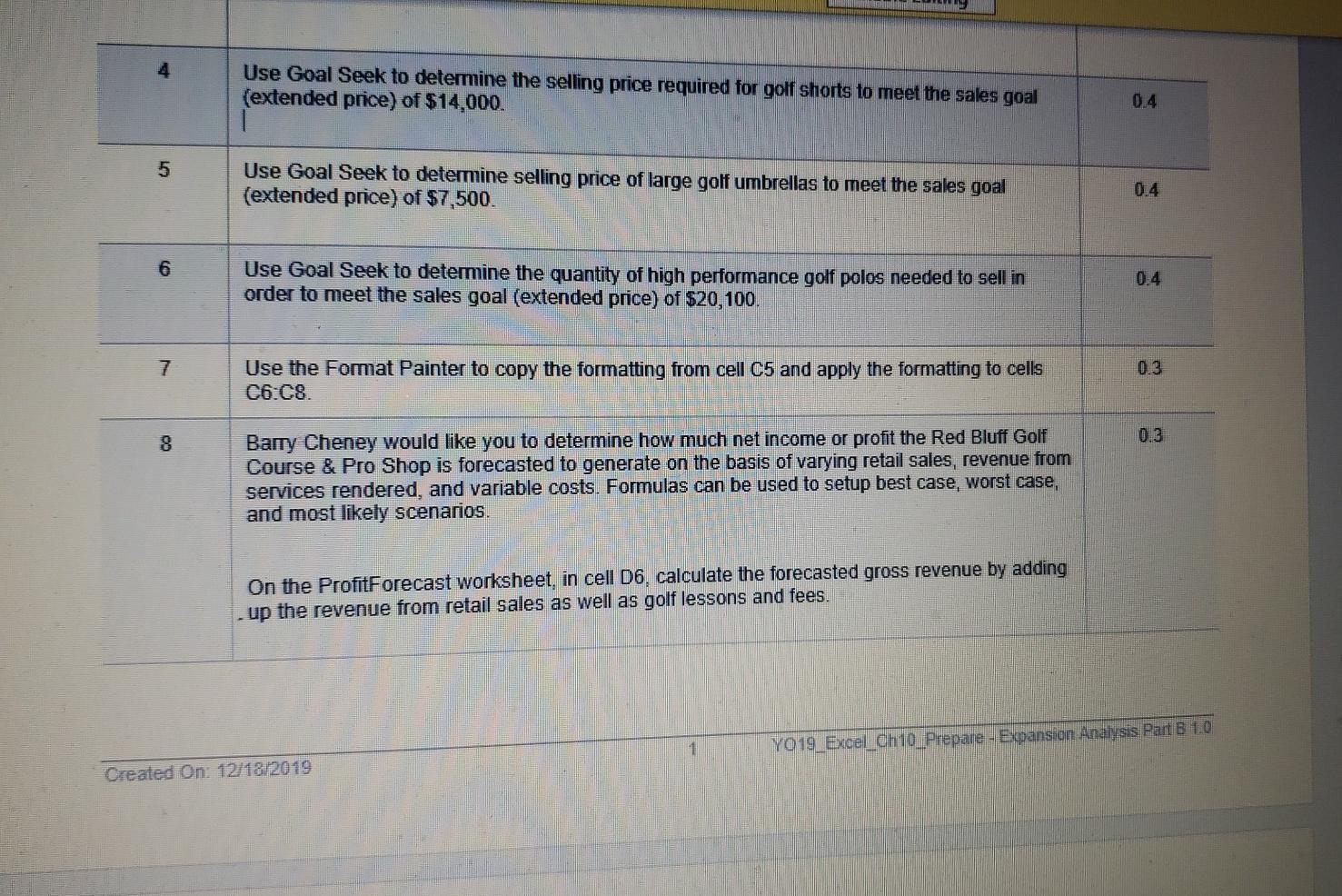
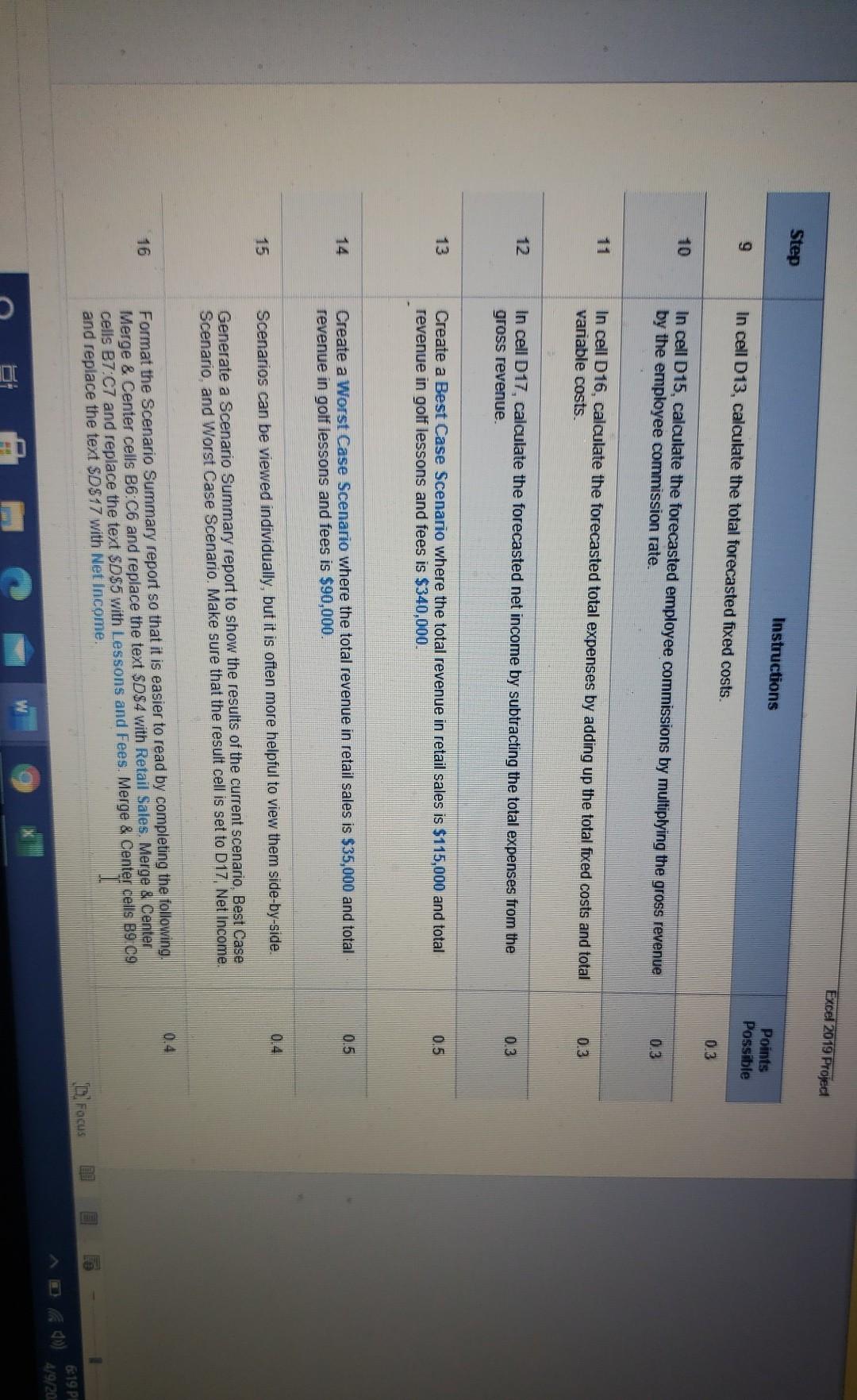
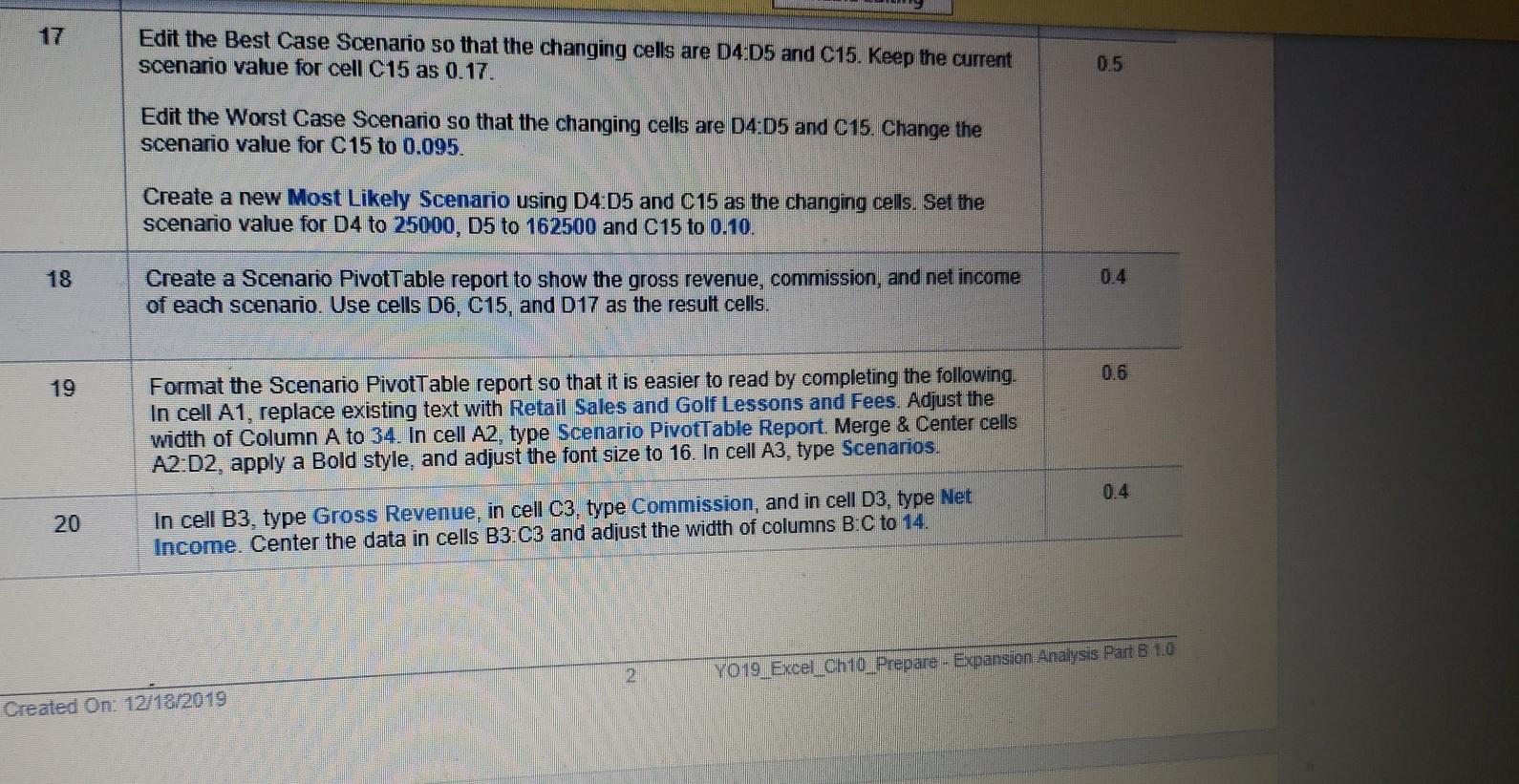
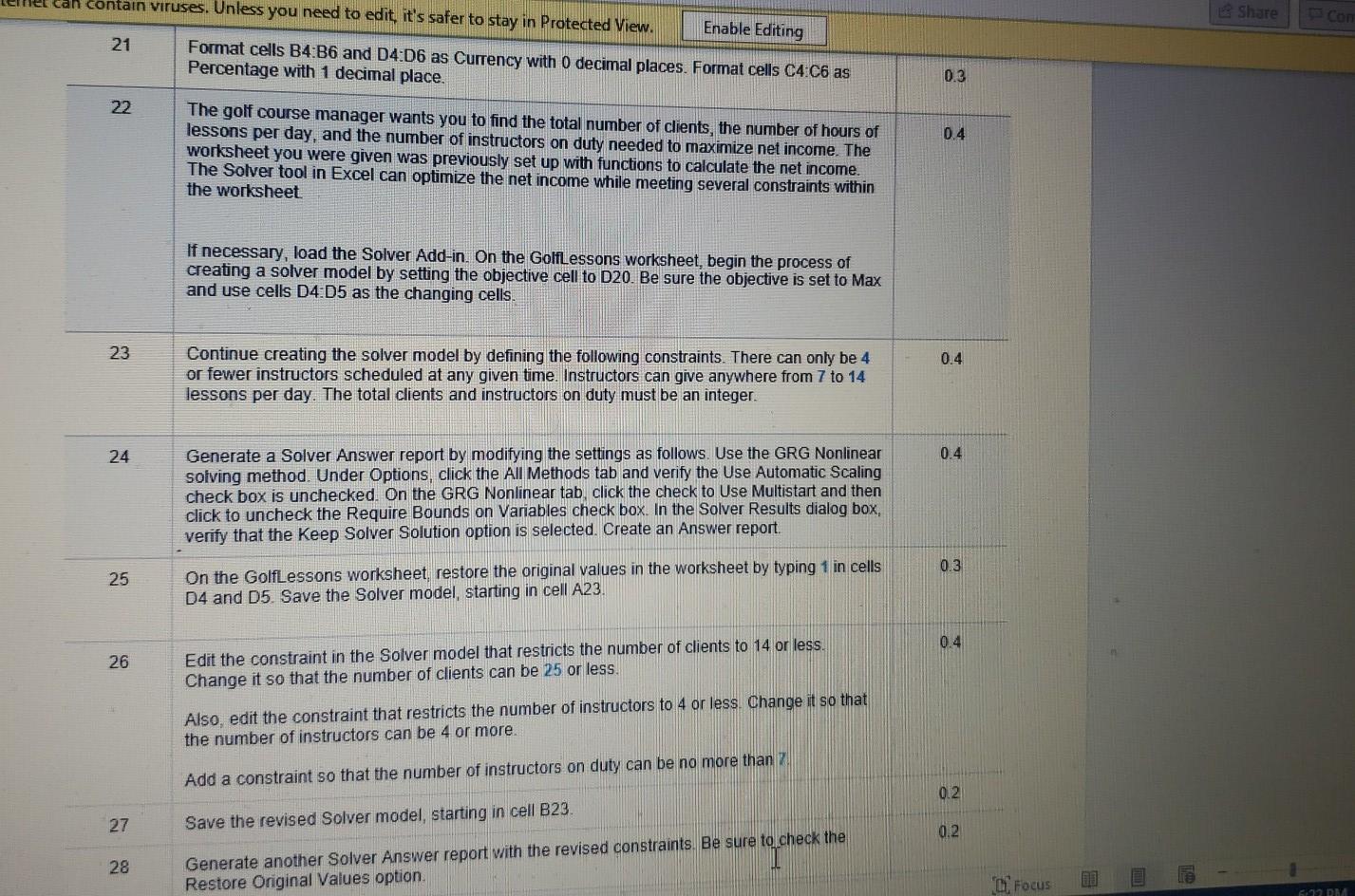
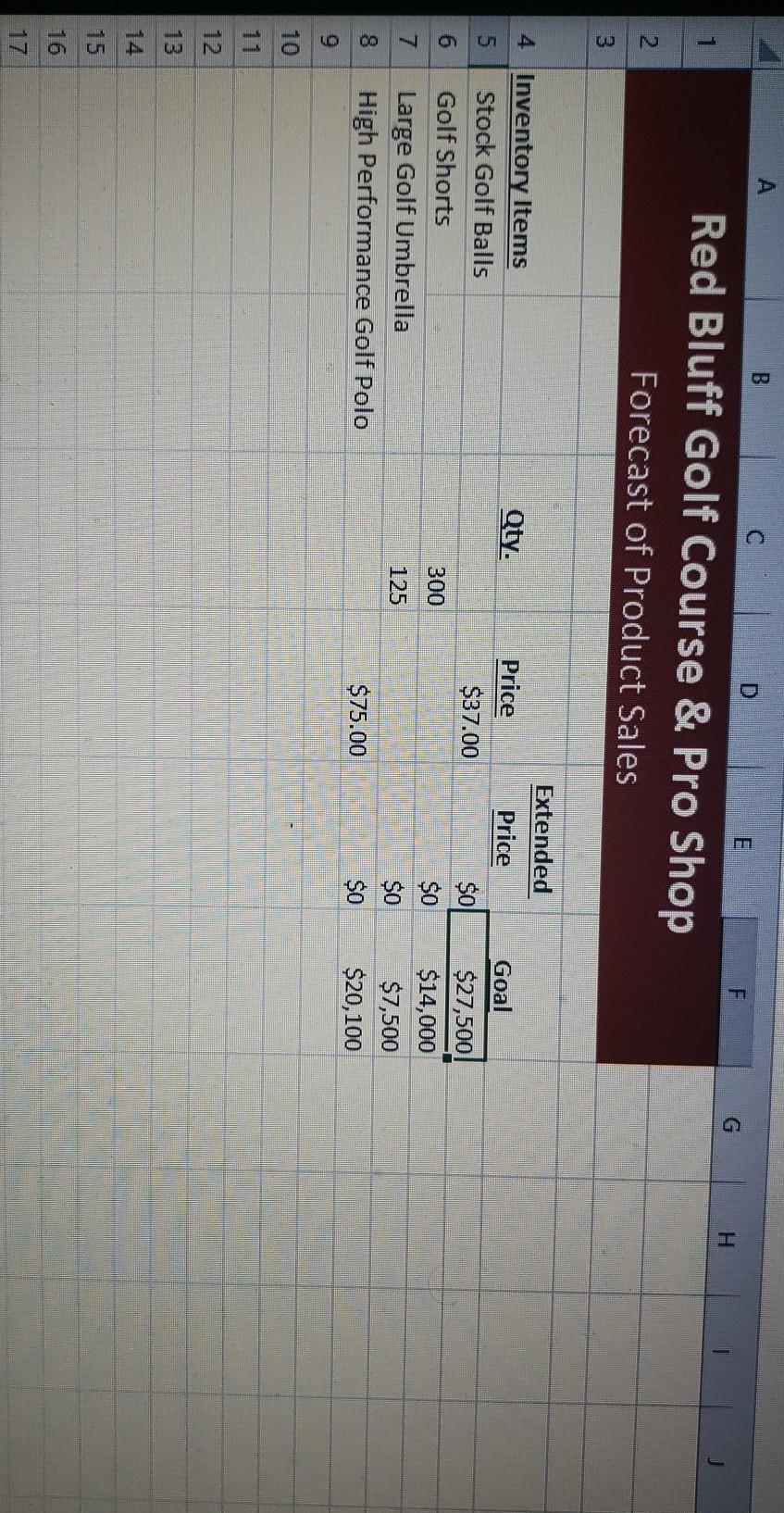
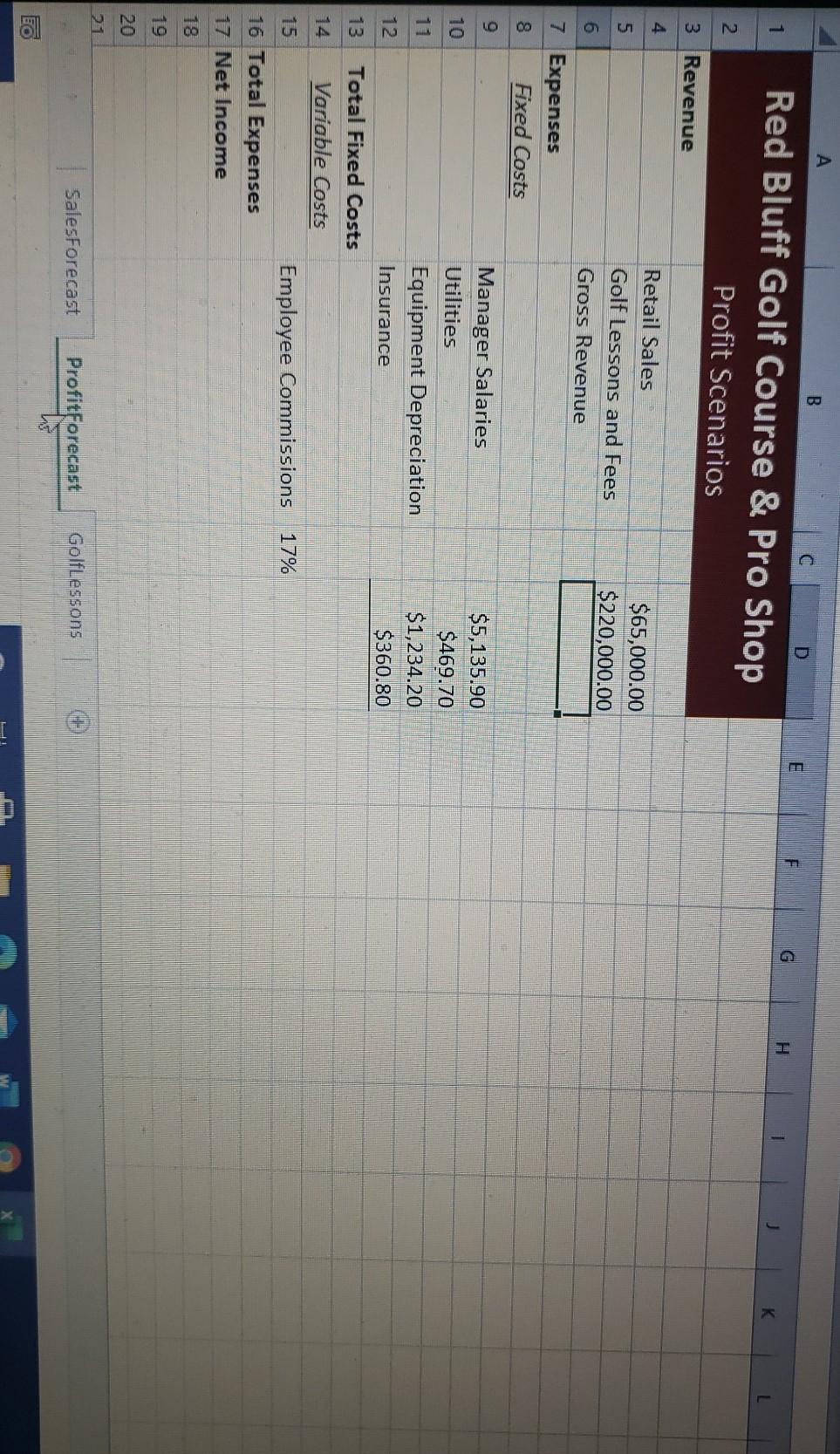
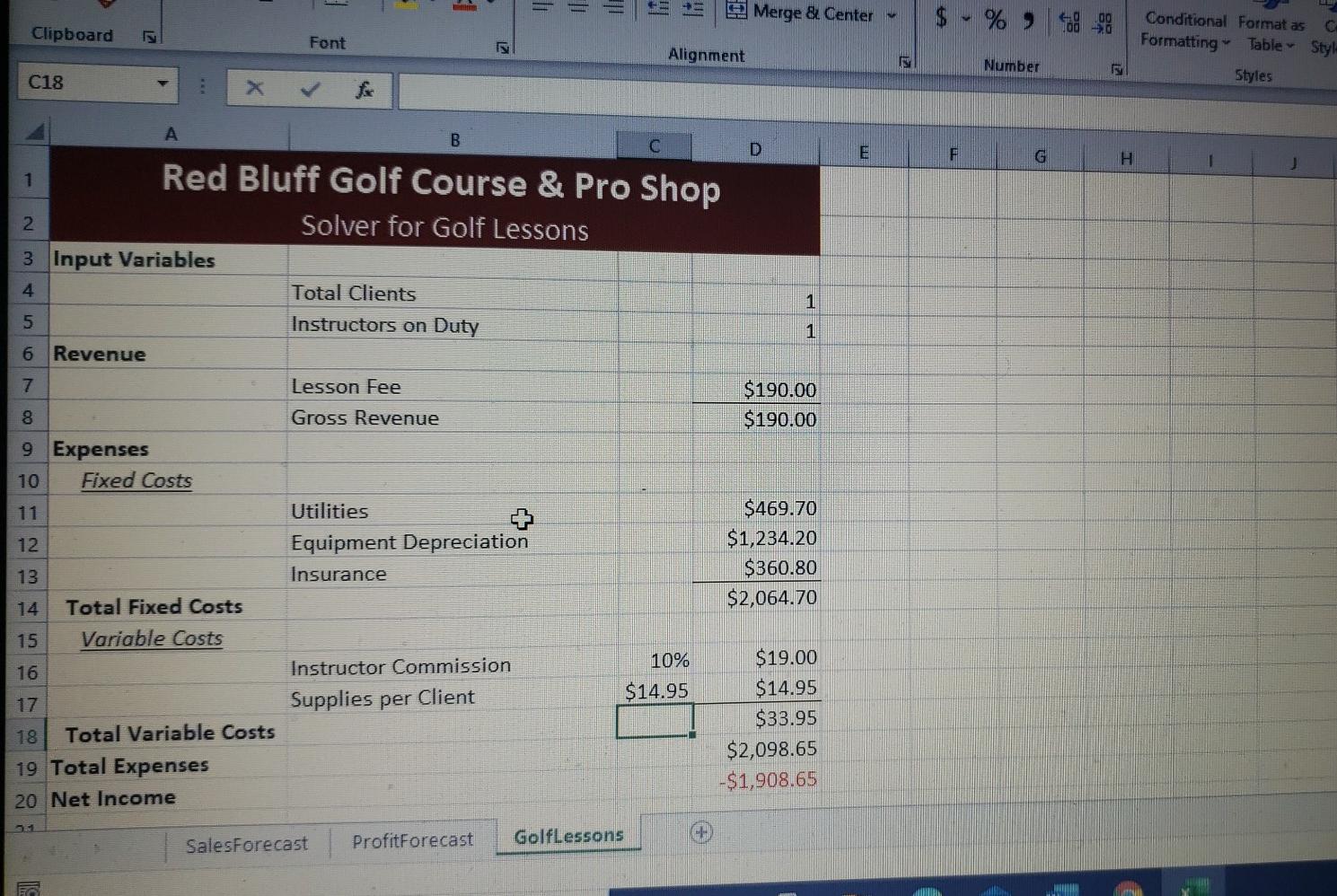
Grader - Instructions Excel 2019 Project YO19_Excel_Ch10_Prepare - Expansion Analysis Part B 1.0 Project Description: Bary Cheney, the Golf Course Manager at the Red Bluff Golf Course & Pro Shop, has been considering expanding the clubhouse to accommodate a steady increase in business. This expansion could include more space for the pro shop and more guest accommodations. Barry will need to provide a detailed analysis of past sales along with sales forecasts to assure William Mattingly, the resort's CEO, that the money spent on the improvements and expansion will have positive financial benefits for Red Bluff. To increase management's understanding of the current capacities, Barry has collected data about traffic sales and product mix. He has asked you to analyze this data, using Excel's What-If Analysis tools. Steps to Perform: Step Instructions Points Possible 1 0 This exercise starts on page 565 of your text. Start Excel. Download and open the file named ExcelCh10_Prepare_Expansion Analysis_2012.xlsx. Grader has automatically added your last name to the beginning of the filename. Click Enable Editing, if necessary. 0.4 2 Goal Seek is another scenario tool that maximizes Excel's cell-referencing capabilities and enables you to find the input values needed to achieve a goal or objective. Goal Seek can be used to determine the number of boxes of golf balls and high-performance golf polo shirts Red Bluff needs to sell to meet its sales goals as well as the selling price of golf shorts and golf umbrellas required to meet its sales goals On the SalesForecast worksheet, use Goal Seek to determine the quantity of stock golf balls needed to sell in order to meet the sales goal (extended price) of $27,500 0.3 3 Format cell C5 as a Number with o decimal places. I T Focus Use Goal Seek to determine the selling price required for golf shorts to meet the sales goal (extended price) of $14,000. 0.4 5 Use Goal Seek to determine selling price of large golf umbrellas to meet the sales goal (extended price) of $7,500. 0.4 6 Use Goal Seek to determine the quantity of high performance golf polos needed to sell in order to meet the sales goal (extended price) of $20,100. 7 Use the Format Painter to copy the formatting from cell C5 and apply the formatting to cells C6 C8. 0.3 8 Barry Cheney would like you to determine how much net income or profit the Red Bluff Golf Course & Pro Shop is forecasted to generate on the basis of varying retail sales, revenue from services rendered, and variable costs. Formulas can be used to setup best case, worst case, and most likely scenarios. On the ProfitForecast worksheet, in cell D6, calculate the forecasted gross revenue by adding up the revenue from retail sales as well as golf lessons and fees. 1 YO19 Excel_Ch10_Prepare - Expansion Analysis Part B 1.0 Created On: 12/18/2019 Excel 2019 Project Step Instructions Points Possible 9 In cell D13, calculate the total forecasted fixed costs. 0.3 In cell D15, calculate the forecasted employee commissions by multiplying the gross revenue by the employee commission rate. 0.3 In cell D16, calculate the forecasted total expenses by adding up the total fixed costs and total variable costs. 0.3 12 In cell D17, calculate the forecasted net income by subtracting the total expenses from the gross revenue. 0.3 13 0.5 Create a Best Case Scenario where the total revenue in retail sales is $115,000 and total revenue in golf lessons and fees is $340,000. 14 0.5 Create a Worst Case Scenario where the total revenue in retail sales is $35,000 and total revenue in golf lessons and fees is $90,000. 0.4 15 Scenarios can be viewed individually, but it is often more helpful to view them side-by-side. Generate a Scenario Summary report to show the results of the current scenario, Best Case Scenario, and Worst Case Scenario. Make sure that the result cell is set to D17, Net Income. 0.4 16 Format the Scenario Summary report so that it is easier to read by completing the following Merge & Center cells B6 C6 and replace the text $D$4 with Retail Sales. Merge & Center cells B7 C7 and replace the text $D$5 with Lessons and Fees. Merge & Center cells B9.09 and replace the text SD$17 with Net Income. Focus 619 PL 4/9/20 Edit the Best Case Scenario so that the changing cells are D4:05 and C15. Keep the current scenario value for cell C15 as 0.17. 0.5 Edit the Worst Case Scenario so that the changing cells are 04:05 and C15. Change the scenario value for C15 to 0.095. Create a new Most Likely Scenario using D4:05 and C15 as the changing cells. Set the scenario value for D4 to 25000, D5 to 162500 and C15 to 0.10. 18 0.4 Create a Scenario PivotTable report to show the gross revenue, commission, and net income of each scenario. Use cells D6, C15, and D17 as the result cells. 0.6 19 Format the Scenario PivotTable report so that it is easier to read by completing the following. In cell A1, replace existing text with Retail Sales and Golf Lessons and Fees. Adjust the width of Column A to 34. In cell A2, type Scenario PivotTable Report. Merge & Center cells A2:D2, apply a Bold style, and adjust the font size to 16. In cell A3, type Scenarios. 0.4 20 In cell B3, type Gross Revenue, in cell C3, type Commission, and in cell D3, type Net Income. Center the data in cells B3:C3 and adjust the width of columns B:C to 14. YO19 Excel Ch10_Prepare - Expansion Analysis Part B 1.0 Created On: 12/18/2019 can contain viruses. Unless you need to edit, it's safer to stay in Protected View. Share To con Enable Editing 21 Format cells B4:B6 and D4:06 Currency with 0 decimal places. Format cells C4 C6 as Percentage with 1 decimal place. 0.3 22 0.4 The golf course manager wants you to find the total number of clients, the number of hours of lessons per day, and the number of instructors on duty needed to maximize net income. The worksheet you were given was previously set up with functions to calculate the net income. The Solver tool in Excel can optimize the net income while meeting several constraints within the worksheet If necessary, load the Solver Add-in. On the Golflessons worksheet, begin the process of creating a solver model by setting the objective cell to D20. Be sure the objective is set to Max and use cells D4 D5 as the changing cells. 23 0.4 Continue creating the solver model by defining the following constraints. There can only be 4 or fewer instructors scheduled at any given time. Instructors can give anywhere from 7 to 14 lessons per day. The total clients and instructors on duty must be an integer. 24 0.4 Generate a Solver Answer report by modifying the settings as follows. Use the GRG Nonlinear solving method. Under Options, click the All Methods tab and verify the Use Automatic Scaling check box is unchecked. On the GRG Nonlinear tab, click the check to Use Multistart and then click to uncheck the Require Bounds on Variables check box. In the Solver Results dialog box, verify that the Keep Solver Solution option is selected. Create an Answer report. 0.3 25 On the GolfLessons worksheet, restore the original values in the worksheet by typing 1 in cells D4 and D5. Save the Solver model, starting in cell A23. 0.4 26 Edit the constraint in the Solver model that restricts the number of clients to 14 or less Change it so that the number of clients can be 25 or less Also edit the constraint that restricts the number of instructors to 4 or less. Change it so that the number of instructors can be 4 or more. Add a constraint so that the number of instructors on duty can be no more than 7 0.2 27 Save the revised Solver model, starting in cell B23 0.2 28 Generate another Solver Answer report with the revised constraints. Be sure to check the Restore Original Values option. Focus 62 DNA B C D F. 1 H Red Bluff Golf Course & Pro Shop Profit Scenarios L 2 3 Revenue $65,000.00 $220,000.00 4 Retail Sales 5 Golf Lessons and Fees 6 Gross Revenue 7 Expenses 8 Fixed Costs 9 Manager Salaries 10 Utilities 11 Equipment Depreciation 12 Insurance 13 Total Fixed Costs Variable Costs 15 Employee Commissions 16 Total Expenses 17 Net Income $5,135.90 $469.70 $1,234.20 $360.80 17% 18 19 20 21 SalesForecast ProfitForecast Golflessons Grader - Instructions Excel 2019 Project YO19_Excel_Ch10_Prepare - Expansion Analysis Part B 1.0 Project Description: Bary Cheney, the Golf Course Manager at the Red Bluff Golf Course & Pro Shop, has been considering expanding the clubhouse to accommodate a steady increase in business. This expansion could include more space for the pro shop and more guest accommodations. Barry will need to provide a detailed analysis of past sales along with sales forecasts to assure William Mattingly, the resort's CEO, that the money spent on the improvements and expansion will have positive financial benefits for Red Bluff. To increase management's understanding of the current capacities, Barry has collected data about traffic sales and product mix. He has asked you to analyze this data, using Excel's What-If Analysis tools. Steps to Perform: Step Instructions Points Possible 1 0 This exercise starts on page 565 of your text. Start Excel. Download and open the file named ExcelCh10_Prepare_Expansion Analysis_2012.xlsx. Grader has automatically added your last name to the beginning of the filename. Click Enable Editing, if necessary. 0.4 2 Goal Seek is another scenario tool that maximizes Excel's cell-referencing capabilities and enables you to find the input values needed to achieve a goal or objective. Goal Seek can be used to determine the number of boxes of golf balls and high-performance golf polo shirts Red Bluff needs to sell to meet its sales goals as well as the selling price of golf shorts and golf umbrellas required to meet its sales goals On the SalesForecast worksheet, use Goal Seek to determine the quantity of stock golf balls needed to sell in order to meet the sales goal (extended price) of $27,500 0.3 3 Format cell C5 as a Number with o decimal places. I T Focus Use Goal Seek to determine the selling price required for golf shorts to meet the sales goal (extended price) of $14,000. 0.4 5 Use Goal Seek to determine selling price of large golf umbrellas to meet the sales goal (extended price) of $7,500. 0.4 6 Use Goal Seek to determine the quantity of high performance golf polos needed to sell in order to meet the sales goal (extended price) of $20,100. 7 Use the Format Painter to copy the formatting from cell C5 and apply the formatting to cells C6 C8. 0.3 8 Barry Cheney would like you to determine how much net income or profit the Red Bluff Golf Course & Pro Shop is forecasted to generate on the basis of varying retail sales, revenue from services rendered, and variable costs. Formulas can be used to setup best case, worst case, and most likely scenarios. On the ProfitForecast worksheet, in cell D6, calculate the forecasted gross revenue by adding up the revenue from retail sales as well as golf lessons and fees. 1 YO19 Excel_Ch10_Prepare - Expansion Analysis Part B 1.0 Created On: 12/18/2019 Excel 2019 Project Step Instructions Points Possible 9 In cell D13, calculate the total forecasted fixed costs. 0.3 In cell D15, calculate the forecasted employee commissions by multiplying the gross revenue by the employee commission rate. 0.3 In cell D16, calculate the forecasted total expenses by adding up the total fixed costs and total variable costs. 0.3 12 In cell D17, calculate the forecasted net income by subtracting the total expenses from the gross revenue. 0.3 13 0.5 Create a Best Case Scenario where the total revenue in retail sales is $115,000 and total revenue in golf lessons and fees is $340,000. 14 0.5 Create a Worst Case Scenario where the total revenue in retail sales is $35,000 and total revenue in golf lessons and fees is $90,000. 0.4 15 Scenarios can be viewed individually, but it is often more helpful to view them side-by-side. Generate a Scenario Summary report to show the results of the current scenario, Best Case Scenario, and Worst Case Scenario. Make sure that the result cell is set to D17, Net Income. 0.4 16 Format the Scenario Summary report so that it is easier to read by completing the following Merge & Center cells B6 C6 and replace the text $D$4 with Retail Sales. Merge & Center cells B7 C7 and replace the text $D$5 with Lessons and Fees. Merge & Center cells B9.09 and replace the text SD$17 with Net Income. Focus 619 PL 4/9/20 Edit the Best Case Scenario so that the changing cells are D4:05 and C15. Keep the current scenario value for cell C15 as 0.17. 0.5 Edit the Worst Case Scenario so that the changing cells are 04:05 and C15. Change the scenario value for C15 to 0.095. Create a new Most Likely Scenario using D4:05 and C15 as the changing cells. Set the scenario value for D4 to 25000, D5 to 162500 and C15 to 0.10. 18 0.4 Create a Scenario PivotTable report to show the gross revenue, commission, and net income of each scenario. Use cells D6, C15, and D17 as the result cells. 0.6 19 Format the Scenario PivotTable report so that it is easier to read by completing the following. In cell A1, replace existing text with Retail Sales and Golf Lessons and Fees. Adjust the width of Column A to 34. In cell A2, type Scenario PivotTable Report. Merge & Center cells A2:D2, apply a Bold style, and adjust the font size to 16. In cell A3, type Scenarios. 0.4 20 In cell B3, type Gross Revenue, in cell C3, type Commission, and in cell D3, type Net Income. Center the data in cells B3:C3 and adjust the width of columns B:C to 14. YO19 Excel Ch10_Prepare - Expansion Analysis Part B 1.0 Created On: 12/18/2019 can contain viruses. Unless you need to edit, it's safer to stay in Protected View. Share To con Enable Editing 21 Format cells B4:B6 and D4:06 Currency with 0 decimal places. Format cells C4 C6 as Percentage with 1 decimal place. 0.3 22 0.4 The golf course manager wants you to find the total number of clients, the number of hours of lessons per day, and the number of instructors on duty needed to maximize net income. The worksheet you were given was previously set up with functions to calculate the net income. The Solver tool in Excel can optimize the net income while meeting several constraints within the worksheet If necessary, load the Solver Add-in. On the Golflessons worksheet, begin the process of creating a solver model by setting the objective cell to D20. Be sure the objective is set to Max and use cells D4 D5 as the changing cells. 23 0.4 Continue creating the solver model by defining the following constraints. There can only be 4 or fewer instructors scheduled at any given time. Instructors can give anywhere from 7 to 14 lessons per day. The total clients and instructors on duty must be an integer. 24 0.4 Generate a Solver Answer report by modifying the settings as follows. Use the GRG Nonlinear solving method. Under Options, click the All Methods tab and verify the Use Automatic Scaling check box is unchecked. On the GRG Nonlinear tab, click the check to Use Multistart and then click to uncheck the Require Bounds on Variables check box. In the Solver Results dialog box, verify that the Keep Solver Solution option is selected. Create an Answer report. 0.3 25 On the GolfLessons worksheet, restore the original values in the worksheet by typing 1 in cells D4 and D5. Save the Solver model, starting in cell A23. 0.4 26 Edit the constraint in the Solver model that restricts the number of clients to 14 or less Change it so that the number of clients can be 25 or less Also edit the constraint that restricts the number of instructors to 4 or less. Change it so that the number of instructors can be 4 or more. Add a constraint so that the number of instructors on duty can be no more than 7 0.2 27 Save the revised Solver model, starting in cell B23 0.2 28 Generate another Solver Answer report with the revised constraints. Be sure to check the Restore Original Values option. Focus 62 DNA B C D F. 1 H Red Bluff Golf Course & Pro Shop Profit Scenarios L 2 3 Revenue $65,000.00 $220,000.00 4 Retail Sales 5 Golf Lessons and Fees 6 Gross Revenue 7 Expenses 8 Fixed Costs 9 Manager Salaries 10 Utilities 11 Equipment Depreciation 12 Insurance 13 Total Fixed Costs Variable Costs 15 Employee Commissions 16 Total Expenses 17 Net Income $5,135.90 $469.70 $1,234.20 $360.80 17% 18 19 20 21 SalesForecast ProfitForecast Golflessons
Step by Step Solution
There are 3 Steps involved in it
1 Expert Approved Answer
Step: 1 Unlock

Question Has Been Solved by an Expert!
Get step-by-step solutions from verified subject matter experts
Step: 2 Unlock
Step: 3 Unlock
 Study Help