


Question: Fill in the blanks in the excel sheet #2 B C D E F G H J L M N 0 P Q R S

Fill in the blanks in the excel sheet

#2 Fill in the blanks in the excel sheet #2 B C D E
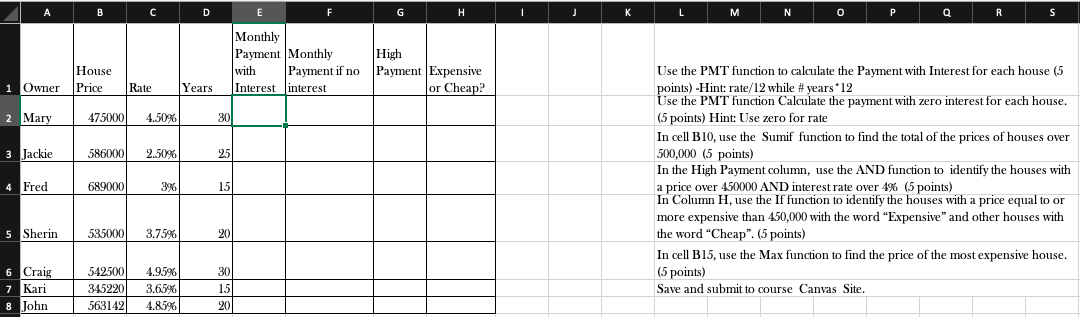
B C D E F G H J L M N 0 P Q R S Monthly Payment Monthly High with Payment if no Payment Expensive Interest interest or Cheap? House Price 1 Owner Rate Years 2 Mary 475000 4.50% 30. 3 Jackie 586000 2.50%6 25 Use the PMT function to calculate the Payment with Interest for each house (5 points) -Hint: rate/12 while # years '12 Use the PMT function Calculate the payment with zero interest for each house. (5 points) Hint: Use zero for rate In cell B10, use the Sumif function to find the total of the prices of houses over 500,000 (5 points) In the High Payment column, use the AND function to identify the houses with a price over 450000 AND interest rate over 4% (5 points) In Column H, use the If function to identify the houses with a price equal to or more expensive than 450,000 with the word "Expensive" and other houses with the word "Cheap". (5 points) In cell B15, use the Max function to find the price of the most expensive house. (5 points) Save and submit to course Canvas Site. 4 Fred 689000 3% 15 5 Sherin 535000 3.75%6 201 6 Craig 7 Kari 8 John 542500 345220 563142 4.95% 3.65%6 4.85% 30 15 20 B C D E F G H J L M N 0 P Q R S Monthly Payment Monthly High with Payment if no Payment Expensive Interest interest or Cheap? House Price 1 Owner Rate Years 2 Mary 475000 4.50% 30. 3 Jackie 586000 2.50%6 25 Use the PMT function to calculate the Payment with Interest for each house (5 points) -Hint: rate/12 while # years '12 Use the PMT function Calculate the payment with zero interest for each house. (5 points) Hint: Use zero for rate In cell B10, use the Sumif function to find the total of the prices of houses over 500,000 (5 points) In the High Payment column, use the AND function to identify the houses with a price over 450000 AND interest rate over 4% (5 points) In Column H, use the If function to identify the houses with a price equal to or more expensive than 450,000 with the word "Expensive" and other houses with the word "Cheap". (5 points) In cell B15, use the Max function to find the price of the most expensive house. (5 points) Save and submit to course Canvas Site. 4 Fred 689000 3% 15 5 Sherin 535000 3.75%6 201 6 Craig 7 Kari 8 John 542500 345220 563142 4.95% 3.65%6 4.85% 30 15 20

Step by Step Solution

There are 3 Steps involved in it

1 Expert Approved Answer
Step: 1 Unlock blur-text-image

Question Has Been Solved by an Expert!

Get step-by-step solutions from verified subject matter experts

Step: 2 Unlock
Step: 3 Unlock

Students Have Also Explored These Related General Management Questions!