





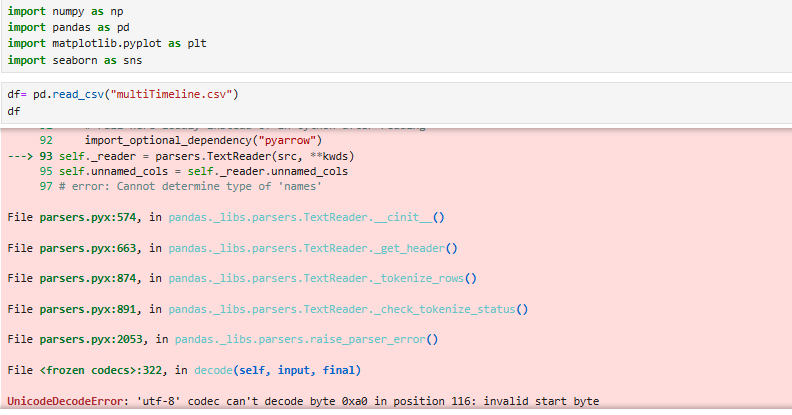
Question: Fix the error import numpy as np import pandas as pd import matplotlib. pyplot as plt import seaborn as sns df= pd. read_cav(multiTimeline.csv) df 92

Fix the error
Fix the error import numpy as np import pandas as
import numpy as np import pandas as pd import matplotlib. pyplot as plt import seaborn as sns df= pd. read_cav("multiTimeline.csv") df 92 import_optional_dependency ( "pyarrow") ---> 93 self._reader = parsers . TextReader (src, **kwds) 95 self . unnamed_cols = self._reader . unnamed_cols 97 # error: Cannot determine type of 'names' File parsers. pyx:574, in pandas. _libs . parsers. TextReader._cinit_() File parsers. pyx:663, in pandas. _libs . parsers. TextReader._get_header() File parsers. pyx:874, in pandas. _libs . parsers. TextReader._tokenize_rows () File parsers. pyx:891, in pandas. _libs . parsers. TextReader._check_tokenize_status() File parsers. pyx:2053, in pandas. _libs. parsers. raise_parser_error() File :322, in decode(self, input, final) UnicodeDecodeError: 'utf-8' codec can't decode byte Oxa0 in position 116: invalid start byte

Step by Step Solution

There are 3 Steps involved in it

1 Expert Approved Answer
Step: 1 Unlock blur-text-image

Question Has Been Solved by an Expert!

Get step-by-step solutions from verified subject matter experts

Step: 2 Unlock
Step: 3 Unlock

Students Have Also Explored These Related Accounting Questions!