







Question: for this you would need to use visual studio code and start a dart web application project once you have that you need to edit
for this you would need to use visual studio code and start a dart web application project once you have that you need to edit the html file to look like those pictures then make the code in the main.dart file it needs to be done using dart.
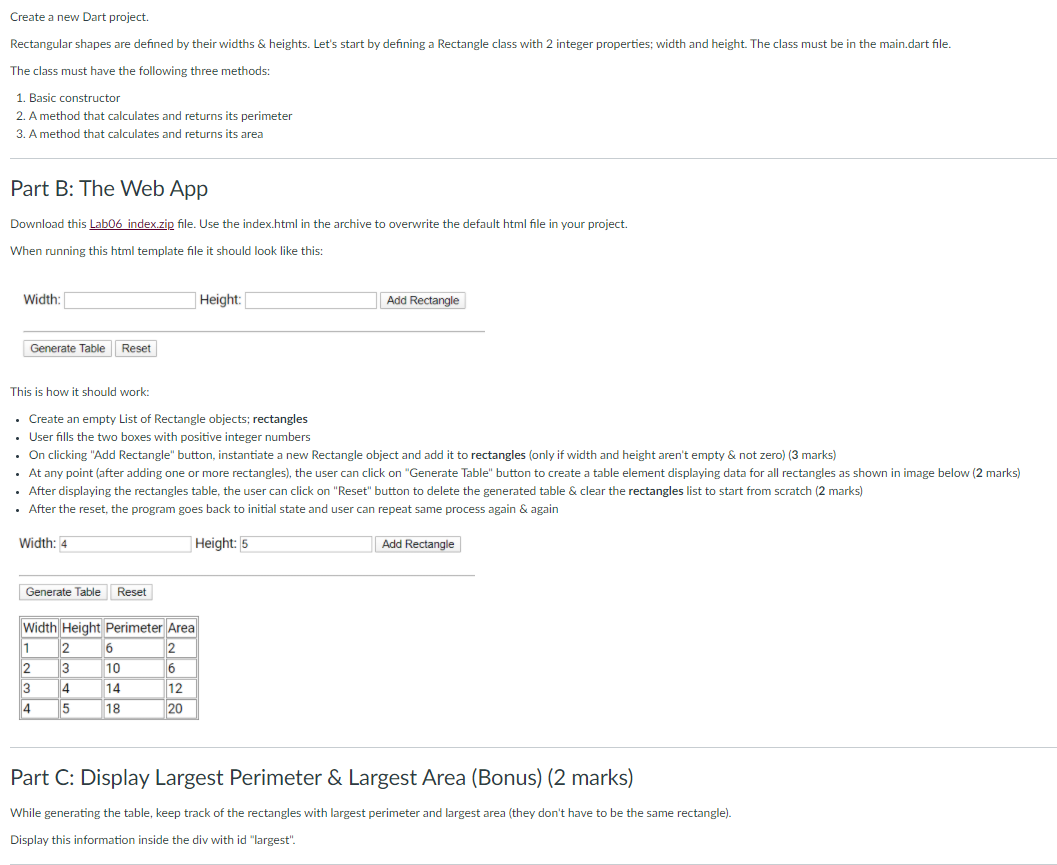
Create a new Dart project. Rectangular shapes are defined by their widths & heights. Let's start by defining a Rectangle class with 2 integer properties; width and height. The class must be in the main.dart file. The class must have the following three methods: 1. Basic constructor 2. A method that calculates and returns its perimeter 3. A method that calculates and returns its area Part B: The Web App Download this LabO6 index.zip file. Use the index.html in the archive to overwrite the default html file in your project. When running this html template file it should look like this: Width: Height: Add Rectangle Generate Table Reset This is how it should work: . Create an empty List of Rectangle objects; rectangles User fills the two boxes with positive integer numbers . On clicking "Add Rectangle" button, instantiate a new Rectangle object and add it to rectangles (only if width and height aren't empty & not zero) (3 marks) . At any point (after adding one or more rectangles), the user can click on "Generate Table" button to create a table element displaying data for all rectangles as shown in image below (2 marks) After displaying the rectangles table, the user can click on "Reset" button to delete the generated table & clear the rectangles list to start from scratch (2 marks) . After the reset, the program goes back to initial state and user can repeat same process again & again Width: 4 Height: 5 Add Rectangle Generate Table Reset Width Height Perimeter Area 1 2 6 2 2 3 10 6 3 4 14 12 4 5 18 20 Part C: Display Largest Perimeter & Largest Area (Bonus) (2 marks) While generating the table, keep track of the rectangles with largest perimeter and largest area (they don't have to be the same rectangle). Display this information inside the div with id "largest". Create a new Dart project. Rectangular shapes are defined by their widths & heights. Let's start by defining a Rectangle class with 2 integer properties; width and height. The class must be in the main.dart file. The class must have the following three methods: 1. Basic constructor 2. A method that calculates and returns its perimeter 3. A method that calculates and returns its area Part B: The Web App Download this LabO6 index.zip file. Use the index.html in the archive to overwrite the default html file in your project. When running this html template file it should look like this: Width: Height: Add Rectangle Generate Table Reset This is how it should work: . Create an empty List of Rectangle objects; rectangles User fills the two boxes with positive integer numbers . On clicking "Add Rectangle" button, instantiate a new Rectangle object and add it to rectangles (only if width and height aren't empty & not zero) (3 marks) . At any point (after adding one or more rectangles), the user can click on "Generate Table" button to create a table element displaying data for all rectangles as shown in image below (2 marks) After displaying the rectangles table, the user can click on "Reset" button to delete the generated table & clear the rectangles list to start from scratch (2 marks) . After the reset, the program goes back to initial state and user can repeat same process again & again Width: 4 Height: 5 Add Rectangle Generate Table Reset Width Height Perimeter Area 1 2 6 2 2 3 10 6 3 4 14 12 4 5 18 20 Part C: Display Largest Perimeter & Largest Area (Bonus) (2 marks) While generating the table, keep track of the rectangles with largest perimeter and largest area (they don't have to be the same rectangle). Display this information inside the div with id "largest
Step by Step Solution
There are 3 Steps involved in it

Get step-by-step solutions from verified subject matter experts
 Study Help