







Question: Grader - Instructions Excel 2019 Project Instructions Points Step Possible In cells A8, A21, and A22 type today's date In cells B8 and C22, type
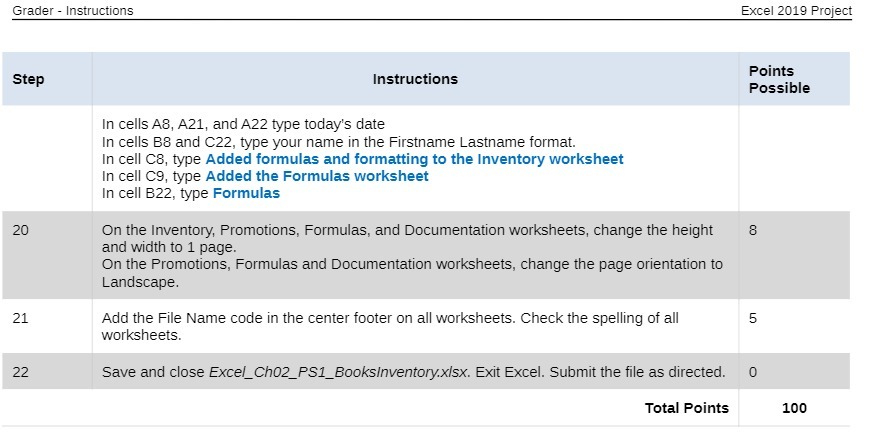
Grader - Instructions Excel 2019 Project Instructions Points Step Possible In cells A8, A21, and A22 type today's date In cells B8 and C22, type your name in the Firstname Lastname format. In cell C8, type Added formulas and formatting to the Inventory worksheet In cell C9, type Added the Formulas worksheet In cell B22, type Formulas 20 On the Inventory, Promotions, Formulas, and Documentation worksheets, change the height 8 and width to 1 page. On the Promotions, Formulas and Documentation worksheets, change the page orientation to Landscape. 21 Add the File Name code in the center footer on all worksheets. Check the spelling of all 5 worksheets. 22 Save and close Excel_Ch02_PS1_Booksinventory.x/sx. Exit Excel. Submit the file as directed. 0 Total Points 100
Step by Step Solution
There are 3 Steps involved in it

Get step-by-step solutions from verified subject matter experts
 Study Help