







Question: graphic user interface. you can use java and create a simple connection with database to join the table my myqsl all code posible with clear
graphic user interface. you can use java and create a simple connection with database to join the table my myqsl
all code posible with clear explanation and screenshot:
In this part of the project you are required to implement a Graphical User Interface for your database. Your interface must include a set of at least three different forms and a menu as follows:
Form 1:
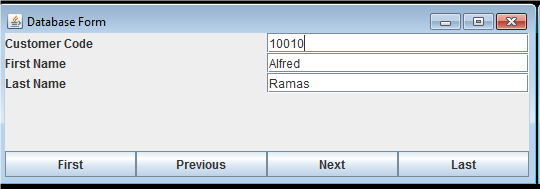
The first form should display information from a single table in your database that you created in Step 2. The form should include at least four buttons (first, previous, next, and last). These buttons are supposed to allow the user to navigate through all the rows in the table. For example, the form shown below is used to display all rows in Customer table:
Form 2:
The second form should display information from more than one table. This means that the underlying query must include join between two or more table. The form layout can be same as for Form 1.
Form 3:
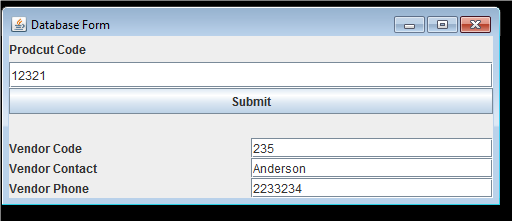
The third form should be divided into two parts. The first part reads input from the user. The form then uses the user input to retrieve information from the database and display the information in the other part of the form. For example, the below form takes Product Code as input. The form then retrieves and displays the corresponding vendor information.
Menu:
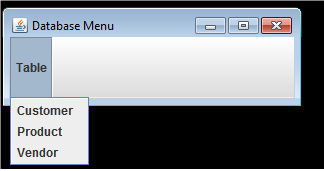
Implement a Menu to allow the user to use the three forms. For example, the below menu allows the user to use three forms to navigate through Customer, Product, or Vendor tables. When you click on any of the options, it should take you to Form 1.
| Database Form Customer Code First Name Last Name 10010 Alfred First Previous Next Last
Step by Step Solution
There are 3 Steps involved in it

Get step-by-step solutions from verified subject matter experts
 Study Help