







Question: #gremlinSim.py import matplotlib.pyplot as plt import numpy as np import random MAXROW = 20 MAXCOL = 30 # Takes in a line of the file
#gremlinSim.py
import matplotlib.pyplot as plt import numpy as np import random
MAXROW = 20 MAXCOL = 30
# Takes in a line of the file after it has been split on colons and then converts each # cordinate into a number and returns the resulting list def processline(sline): newlist = [(int(l.split(",")[0]),int(l.split(",")[1])) for l in sline[1:]] return newlist
def read_data(filename): # add file IO code here - use processline (above) wlist = [(19,2),(18,2),(17,2),(16,2),(2,27),(3,27),(4,27),(5,27)] llist = [(19,0),(18,0),(17,0),(16,0),(19,25),(18,26),(17,27),(16,28),(15,29)] flist = [(10,10),(5,5),(5,15),(15,5),(5,10),(10,5),(15,15),(15,10),(10,15),(5,20),(10,20),(15,20), (5,25),(10,25),(15,25)] return wlist, llist, flist
def move_em(current, moves): nextgrid = np.zeros(current.shape, dtype="int16")
for row in range(MAXROW): for col in range(MAXCOL): for g in range(current[row,col]): nextrow = row + random.choice(moves) nextcol = col + random.choice(moves) #print("Newpos = ", nextrow, nextcol) if nextrow = MAXROW: nextrow = MAXROW - 1 if nextcol >= MAXCOL: nextcol = MAXCOL - 1 nextgrid[nextrow, nextcol] += 1 return nextgrid
def rule1(pop, lightlist): for row in range(MAXROW): for col in range(MAXCOL): if (row, col) in lightlist: for g in range(pop[row,col]): pop[row, col] -= 1 print("kill gremlins")
def rule2(pop, waterlist): for row in range(MAXROW): for col in range(MAXCOL): if (row, col) in waterlist: for g in range(pop[row,col]): pop[row, col] += 1 print("More gremlins")
def rule3(good, evil, foodlist): for row in range(MAXROW): for col in range(MAXCOL): if (row, col) in foodlist and good[row, col] > 0: print(good[row, col], "Gremlins turned evil") evil[row, col] += good[row, col] good[row, col] = 0
def make_feature_scatter(itemlist, colour): xlist = [] ylist = [] for r,c in itemlist: ylist.append(MAXROW - r - 1) xlist.append(c) plt.scatter(xlist,ylist,color=colour, marker='s')
def make_gremlin_scatter(pop, colour): xlist = [] ylist = [] slist = [] for row in range(MAXROW): for col in range(MAXCOL): if pop[row,col] > 0: ylist.append(MAXROW - row - 1) xlist.append(col) #flip rows/columns to y/x slist.append(pop[row,col]*20) plt.scatter(xlist,ylist,s=slist,color=colour)
def main():
goodarray = np.zeros((MAXROW,MAXCOL), dtype="int16") evilarray = np.zeros((MAXROW,MAXCOL), dtype="int16")
water, light, food = read_data("gremlins.txt") # read in data
moves = [-1,0,1]
# Starting population initpop = 10
for i in range(initpop): # add good gremlins to grid goodarray[random.randint(0,MAXROW-1),random.randint(0,MAXCOL-1)] += 1
# Simulation
for t in range(30): # @ 8 hour / timestep = 10 days print("### Timestep ", "t", "###") goodnext = move_em(goodarray, moves) evilnext = move_em(evilarray, moves)
rule1(goodnext, light) rule1(evilnext, light) rule2(goodnext, water) rule2(evilnext, water) if t%3 == 0: # after midnight till 8am rule3(goodnext, evilnext, food)
goodarray = goodnext evilarray = evilnext
make_gremlin_scatter(goodarray, "b") make_gremlin_scatter(evilarray, "r") make_feature_scatter(water, "c") make_feature_scatter(light, "y") make_feature_scatter(food, "g") plt.xlim(-1,MAXCOL) plt.ylim(-1,MAXROW) plt.pause(1) plt.clf() plt.title("Gremlin Simulation") plt.xlabel("Rows") plt.ylabel("Columns")
if __name__ == "__main__": main()
# gremlin.txt
water:19,2:18,2:17,2:16,2:2,27:3,27:4,27:5,27 light:19,0:18,0:17,0:16,0:19,25:18,26:17,27:16,28:15,29 food:10,10:5,5:5,15:15,5:5,10:10,5:15,15:15,10:10,15:5,20:10,20:15,20:5,25:10,25:15,25
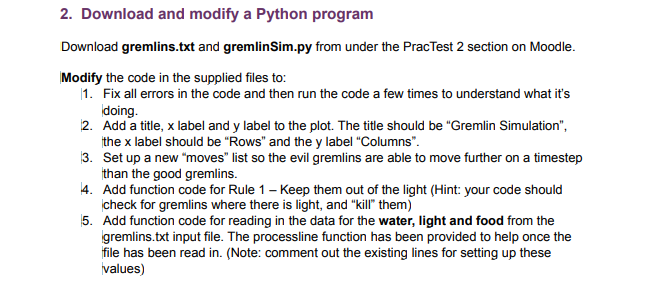
2. Download and modify a Python program Download gremlins.txt and gremlinSim.py from under the PracTest 2 section on Moodle. Modify the code in the supplied files to: 1. Fix all errors in the code and then run the code a few times to understand what it's doing. 2. Add a title, x label and y label to the plot. The title should be "Gremlin Simulation", the x label should be "Rows" and the y label "Columns". 13. Set up a new "moves" list so the evil gremlins are able to move further on a timestep than the good gremlins. 4. Add function code for Rule 1 - Keep them out of the light (Hint: your code should check for gremlins where there is light, and "kill them) 5. Add function code for reading in the data for the water, light and food from the gremlins.txt input file. The processline function has been provided to help once the file has been read in. (Note: comment out the existing lines for setting up these values)
Step by Step Solution
There are 3 Steps involved in it

Get step-by-step solutions from verified subject matter experts
 Study Help