







Question: Hands - On Task 2 : Array Manipulation In this exercise, you will explore how to apply array methods to add, remove, and search for
HandsOn Task : Array Manipulation
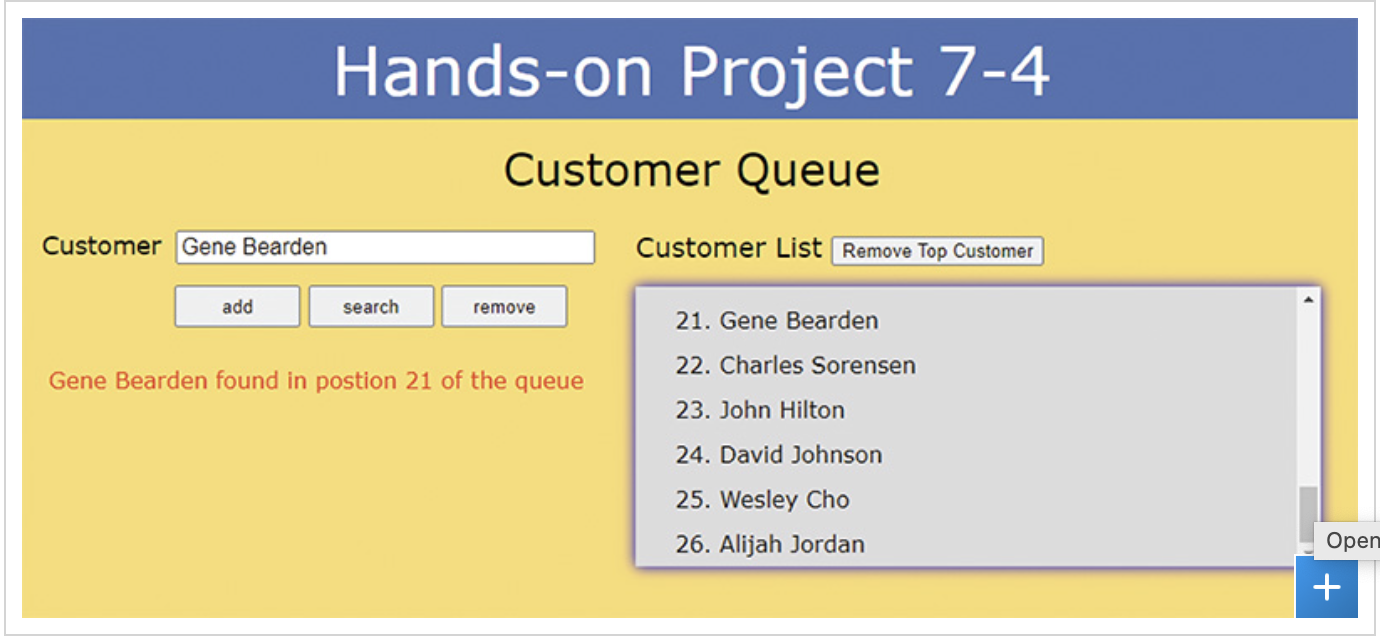
In this exercise, you will explore how to apply array methods to add, remove, and search for entries within the array of customer names. A web page has been created for you containing web form buttons to enable the different array features. Your task is to create event handlers for those buttons. A preview of the completed page is shown in the image below. PLEASE SHOW HTML AND JAVASCRIPT CODE.
Instructions:
Open the provided tasktemplatefolder' in your code editor.
Use your code editor to open the taskhtml and taskjs files from the tasktemplatefolder folder in the cloned repository.
Go to the taskhtml file in your code editor and the head section add a script element to add the taskjs file to add the external JavaScript file.
Take some time to study the content and structure of the document. There are four buttons you will need to program for adding, searching for, and removing customer names and another button for removing the top customer from the queue. Save your changes to the file.
Return to the taskjs file in your code editor. Add an onclick event handler for the addButton object. Within the event handler do the following:
Use the push method to add the value of the customerName object to the end of the customers array.
Run the generateCustomerList function to update the contents of the ordered list that appears on the web page.
Change the text of the status paragraph to customer added to the end of the queue where customer is the value of the customerName object.
Add an onclick event handler for the searchButton object. Within the event handler do the following:
Use the indexOf method to locate the index of the array item whose value equals the value of the customerName object. Add to the index value and store the result in the place variable.
If place is equal to change the text of the status paragraph to customer is not found in the queue where customer is the value of the customerName object; otherwise change the text of the status paragraph to customer found in position place of the queue where place is the value of the place variable.
Add an onclick event handler for the removeButton object. Within the event handler do the following:
Use the indexOf method to locate the index of the array item whose value equals the value of the customerName object. Store the index in a variable named index.
If index is not equal to then i use the splice method to remove one item from the customers array whose index equal the value of the index variable, ii change the text of the status paragraph to customer removed from the queue and iii call the generateCustomerList function to recreate the ordered list of customer names. Otherwise, change the text of the status paragraph to customer is not found in the queue
Add an onclick event handler for the topButton object. Within the event handler do the following:
Apply the shift method to remove the first item from the customers array, storing the value returned by the shift method in the topCustomer variable.
Change the text of the status paragraph to Top customer from the queue where Top Customer is the value of the topCustomer variable.
Call the generateCustomerList function.
Save your changes to the file and open taskhtml in your web browser. Do the following tasks to test your code:
Add Alijah Jordan to the customer list. Verify that her name appears as the th entry in the list.
Search for Gene Bearden. Verify that his entry is in the st position in the queue.
Remove John Hilton from the custom list. Verify that the number of customers is reduced back to
Remove the top customer from the list to reduce the customer list to entries.
Search for Peter Blake. Verify that the page reports that no such entry can be found in the customer list.
Step by Step Solution
There are 3 Steps involved in it
1 Expert Approved Answer
Step: 1 Unlock

Question Has Been Solved by an Expert!
Get step-by-step solutions from verified subject matter experts
Step: 2 Unlock
Step: 3 Unlock
 Study Help