







Question: HANDS-ON ACTIVITY 4A Capturing Packets on Your Network them to your whe la this chapter, we discussed several datalin per protocol doing the wachas SDLC
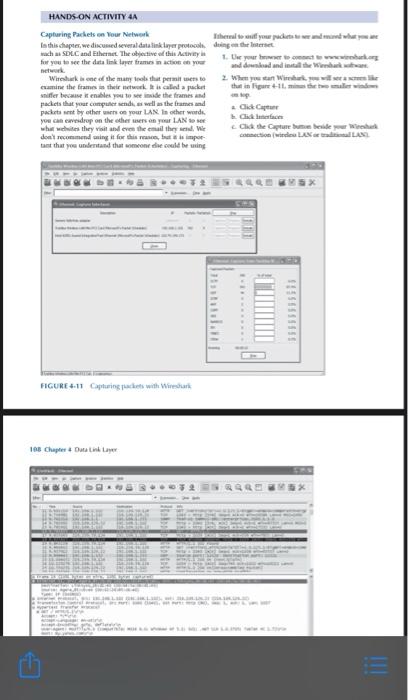
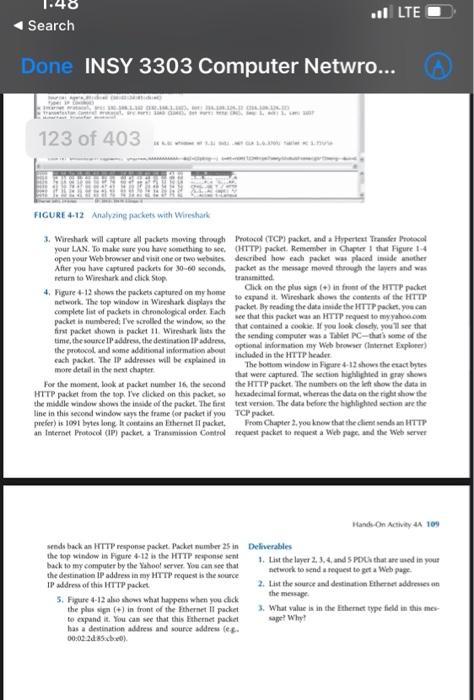
HANDS-ON ACTIVITY 4A Capturing Packets on Your Network them to your whe la this chapter, we discussed several datalin per protocol doing the wachas SDLC and Ethernet. The objective of this Activity 1. Use your owwwww for you to see the data link layer frames action you and download and into the Waikan Wireshare of the many other wet 2. When you can Wirka amine the frames the new called a packet that in ligare + 1 taient sniffer became enables you to see side the frames and packets that your computer sendes well as the frames and packets set by other was on your LAN In other words you can we drop on the other on your LAN What while they visit and even the email three Click the Capture de don't recommend using it for this, but is impor tant that you undentand that someone de could be wing wax FIGURE 4.11 Capturing jackets with Wireshark 108 Chapter 4 Catalina GO l LTE Search Done INSY 3303 Computer Netwro... 123 of 403 FIGURE 4-12 Analyzing packets with Wireshark 3. Wireshark will captare all packets moving through Protocol (TCP) packet, and a Hypertext Trade Protocol your LAN. To make sure you have something to see. HTTP) packet. Remember in Chapter that Figure 1.4 open your web browser and visit one or two webuses described how each packet w placed imide anather After you have captured packets for 30-60 seconds packet as the message moved through the layers and was return to Wireshark and click Stop transmitted 4. Figure 4-12 shows the packets captured on my home Click on the plus sign (+) in front of the HTTP paket network. The top window in Weshk displays the to expand it. Wireshark shows the contents of the HTTP complete list of pockets in chronological order. Fach packet. By reading the data inside the HTTP packet, you can packet in numbered: I've scrolled the window to the see that this packet was an HTTP request to myyahoo.com first packet shown is packet 11 Wireshark is the that contained a cookie. If you look duch, you see that time, the source IP address the destination IP address the sending computer was The PC-thull some of the the protocol and some additional information about optional information my Web broernernet Explorer each packet. The IP addresses will be explained in included in the HTTP header more detail in the next chapter The bottom window in Figure 6-12 shows the exact bytes that were captured. The section highlighted in gray shows For the moment, look at packet number 16, the second the HTTP packet. The numbers on the left show the data in HTTP packet from the top. The clicked on this packet. o hexadecimal format, whereas the data on the right show the the middle window show the inside of the packet. The first text version. The data before the highlighted section are the line in this second window ways the frame (or packet if you TCP packet prefer) is 1091 bytes long. It contains an Bhernet I pucket From Chapter 2. you know that the intenden HTTP an Internet Protocol (IP) packet Transmission Control request packet to request a web page and the Web server Hand On Activy 1 109 sende back an HTTP response packet. Packet numbers in Deliverables the top window in Figure 1-12 is the HTTP response went 1. List the layer 2.3.4 and SPOL that we wed in your back to my computer by the Yahoo server. You can see that the destination IP address in my HTTP request is the source network to send request to get a Web page IP address of this HTTP packet 2. List the source and destination Ethernet addressen the message 5. Figure 4-12 also shows what happens when you dick the plus (+) in front of the Ethernet il packet 3. What value is in the theme type held in this mes to expand it. You can see that this Ethernet jacket sape? Why? has a destination dress and source address leg 00:02:25) Description P 114-115. Hands-On Activity 4A "Capturing Packets on Your Network" using Wireshark. Attach Word document with screen capture images of deliverables and your typed answers for three questions (pictures are not an answer, but back up your typed answer). Question 1 Screenshots and typed answers (4) 25 pts Question 2 Screenshots and typed answers (2) 15 pts Question 3 Screenshot and typed answer (1) 10 pts HANDS-ON ACTIVITY 4A Capturing Packets on Your Network them to your whe la this chapter, we discussed several datalin per protocol doing the wachas SDLC and Ethernet. The objective of this Activity 1. Use your owwwww for you to see the data link layer frames action you and download and into the Waikan Wireshare of the many other wet 2. When you can Wirka amine the frames the new called a packet that in ligare + 1 taient sniffer became enables you to see side the frames and packets that your computer sendes well as the frames and packets set by other was on your LAN In other words you can we drop on the other on your LAN What while they visit and even the email three Click the Capture de don't recommend using it for this, but is impor tant that you undentand that someone de could be wing wax FIGURE 4.11 Capturing jackets with Wireshark 108 Chapter 4 Catalina GO l LTE Search Done INSY 3303 Computer Netwro... 123 of 403 FIGURE 4-12 Analyzing packets with Wireshark 3. Wireshark will captare all packets moving through Protocol (TCP) packet, and a Hypertext Trade Protocol your LAN. To make sure you have something to see. HTTP) packet. Remember in Chapter that Figure 1.4 open your web browser and visit one or two webuses described how each packet w placed imide anather After you have captured packets for 30-60 seconds packet as the message moved through the layers and was return to Wireshark and click Stop transmitted 4. Figure 4-12 shows the packets captured on my home Click on the plus sign (+) in front of the HTTP paket network. The top window in Weshk displays the to expand it. Wireshark shows the contents of the HTTP complete list of pockets in chronological order. Fach packet. By reading the data inside the HTTP packet, you can packet in numbered: I've scrolled the window to the see that this packet was an HTTP request to myyahoo.com first packet shown is packet 11 Wireshark is the that contained a cookie. If you look duch, you see that time, the source IP address the destination IP address the sending computer was The PC-thull some of the the protocol and some additional information about optional information my Web broernernet Explorer each packet. The IP addresses will be explained in included in the HTTP header more detail in the next chapter The bottom window in Figure 6-12 shows the exact bytes that were captured. The section highlighted in gray shows For the moment, look at packet number 16, the second the HTTP packet. The numbers on the left show the data in HTTP packet from the top. The clicked on this packet. o hexadecimal format, whereas the data on the right show the the middle window show the inside of the packet. The first text version. The data before the highlighted section are the line in this second window ways the frame (or packet if you TCP packet prefer) is 1091 bytes long. It contains an Bhernet I pucket From Chapter 2. you know that the intenden HTTP an Internet Protocol (IP) packet Transmission Control request packet to request a web page and the Web server Hand On Activy 1 109 sende back an HTTP response packet. Packet numbers in Deliverables the top window in Figure 1-12 is the HTTP response went 1. List the layer 2.3.4 and SPOL that we wed in your back to my computer by the Yahoo server. You can see that the destination IP address in my HTTP request is the source network to send request to get a Web page IP address of this HTTP packet 2. List the source and destination Ethernet addressen the message 5. Figure 4-12 also shows what happens when you dick the plus (+) in front of the Ethernet il packet 3. What value is in the theme type held in this mes to expand it. You can see that this Ethernet jacket sape? Why? has a destination dress and source address leg 00:02:25) Description P 114-115. Hands-On Activity 4A "Capturing Packets on Your Network" using Wireshark. Attach Word document with screen capture images of deliverables and your typed answers for three questions (pictures are not an answer, but back up your typed answer). Question 1 Screenshots and typed answers (4) 25 pts Question 2 Screenshots and typed answers (2) 15 pts Question 3 Screenshot and typed answer (1) 10 pts
Step by Step Solution
There are 3 Steps involved in it

Get step-by-step solutions from verified subject matter experts
 Study Help