







Question: Hello Chegg! I am a BEGINNER at using Microsoft Visual Basic as my coding program and this exercise comes from the Microsoft Visual Basic 2015
Hello Chegg! I am a BEGINNER at using Microsoft Visual Basic as my coding program and this exercise comes from the "Microsoft Visual Basic 2015 RELOADED" book. This exercise is from chapter 12, programming example page 643. And again, I am a BEGINNER with very little knowledge at this.
Here is the exercise:
PROGRAMMING EXAMPLE Cartwright Industries Application The sales manager at Cartwright Industries records the item number, name, and price of the companys products in a database named Items. The Items database is stored in the Items.accdb file, which is contained in the VbReloaded2015\Chap12\Access Databases folder. The tblItems table in the database contains 10 records, each composed of three fields. The ItemNum and ItemName fields contain text, and the Price field contains numbers. Create an application that displays the records in a DataGridView control. The application should allow the user to select records whose ItemNum field matches the one or more characters entered by the user. Use the following names for the solution and project, respectively: Cartwright Solution and Cartwright Project. Save the application in the VbReloaded2015\Chap12 folder. Change the form files name to Main Form.vb.
Here is the existing code that just needs some code added, and as you can see there are some red lines under certain parts. And I believe that those are what need to be fixed along with anything else: 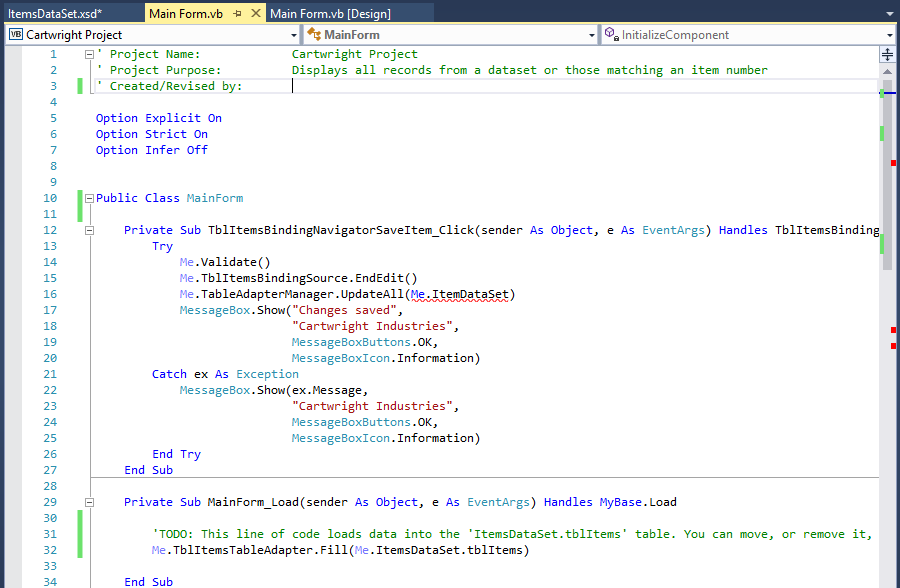
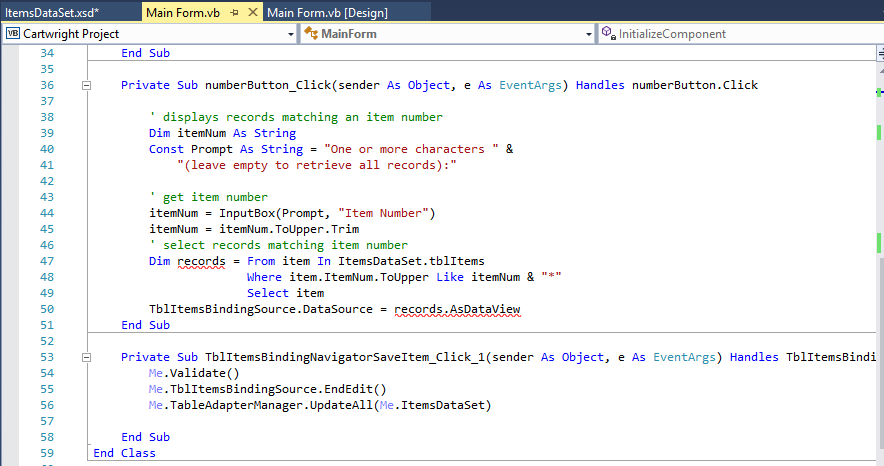
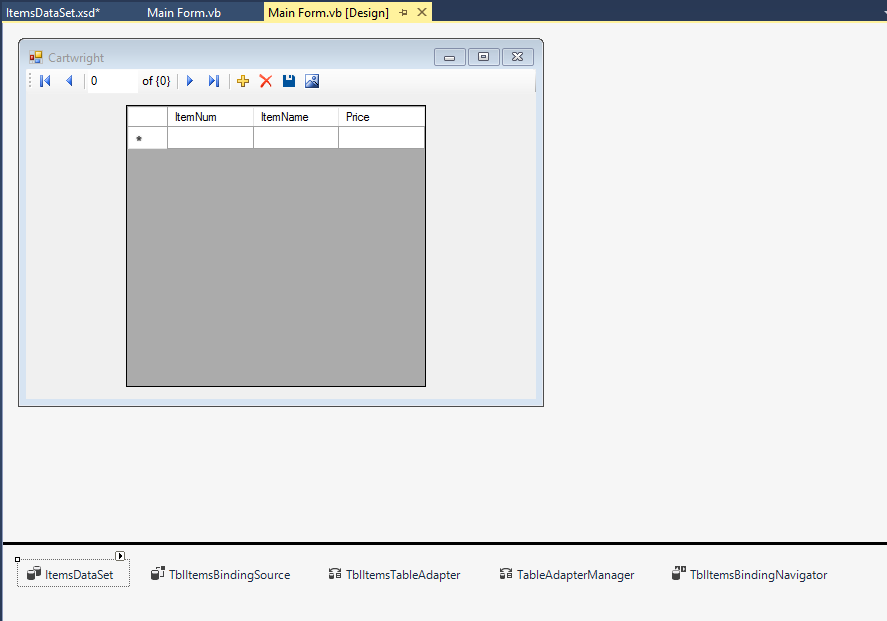
Here is the Interface:
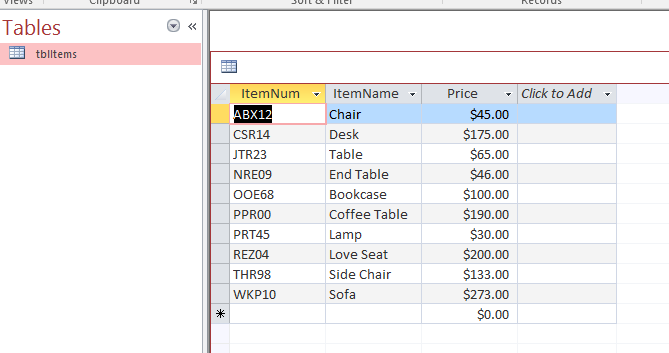
Here is the Microsoft Access file (in the project's folder) with the items:
Thank you so much for your work/help in this exercise!!!
Main Form vb x Main Form.vb [Design] Items DataSet xsd MainForm Sa InitializeComponent Cartwright Project E' Project Name: Cartwright Project Displays all records from a dataset or those matching an item number Project Purpose L Created/Revised by Option Explicit on Option Strict On Option Infer off 10 I E Public Class MainForm 11 12 Private sub TblItems Navi tem Click (sender As object, e As EventArgs) H TblItemsBinding andles 13 Me Validate() 14 ce.EndEdit() 15 Me. Table Adapte anager r.U ItemDataset) UpdateAll(Me 16 Show ("Changes saved 17 Cartwright Industries 18 19 MessageBox Buttons.0K, Message Information 20 Catch ex As Exception 21 MessageBox Show essage 22 Cartwright Industries 23 24 MessageBox Buttons.0K, Message Information 25 End T 26 End Sub 27 28 Private Sub Main Form Load sende r As Object Event Args) H andles oad 29 As Base 30 TODO This line of code loads data into the 'ItemsDataSet.tblItems' table You can move or remove it 31 TblItemsTableAdapter Fill ItemsDataset.tblItems 32 33 End Sub Main Form vb x Main Form.vb [Design] Items DataSet xsd MainForm Sa InitializeComponent Cartwright Project E' Project Name: Cartwright Project Displays all records from a dataset or those matching an item number Project Purpose L Created/Revised by Option Explicit on Option Strict On Option Infer off 10 I E Public Class MainForm 11 12 Private sub TblItems Navi tem Click (sender As object, e As EventArgs) H TblItemsBinding andles 13 Me Validate() 14 ce.EndEdit() 15 Me. Table Adapte anager r.U ItemDataset) UpdateAll(Me 16 Show ("Changes saved 17 Cartwright Industries 18 19 MessageBox Buttons.0K, Message Information 20 Catch ex As Exception 21 MessageBox Show essage 22 Cartwright Industries 23 24 MessageBox Buttons.0K, Message Information 25 End T 26 End Sub 27 28 Private Sub Main Form Load sende r As Object Event Args) H andles oad 29 As Base 30 TODO This line of code loads data into the 'ItemsDataSet.tblItems' table You can move or remove it 31 TblItemsTableAdapter Fill ItemsDataset.tblItems 32 33 End Sub
Step by Step Solution
There are 3 Steps involved in it

Get step-by-step solutions from verified subject matter experts
 Study Help