







Question: Hello :) Please help me create a design document for the following project that I will be working on. I a not exactly sure where
Hello :) Please help me create a design document for the following project that I will be working on. I a not exactly sure where to start, so the design document as well as the .h files would be very helpful. This is for data structures and will be coded using C++.
The design should look something like the following attached files and should include:
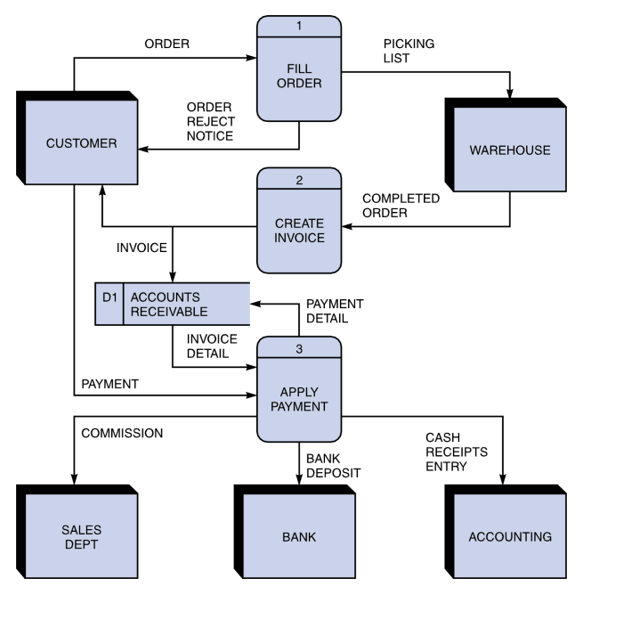
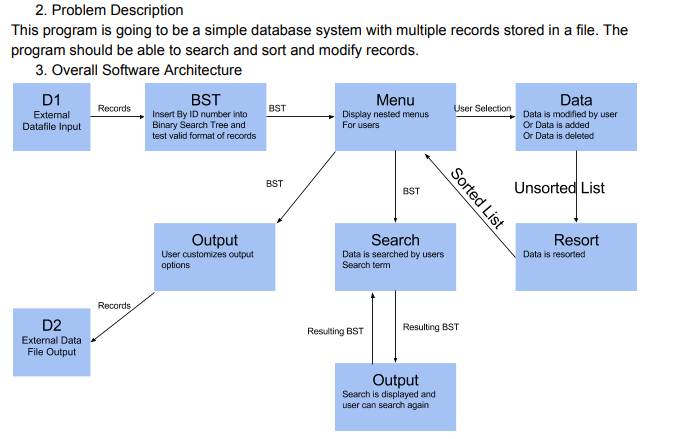
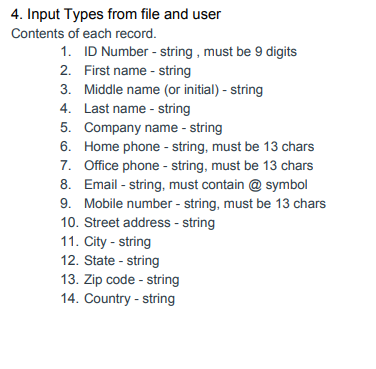
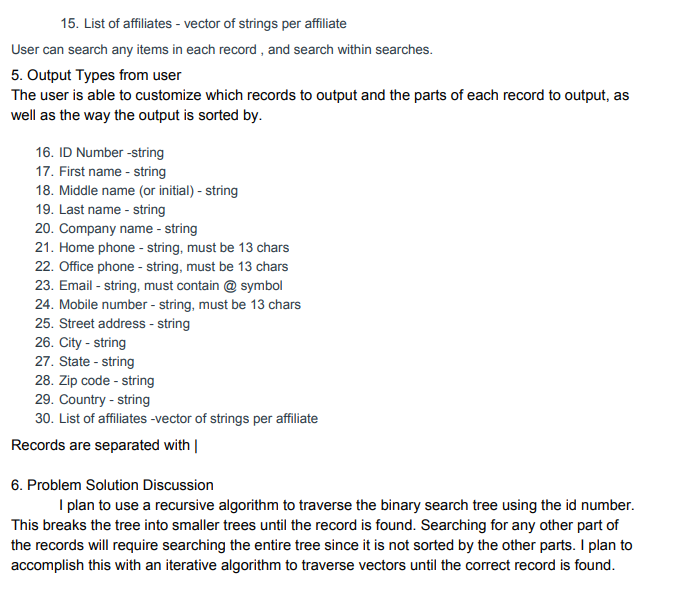
Problem Description A brief description of what this program does.
Overall Software Architecture A brief description of major functions and their main roles in the program. You need to explain how the entire program is constructed and how the functions are related each other. You don't have to explain every little function.
Usually your start and end points (or program exit points) are denoted with a circle
D1 is an external data file (arrows point to whether it is input or output)
Arrows are labeled with the (general) input and output typeslist major data structures or results like input of Unsorted List and output labeled as List Sorted by ID
Not listed on the diagram above, but necessary for this project, you should list the major classes, functions and member functions in each block (under the name of the block)
Input Requirements A detailed list of all external inputs (from files or keyboard) including a description of the data type and range of valid values for each input. For input file format and interactive user input, you need to write what data type is used for every field and valid value and length.
Output Requirements A detailed list or description of all outputs (to files) including a description of the data type and range of valid values for each output.
Problem Solution Discussion A summary description of the solution steps with algorithms analysis (1 paragraph, approximately 100 words). If any unusual techniques or algorithms are used that need further explanation, and additional paragraph may be used.
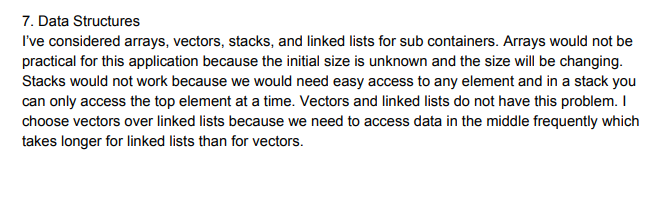
Data Structures A description of choice of your data structures and justification. Of course the main data structure for the database is Binary Search tree. But for some internal operations you may have to use a few sub containers. So include a brief explanation for your choice. For example, "I have considered DS1, DS2, and DS3. Their pros and cons are summarized as follow... I choose DS1 over DS2 and DS3 because ...."
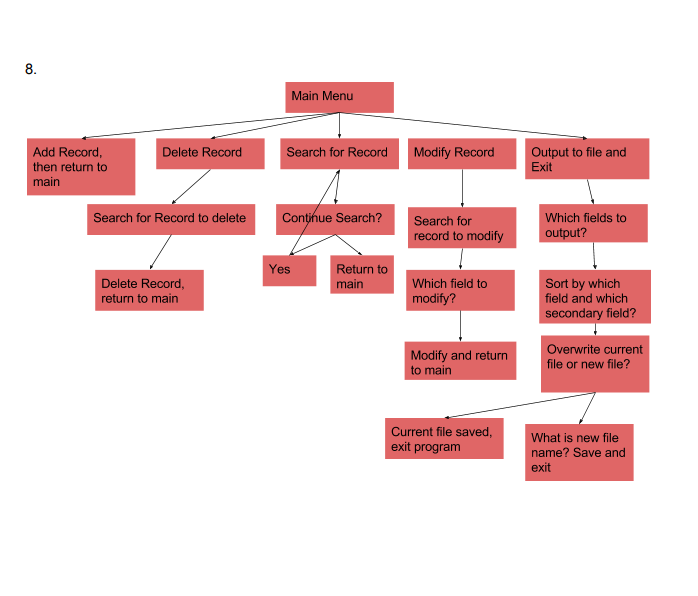
User Interface Scheme User interface scheme should show the menu items at top level and items in sub menus and how to navigate through menus.
Develop a simple database system. The database is to handle multiple records, each composed of several fields. The database will store its information to a file, addition and deletion of records, field modifications, and it will allow users to sort records based on the selected keys, and produce reports (output) according to predefined criteria.
Below is what the project would be on, so use this info to build the diagram and design document please.... :)
Given the requirements as a rough specification, you are to design the classes and implement the database. So you can consider the requirements below as an outcome from a meeting with a client. You are in full control of the choice of data structures (except the main data structure of a Binary Search Tree, more detail below), algorithms, internal file format, and detailed user interface scheme.
Requirements are listed with R:
You are designing and implementing a database for the Academy Award winners.
R1/R2: You are to read in information from two files.
R1: You will read in actor-actress.csv which is formatted as a csv file (Ask the user for the file name). Then place the items in a Binary Search Tree, sorted by name.
This is a common format and is comma separated (instead of being on separate lines). So you will have comma's between the values. Blank values will just have a comma noting to go to the next field. (so you may have value,, indicating a blank field.) Each line ends in a newline, not a comma. If you want to view the file, often this will be opened by a spreadsheet unless you specifically open it with a text editor. Do not open it with Microsoft Word, as this may change the format. Consider using getline with three parameters, as an easy way to read in files The first line of a CSV file notes the data descriptions as follows:
Year,Award,Winner,Name,Film
The Winner field has a one if they won and a zero if they did not win.
R2: Then you will read in information about the movies (called pictures by the Academy of Motion Pictures) that have won best picture award. Place these items in a Binary Search Tree, sorted by name. This is also formatted as a .csv file
The first line of pictures.csv contains the data fields including: name,year,nominations,rating,duration,genre1,genre2,release,metacritic,synopsis
R3/R4: Choose either the movie or actor database and add a record
R5/R6: Choose either the movie or actor database, search for a record, and modify the fields.
R7/R8: Choose either the movie or actor database, search for a record and delete the fields.
R9/R10: Choose either the movie or actor database and sort by any single (sortable) field
R11/R12: Choose either the movie or the actor database and do a complete search on any complete searchable field. It is unlikely that you would have an exact match on an entire description, so that would not be listed to search.
R13/R14: Choose either the movie or the actor database and do a partial search on any searchable field. A partial search is any substring within a field.
R15/R16: Choose either the movie or actor database, ask for a file name, and print out a .csv file of the latest database (after adds, deletes or modifies). Remember that the first line of a .csv file lists the name of the fields separated with commas, ending in a newline. Then the following lines are the information from the fields separated with commas, ending in a newline.
Incorporate the nominations.csv file (which has the same format as the actress-actors file but adds many categories and about 10,000 records. In addition to incorporating the nominations, you should provide options for three or four statistics. Look at the data to decide what you could provide. Examples: List of Directors and number of nominations (sorted by number of nominations) or top 20 words in titles.be creative with the data.
Thank you very much!
ORDER PICKING LIST FILL ORDER ORDER REJECT NOTICE CUSTOMER WAREHOUSE 2 COMPLETED ORDER CREATE INVOICE INVOICE D1 ACCOUNTS PAYMENT DETAIL RECEIVABLE INVOICE DETAIL PAYMENT APPLY PAYMENT COMMISSION CASH RECEIPTS ENTRY BANK DEPOSIT SALES DEPT BANK ACCOUNTING ORDER PICKING LIST FILL ORDER ORDER REJECT NOTICE CUSTOMER WAREHOUSE 2 COMPLETED ORDER CREATE INVOICE INVOICE D1 ACCOUNTS PAYMENT DETAIL RECEIVABLE INVOICE DETAIL PAYMENT APPLY PAYMENT COMMISSION CASH RECEIPTS ENTRY BANK DEPOSIT SALES DEPT BANK ACCOUNTING
Step by Step Solution
There are 3 Steps involved in it

Get step-by-step solutions from verified subject matter experts
 Study Help