







Question: Hello this is my C-sharp homework question Create a State Maintenance application In this exercise, youll create an application that uses a data source and
Hello this is my C-sharp homework question
Create a State Maintenance application In this exercise, youll create an application that uses a data source and a DataGridView control to maintain the states in the States table of the MMABooks database.
If its necessary i will send you the mdf file and state maintenance file, thank you
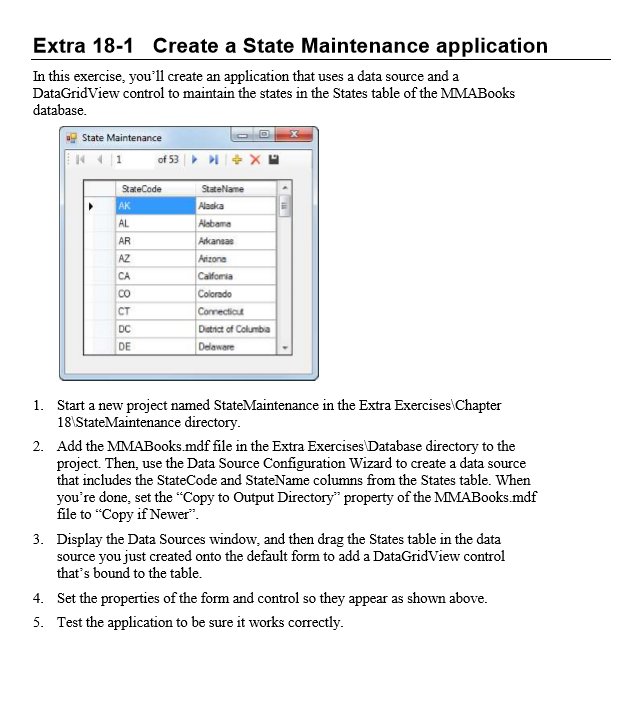
Extra 18-1 Create a State Maintenance application In this exercise, you'll create an application that uses a data source and a DataGridView control to maintain the states in the States table of the MMABooks database State Maintenance of 53 X 1 State Code Arizona Dotnict of Columba DE 1. Start a new project named StateMaintenance in the Extra Exercises Chapter 18 StateMaintenance directory 2. Add the MMABooks.mdf file in the Extra Exercises Database directory to the project. Then, use the Data Source Configuration Wizard to create a data source that includes the StateCode and StateName columns from the States table. When you're done, set the "Copy to output Directory" property of the MMABooksmdf file to "Copy if Newer" 3. Display the Data Sources window, and then drag the States table in the data source you just created onto the default form to add a DataGridView control that's bound to the table. 4. Set the properties of the formand control so they appear as shown above. 5. Test the application to be sure it works correctly. Extra 18-1 Create a State Maintenance application In this exercise, you'll create an application that uses a data source and a DataGridView control to maintain the states in the States table of the MMABooks database State Maintenance of 53 X 1 State Code Arizona Dotnict of Columba DE 1. Start a new project named StateMaintenance in the Extra Exercises Chapter 18 StateMaintenance directory 2. Add the MMABooks.mdf file in the Extra Exercises Database directory to the project. Then, use the Data Source Configuration Wizard to create a data source that includes the StateCode and StateName columns from the States table. When you're done, set the "Copy to output Directory" property of the MMABooksmdf file to "Copy if Newer" 3. Display the Data Sources window, and then drag the States table in the data source you just created onto the default form to add a DataGridView control that's bound to the table. 4. Set the properties of the formand control so they appear as shown above. 5. Test the application to be sure it works correctly
Step by Step Solution
There are 3 Steps involved in it

Get step-by-step solutions from verified subject matter experts
 Study Help