







Question: Hello this is my C-sharp homework question Create a State Maintenance application In this exercise, youll create an application that uses a data source and
Hello this is my C-sharp homework question
Create a State Maintenance application In this exercise, youll create an application that uses a data source and a DataGridView control to maintain the states in the States table of the MMABooks database.
If its necessary i will send you the mdf file and state maintenance file, thank you
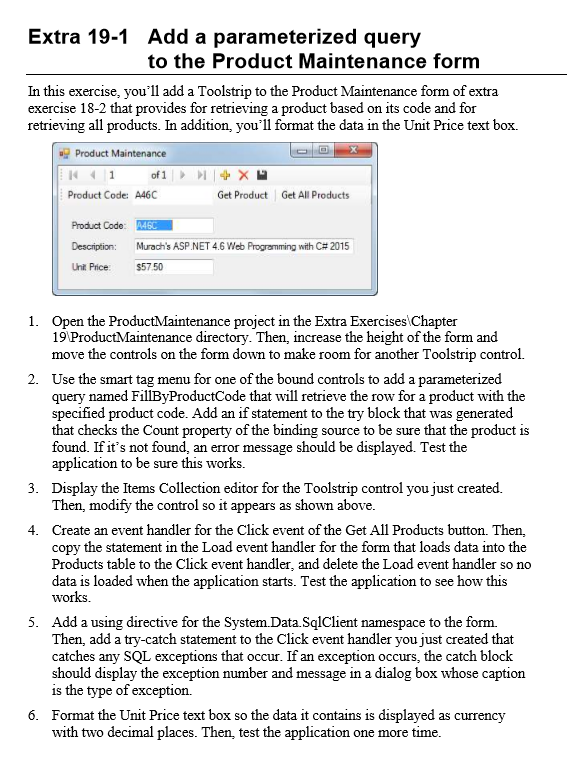
Extra 19-1 Add a parameterized query to the Product Maintenance form In this exercise, you'll add a Toolstrip to the Product Maintenance form ofextra exercise 18-2 that provides for retrieving a product based on its code and for retrieving all products. In addition, you'll format the data in the Unit Price text box. Product Maintenance of 1 Product Code: A46C Get Product Get All Products Product Code: Murach's P.NET 4.6 Web Programming with C#2015 Unit Price $57.50 1. Open the ProductMaintenance project in the Extra Exercises Chapter 19 Pro enance directory. Then, increase the height of the form and move the controls on the form down to make room for another Toolstrip control. 2. Use the smart tag menu for one of the bound controls to add a parameterized query named FillByProductCode that will retrieve the row for a product with the specified product code. Add an if statement to the try block that was generated that checks the Count property of the binding source to be sure that the product is found. If it's not found, an error message should be displayed. T the application to be sure this works 3. Display the Items Collection editor for the Toolstrip control you just created Then, modify the control so it appears as shown above 4. Create an event handler for the Click event of the Get All Products button. Then, copy the statement in the Load event handler for the form that loads data into the Products table to the Click event handler, and delete the Load event handler so no data is loaded when the application starts. Test the application to see how this works. 5. Add a using directive for the Syst namespace to the form. Then, add a try-catch statement to the Click event handler you just created that catches any SQL exceptions that occur. If an exception occurs, the catch block should display the exception number and message in a dialog box whose caption is the type of exception. 6. Format the Unit Price text box so the data it contains is displayed as currency with two decimal places. Then, test the application one more time Extra 19-1 Add a parameterized query to the Product Maintenance form In this exercise, you'll add a Toolstrip to the Product Maintenance form ofextra exercise 18-2 that provides for retrieving a product based on its code and for retrieving all products. In addition, you'll format the data in the Unit Price text box. Product Maintenance of 1 Product Code: A46C Get Product Get All Products Product Code: Murach's P.NET 4.6 Web Programming with C#2015 Unit Price $57.50 1. Open the ProductMaintenance project in the Extra Exercises Chapter 19 Pro enance directory. Then, increase the height of the form and move the controls on the form down to make room for another Toolstrip control. 2. Use the smart tag menu for one of the bound controls to add a parameterized query named FillByProductCode that will retrieve the row for a product with the specified product code. Add an if statement to the try block that was generated that checks the Count property of the binding source to be sure that the product is found. If it's not found, an error message should be displayed. T the application to be sure this works 3. Display the Items Collection editor for the Toolstrip control you just created Then, modify the control so it appears as shown above 4. Create an event handler for the Click event of the Get All Products button. Then, copy the statement in the Load event handler for the form that loads data into the Products table to the Click event handler, and delete the Load event handler so no data is loaded when the application starts. Test the application to see how this works. 5. Add a using directive for the Syst namespace to the form. Then, add a try-catch statement to the Click event handler you just created that catches any SQL exceptions that occur. If an exception occurs, the catch block should display the exception number and message in a dialog box whose caption is the type of exception. 6. Format the Unit Price text box so the data it contains is displayed as currency with two decimal places. Then, test the application one more time
Step by Step Solution
There are 3 Steps involved in it

Get step-by-step solutions from verified subject matter experts
 Study Help