







Question: Help me with #2 - #5. The VLOOKUP FORMULA here in chegg does not work for me. I am using this formula and it doesn't
Help me with #2 - #5. The VLOOKUP FORMULA here in chegg does not work for me. I am using this formula and it doesn't work. =VLOOKUP(B2,$A$14:$B$18,2,FALSE)
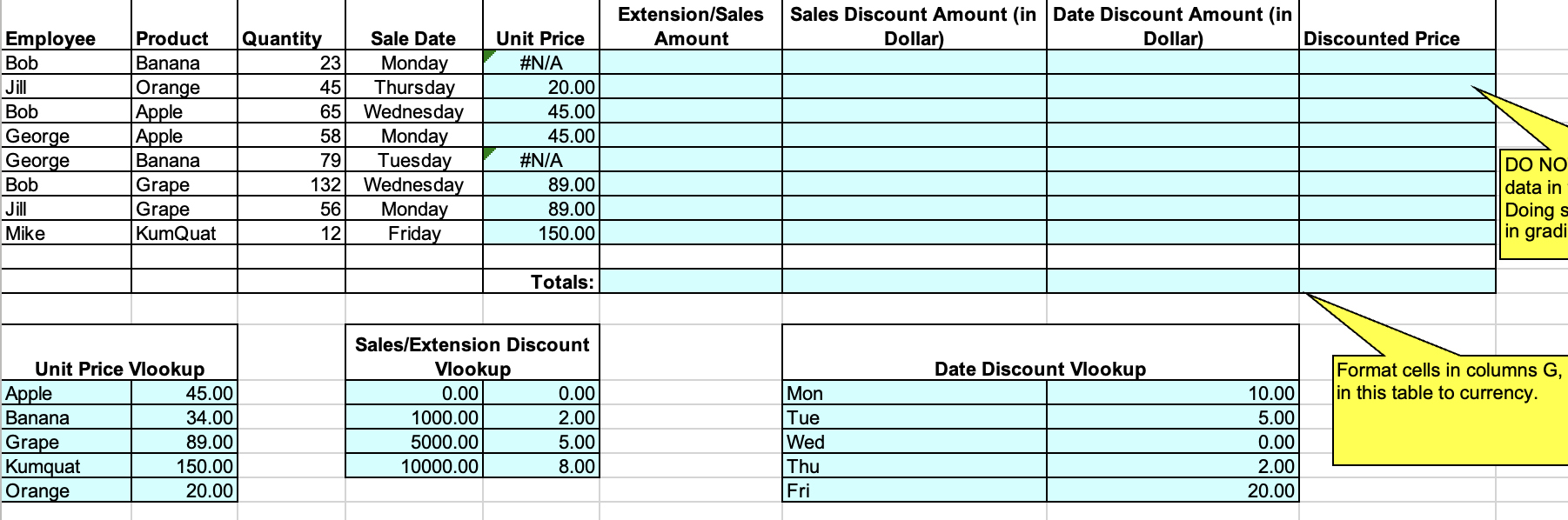
1. Create 3 lookup tables based on the following information: Unit Price: Apple, \$45; Banana, \$34; Grape, \$89; Kumquat,\$150; Orange, $20 Sales Amount Discount: For the sales amount up to less than 1,000, the discount is 0%; for the sales amount from 1,000 up to less than 5,000, the discount is 2%; For the sales amount from 5,000 up to less than 10,000 , the discount is 5%; for the sales amount 10,000 and up, the discount is 8%. Date Discount: Mon, 10\%; Tue, 5\%; Wed, 0\%; Thu, 2\%; Fri, 20\% 2. Calculate Unit Price using VLOOKUP function 3. Calculate Extension/Sales Amount, which is equal to Unit Price X Quantity 4. Calculate Sales Amount Discount Amount using VLOOKUP function ((format cell to Currency) 5. Calculate Date Discount Amount using VLOOKUP function (format cell to Currency)
Step by Step Solution
There are 3 Steps involved in it

Get step-by-step solutions from verified subject matter experts
 Study Help