







Question: #Here is the ArrayBoundedQueue class package ch04.queues; public class ArrayBoundedQueue implements QueueInterface { protected final int DEFCAP = 100; // default capacity protected T[] elements;
#Here is the ArrayBoundedQueue class
package ch04.queues;
public class ArrayBoundedQueue
public ArrayBoundedQueue() { elements = (T[]) new Object[DEFCAP]; rear = DEFCAP - 1; }
public ArrayBoundedQueue(int maxSize) { elements = (T[]) new Object[maxSize]; rear = maxSize - 1; }
public void enqueue(T element) // Throws QueueOverflowException if this queue is full; // otherwise, adds element to the rear of this queue. { if (isFull()) throw new QueueOverflowException("Enqueue attempted on a full queue."); else { rear = (rear + 1) % elements.length; elements[rear] = element; numElements = numElements + 1; } }
public T dequeue() // Throws QueueUnderflowException if this queue is empty; // otherwise, removes front element from this queue and returns it. { if (isEmpty()) throw new QueueUnderflowException("Dequeue attempted on empty queue."); else { T toReturn = elements[front]; elements[front] = null; front = (front + 1) % elements.length; numElements = numElements - 1; return toReturn; } }
public boolean isEmpty() // Returns true if this queue is empty; otherwise, returns false. { return (numElements == 0); }
public boolean isFull() // Returns true if this queue is full; otherwise, returns false. { return (numElements == elements.length); } public int size() // Returns the number of elements in this queue. { return numElements; } }
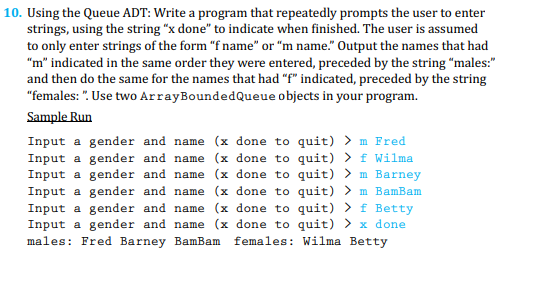
10. Using the Queue ADT: Write a program that repeatedly prompts the user to enter strings, using the string " x done" to indicate when finished. The user is assumed to only enter strings of the form "f name" or "m name." Output the names that had " m " indicated in the same order they were entered, preceded by the string "males:" and then do the same for the names that had " f " indicated, preceded by the string "females: ". Use two ArrayBoundedQueue objects in your program. Sample Run Input a gender and name (x done to quit) >m Fred Input a gender and name (x done to quit) > f Wilma Input a gender and name (x done to quit) >m Barney Input a gender and name (x done to quit) >m BamBam Input a gender and name (x done to quit) > f Betty Input a gender and name (x done to quit) >x done males: Fred Barney BamBam females: Wilma Betty
Step by Step Solution
There are 3 Steps involved in it

Get step-by-step solutions from verified subject matter experts
 Study Help