







Question: Here is the start code: class Node: def __init__(self, children=None, data=None): if not children: children = [] self.children = children class OtherNode(Node): def __init__(self): pass
Here is the start code:
class Node: def __init__(self, children=None, data=None): if not children: children = [] self.children = children
class OtherNode(Node): def __init__(self): pass
class BinaryNode(Node): def __init__(self, children): super().__init__(children) self.name = "BinaryNode"
class DataNode(Node): def __init__(self, data): super().__init__(data) self.name = "DataNode"
class ManyNode(Node): def __init__(self, children): super().__init__(children) self.name = "ManyNode"
def node_to_string(node): pass
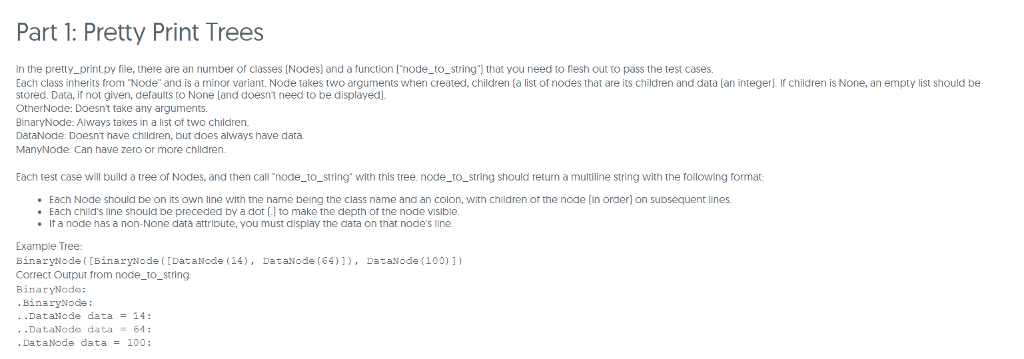
Part 1: Pretty Print Trees In the pretty_print.py file, there are an number of classes [Nodes) and a function ['node_to_string") that you need to flesh out to pass the test cases. Each class inherits from Node" and is a minor variant. Node takes two arguments when created, children [a list of nodes that are its children and data (an integer. If children is None, an empty list should be stored. Data, if not given, defaults to None land doesn't need to be displayed. OtherNode: Doesn't take any arguments. BinaryNode: Always takes in a list of two children. DataNode: Doesnt have children, but does always have data. ManyNode: Can have zero or more children Each test case will build a tree of Nodes, and then call "node_to_string with this tree. node_to_string should return a multiline string with the following format: .Each Node should be on its own line with the name being the class name and an colon, with children of the node in order) on subsequent lines Each child's line should be preceded by a dot (.I to make the depth of the node visible. If a node has a non-None data attribute, you must display the data on that node's line. Example Tree: BinaryNode([BinaryNode ([DataNode (14, DataNode (64)1,DataNode (100)1) Correct Output from node_to_string BinaryNode: BinaryNode: DataNode data = 14: DataNode data64 DataNode data = 100: Part 1: Pretty Print Trees In the pretty_print.py file, there are an number of classes [Nodes) and a function ['node_to_string") that you need to flesh out to pass the test cases. Each class inherits from Node" and is a minor variant. Node takes two arguments when created, children [a list of nodes that are its children and data (an integer. If children is None, an empty list should be stored. Data, if not given, defaults to None land doesn't need to be displayed. OtherNode: Doesn't take any arguments. BinaryNode: Always takes in a list of two children. DataNode: Doesnt have children, but does always have data. ManyNode: Can have zero or more children Each test case will build a tree of Nodes, and then call "node_to_string with this tree. node_to_string should return a multiline string with the following format: .Each Node should be on its own line with the name being the class name and an colon, with children of the node in order) on subsequent lines Each child's line should be preceded by a dot (.I to make the depth of the node visible. If a node has a non-None data attribute, you must display the data on that node's line. Example Tree: BinaryNode([BinaryNode ([DataNode (14, DataNode (64)1,DataNode (100)1) Correct Output from node_to_string BinaryNode: BinaryNode: DataNode data = 14: DataNode data64 DataNode data = 100
Step by Step Solution
There are 3 Steps involved in it

Get step-by-step solutions from verified subject matter experts
 Study Help