







Question: Hey! Would someone mind checking this python code? When I try to run it, there are indentation errors? Thanks! :) from tkinter import * from
Hey! Would someone mind checking this python code? When I try to run it, there are indentation errors? Thanks! :)
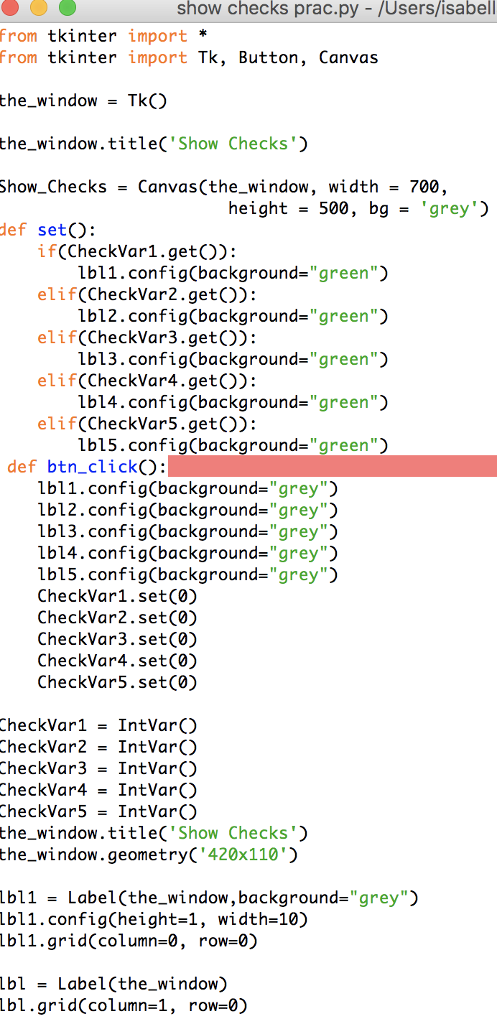
from tkinter import *
from tkinter import Tk, Button, Canvas
the_window = Tk()
the_window.title('Show Checks')
Show_Checks = Canvas(the_window, width = 700,
height = 500, bg = 'grey')
def set():
if(CheckVar1.get()):
lbl1.config(background="green")
elif(CheckVar2.get()):
lbl2.config(background="green")
elif(CheckVar3.get()):
lbl3.config(background="green")
elif(CheckVar4.get()):
lbl4.config(background="green")
elif(CheckVar5.get()):
lbl5.config(background="green")
def btn_click():
lbl1.config(background="grey")
lbl2.config(background="grey")
lbl3.config(background="grey")
lbl4.config(background="grey")
lbl5.config(background="grey")
CheckVar1.set(0)
CheckVar2.set(0)
CheckVar3.set(0)
CheckVar4.set(0)
CheckVar5.set(0)
CheckVar1 = IntVar()
CheckVar2 = IntVar()
CheckVar3 = IntVar()
CheckVar4 = IntVar()
CheckVar5 = IntVar()
the_window.title('Show Checks')
the_window.geometry('420x110')
lbl1 = Label(the_window,background="grey")
lbl1.config(height=1, width=10)
lbl1.grid(column=0, row=0)
lbl = Label(the_window)
lbl.grid(column=1, row=0)
lbl2 = Label(the_window,background="grey")
lbl2.config(height=1, width=10)
lbl2.grid(column=2, row=0)
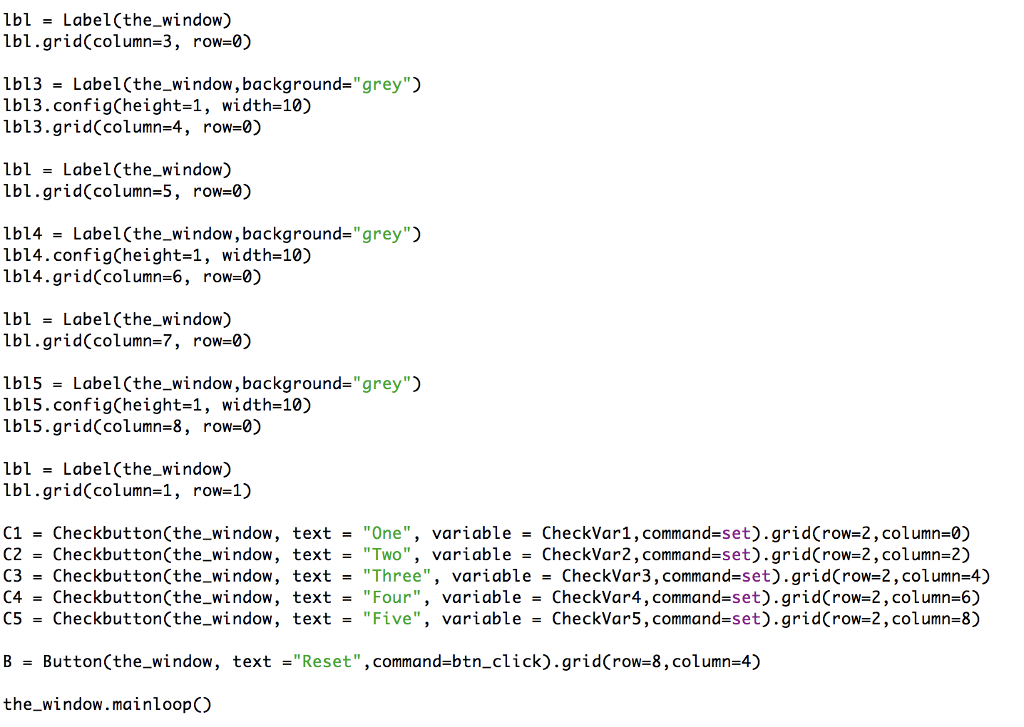
lbl = Label(the_window)
lbl.grid(column=3, row=0)
lbl3 = Label(the_window,background="grey")
lbl3.config(height=1, width=10)
lbl3.grid(column=4, row=0)
lbl = Label(the_window)
lbl.grid(column=5, row=0)
lbl4 = Label(the_window,background="grey")
lbl4.config(height=1, width=10)
lbl4.grid(column=6, row=0)
lbl = Label(the_window)
lbl.grid(column=7, row=0)
lbl5 = Label(the_window,background="grey")
lbl5.config(height=1, width=10)
lbl5.grid(column=8, row=0)
lbl = Label(the_window)
lbl.grid(column=1, row=1)
C1 = Checkbutton(the_window, text = "One", variable = CheckVar1,command=set).grid(row=2,column=0)
C2 = Checkbutton(the_window, text = "Two", variable = CheckVar2,command=set).grid(row=2,column=2)
C3 = Checkbutton(the_window, text = "Three", variable = CheckVar3,command=set).grid(row=2,column=4)
C4 = Checkbutton(the_window, text = "Four", variable = CheckVar4,command=set).grid(row=2,column=6)
C5 = Checkbutton(the_window, text = "Five", variable = CheckVar5,command=set).grid(row=2,column=8)
B = Button(the_window, text ="Reset",command=btn_click).grid(row=8,column=4)
the_window.mainloop()
show checks prac.py - /Users/isabel from tkinter import* From tkinter import Tk, Button, Canva:s the window- TkO the_window.title('Show Checks Show_Checks- Canvas(the window, width - def setO: 700, height500, bggrey if(CheckVar1.getO): elif(CheckVar2.getO): elif(CheckVar3.getO): elif(CheckVar4.getO): elif(CheckVar5.getO): Lbl1.config(background-"green") Lbl2.config(background-"green") lbl3.config(background-"green" lbl4.config(background-"green" lbl5.config(background-"green" def btn_click: lbl1.config(background- "grey lbl2.config(background-" grey") lbl3.config(background-"grey" Lbl4.config(background-"grey) lbl5.config(background-"grey" CheckVar1.set(0) CheckVar2.set(0) CheckVar3.set(0) CheckVar4.set(0) CheckVar5.set(0) CheckVar1-IntVarO CheckVar2 IntVarO CheckVar3 -IntVar() CheckVar4 - IntVarO CheckVar5IntVar() the window.title('Show Checks) the_window. geometry( 420x110') lbl1-Label(the_window,background-"grey") lbl1.config(height-1, width-10) lbl1.grid(column-0, row-0) lbl-Label(the_window) lbl.grid(column-1, row-0)
Step by Step Solution
There are 3 Steps involved in it

Get step-by-step solutions from verified subject matter experts
 Study Help