







Question: Hi, how do I include the alt, height, width, and the image (yogadoor.jpg)? This is the index.html file Path of Light Yoga Studio Path of
Hi, how do I include the alt, height, width, and the image (yogadoor.jpg)?
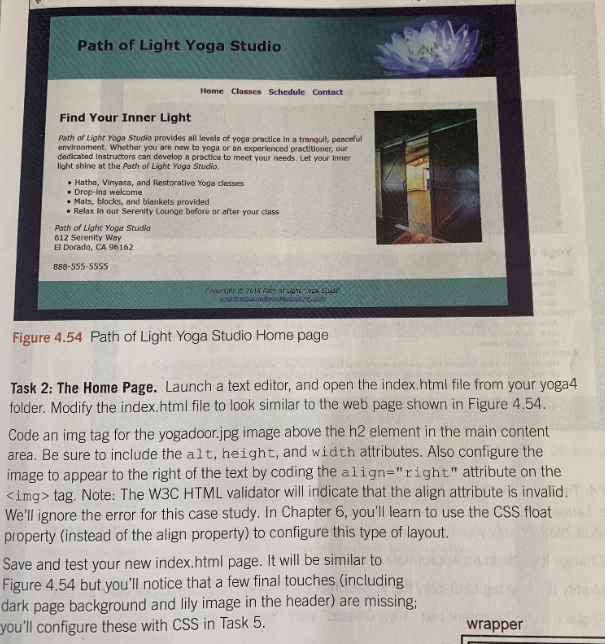
This is the index.html file
Path of Light Yoga Studio
Path of Light Yoga Studio Home Classes Schedule Contact Find Your Inner Light Path of Light Yoga Studio provides all levels of yoga practice in a tranquil, peaceful environment. Whether you are naw to yoga or an experienced practitioner, our dedicated instructors can develop a practice to meet your needs. Let your inner light shine at the Path of Light Yoga Studio Hatha, Vinynsa, and Restorative Yoga dlasses . Drop-ins welcome . Mats, blocks, and blankets provided Relax in our Serenity Lounge before or after your cdass Path of Light Yoga Studf 612 Serenity Way El Dorado, CA 96162 658-555-5555 Figure 4.54 Path of Light Yoga Studio Home page Task 2: The Home Page. Launch a text editor, and open the index.htmi file from your yoga4 folder. Modify the index.html file to look similar to the web page shown in Figure 4.54. Code an img tag for the yogadoor.jpg image above the h2 element in the main content area. Be sure to include the alt, height, and width attributes. Also configure the image to appear to the right of the text by coding the align-"right" attribute on the Kimg> tag. Note: The W3C HTML validator will indicate that the align attribute is invalid. We'll ignore the error for this case study. In Chapter 6, you'll learn to use the CSS float property (instead of the align property) to configure this type of layout. Save and test your new index.html page. It will be similar to Figure 4.54 but you'll notice that a few final touches (including dark page background and lily image in the header) are missing, you'll configure these with CSS in Task 5 wrapper
Step by Step Solution
There are 3 Steps involved in it

Get step-by-step solutions from verified subject matter experts
 Study Help