







Question: How do I edit this code to show the game object to show up on mouse click. and how to show the x and y
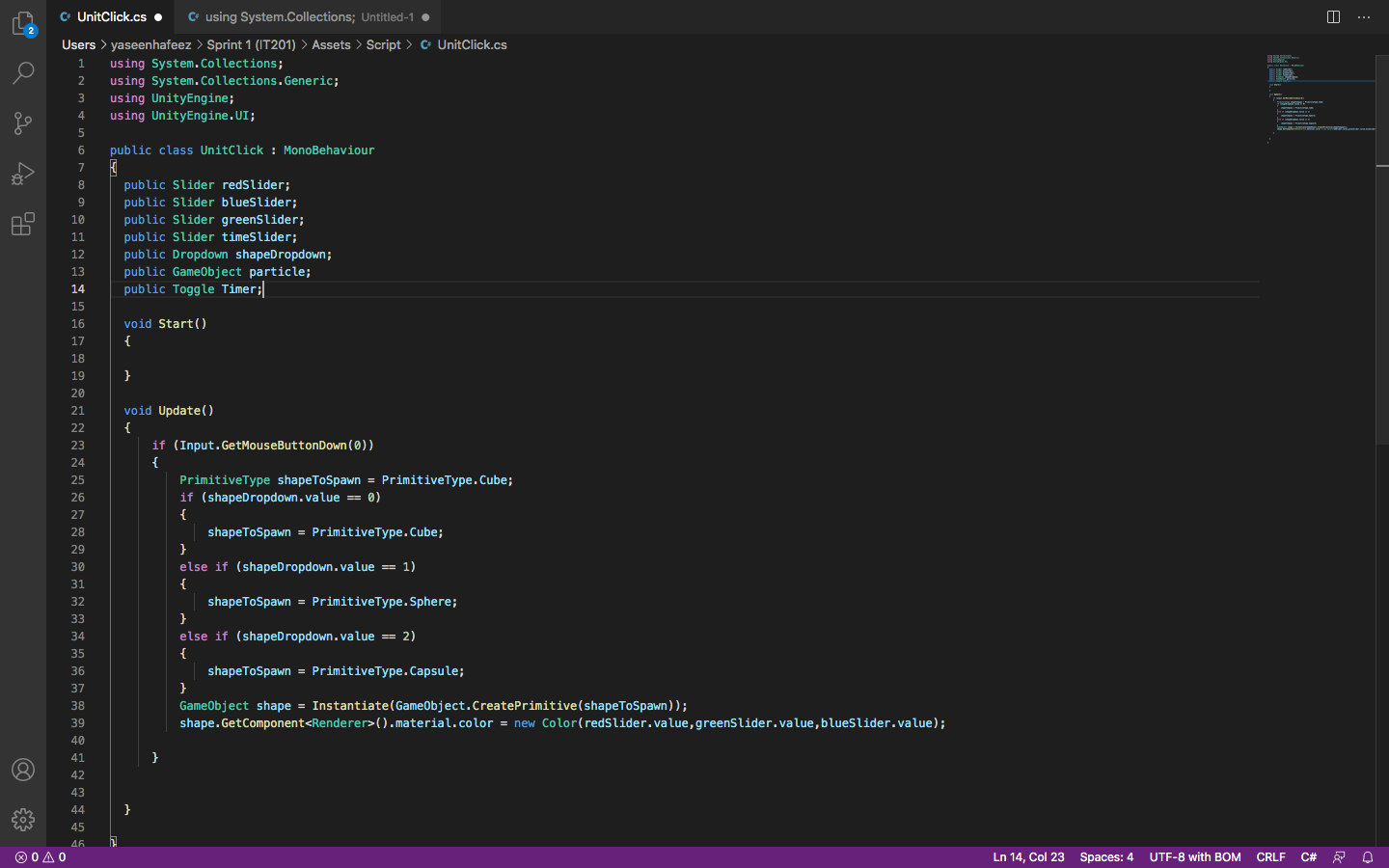
How do I edit this code to show the game object to show up on mouse click.
and how to show the x and y of the mouse
and how to use the time slider to delete the shape after set amount of seconds
and how to use the toggle to turn of the timer to keep the drawing instead of deleting after set amount of seconds
9 CA ds c UnitClick.cs using System.Collections; Untitled-1 . Users > yaseenhafeez > Sprint 1 (IT201) > Assets > Script > UnitClick.cs 1 using System.Collections; 2 using System.Collections.Generic; 3 using UnityEngine; 4 using UnityEngine.UI; 5 6 public class UnitClick : MonoBehaviour 7 8 public Slider redslider; 9 public Slider blueSlider; 10 public Slider greenslider; 11 public Slider timeslider; 12 public Dropdown shapeDropdown; 13 public GameObject particle; 14 public Toggle Timer:| 15 16 void Start() 17 { 18 19 } 20 21 void Update() 22 { 23 if (Input.GetMouseButtonDown (0)) 24 { 25 PrimitiveType shapeToSpawn = PrimitiveType.Cube; 26 if (shapeDropdown.value = 0) 27 28 shapeToSpawn = PrimitiveType.Cube; 29 } 30 else if (shapeDropdown.value = 1) 31 { 32 shapeToSpawn = PrimitiveType. Sphere; 33 } 34 else if (shapeDropdown.value 2) 35 { 36 shapeToSpawn = PrimitiveType.Capsule; 37 } 38 GameObject shape = Instantiate (GameObject.CreatePrimitive(shapeToSpawn)); 39 shape.GetComponent
Step by Step Solution
There are 3 Steps involved in it

Get step-by-step solutions from verified subject matter experts
 Study Help