







Question: How do i execute the code below exactly as stated in python? In [1]: # Import the 'os' and 'csv' libraries import os import csv
How do i execute the code below exactly as stated in python?
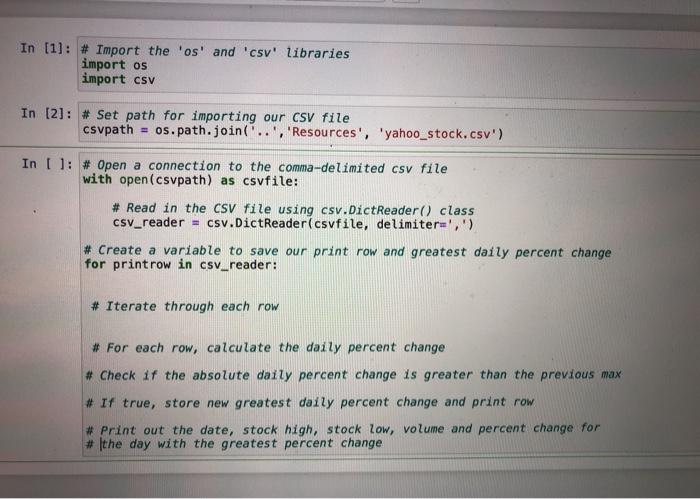
In [1]: # Import the 'os' and 'csv' libraries import os import csv In [2]: # Set path for importing our csv file csvpath = os. path.join('..', 'Resources', 'yahoo_stock.csv') In (): # Open a connection to the comma-delimited csv file with open(csvpath) as csvfile: # Read in the csv file using csv.DictReader() class csv_reader = csv.DictReader(csvfile, delimiter=',') # Create a variable to save our print row and greatest daily percent change for print row in csv_reader: # Iterate through each row # For each row, calculate the daily percent change # Check if the absolute daily percent change is greater than the previous max # If true, store new greatest daily percent change and print row # Print out the date, stock high, stock low, volume and percent change for # the day with the greatest percent change In [1]: # Import the 'os' and 'csv' libraries import os import csv In [2]: # Set path for importing our csv file csvpath = os. path.join('..', 'Resources', 'yahoo_stock.csv') In (): # Open a connection to the comma-delimited csv file with open(csvpath) as csvfile: # Read in the csv file using csv.DictReader() class csv_reader = csv.DictReader(csvfile, delimiter=',') # Create a variable to save our print row and greatest daily percent change for print row in csv_reader: # Iterate through each row # For each row, calculate the daily percent change # Check if the absolute daily percent change is greater than the previous max # If true, store new greatest daily percent change and print row # Print out the date, stock high, stock low, volume and percent change for # the day with the greatest percent change
Step by Step Solution
There are 3 Steps involved in it

Get step-by-step solutions from verified subject matter experts
 Study Help