







Question: html code & css Few Tips: 3. The element has top margin of 0em, left and right margins of 4em, and a bottom margin of
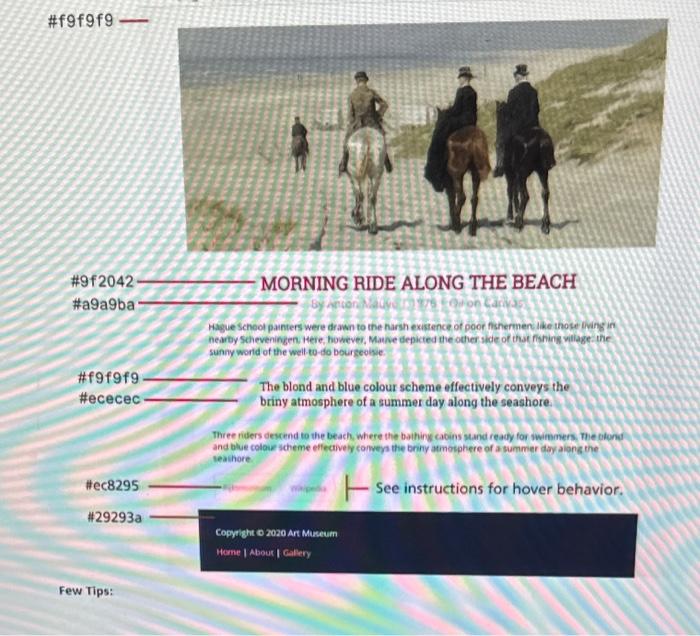
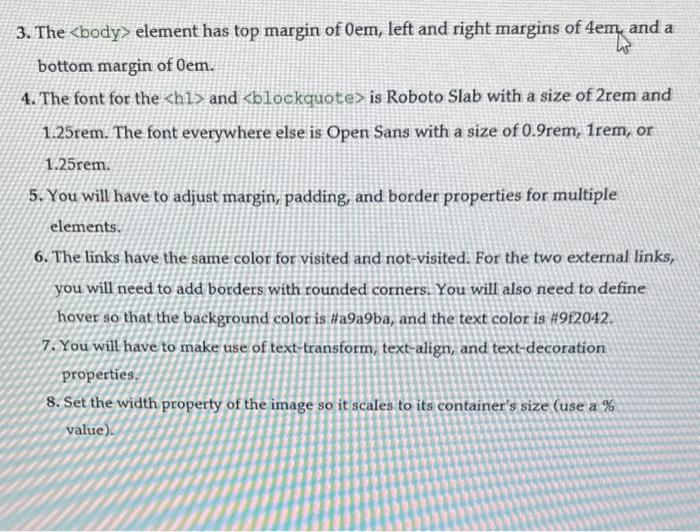
Few Tips: 3. The element has top margin of 0em, left and right margins of 4em, and a bottom margin of 0em. 4. The font for the h1 and blockquote is Roboto Slab with a size of 2rem and 1.25rem. The font everywhere else is Open Sans with a size of 0.9rem,1rem, or 1.25rem. 5. You will have to adjust margin, padding, and border properties for multiple elements. 6. The links have the same color for visited and not-visited. For the two external links, you will need to add borders with rounded corners. You will also need to define hover so that the background color is \#a9a9ba, and the text color is \#9f2042. 7. You will have to make use of text-transform, text-align, and text-decoration properties. 8. Set the width property of the image so it scales to its container's size (use a \% value)
Step by Step Solution
There are 3 Steps involved in it

Get step-by-step solutions from verified subject matter experts
 Study Help