







Question: HW 2 . Build an Interface using Android Studio In this assignment, you will use Android Studio to build an App's interface ( without functions
HW Build an Interface using Android Studio
In this assignment, you will use Android Studio to build an App's interface without functions The objective is to get
familiar with views, layouts, and attribute settings.
The App contains a calculator and a calendar. Since it is not a functioning App, the default text on the upper region of
the whole screen will be HW by FirstName LastName". Here you should use your name in this string.
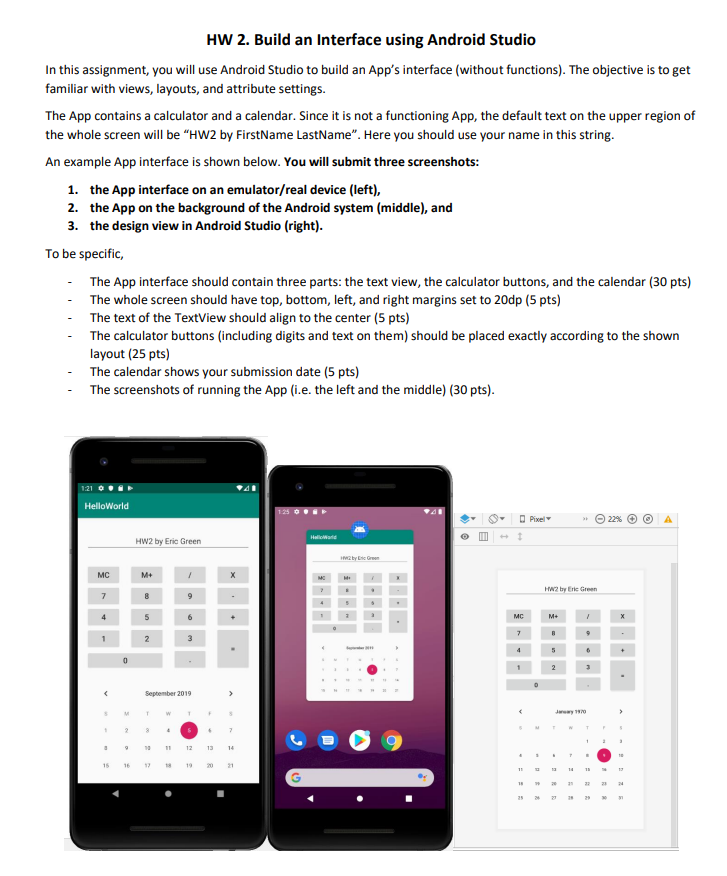
An example App interface is shown below. You will submit three screenshots:
the App interface on an emulatorreal device left
the App on the background of the Android system middle and
the design view in Android Studio right
To be specific,
The App interface should contain three parts: the text view, the calculator buttons, and the calendar pts
The whole screen should have top, bottom, left, and right margins set to dp pts
The text of the TextView should align to the center pts
The calculator buttons including digits and text on them should be placed exactly according to the shown
layout pts
The calendar shows your submission date pts
The screenshots of running the App ie the left and the middle pts
Step by Step Solution
There are 3 Steps involved in it
1 Expert Approved Answer
Step: 1 Unlock

Question Has Been Solved by an Expert!
Get step-by-step solutions from verified subject matter experts
Step: 2 Unlock
Step: 3 Unlock
 Study Help