







Question: i Excel File Edit View Insert Format Tools Data Window Help 9 *) 15% D Fri 4:56:56 PM QE gtq1eUIntro Budget.xlsx Search in Sheet Charts
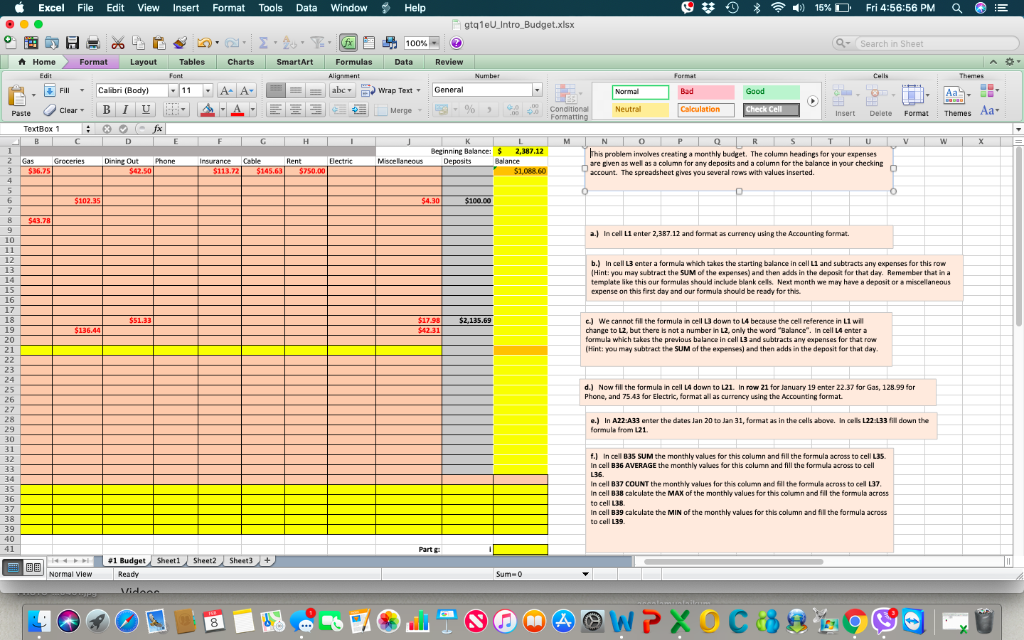
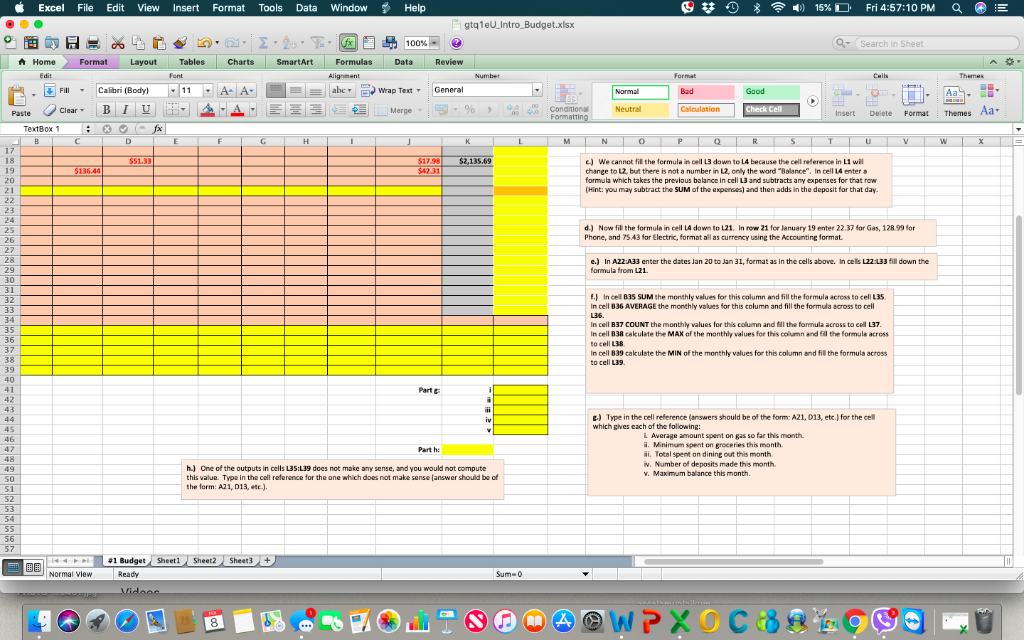
i Excel File Edit View Insert Format Tools Data Window Help 9 *) 15% D Fri 4:56:56 PM QE gtq1eUIntro Budget.xlsx Search in Sheet Charts SmartArt Formulas A Home Format Layout Tables Formulas Data Review Fill Calibri (Body) 11- abe Wrap Text General Bad Aas- Paste Clear , B 1 i ' A,A, ,%. , at Merge , conditional Neutral Calculation Insert Delete Format Themes Aa- TextB ox 1 2,387.12 his problem involves creating a monthly budget. The column headings for your expenses are civen as wel as a column for any deposits and a column for the balance in your checking account. The spreadsheet gives you several rows with values inserted. Cut Phone Insurance Cabe Dectric Mscelareous Balance $36.75 50 $113.72 145,63 $1,088.60 a.) In cel LI enter 2,387.12 and format as currency using the Accounting format 10 12 13 14 15 16 17 18 19 20 b.) In cell L3 enter a formula which takes the starting balance in cell L1 and subtracts any expenses for this row Hint: you may subtract the SUM of the expenses) and then adds in the depasit for that day. Remember that in a template like this our farmules should include blank cels Next month we may have a depasit or a miscelaneous expense on this first day and our formula should be ready for this c) We cannot fil the formula in cell L3 down to L4 because the cell reference in L1 wil change to L2, but there is not a number in L2, only the word "Balance". In cell L4 enter a formula which takes the previous balance in cell L3 and subtracts any expenses for that row (Hint: you may subtract the SUM of the "penses) and then adds in the deposit for that day. $42.31 23 25 26 27 d.) Now fill the formula in cell L4 down to L21. In row 21 for January 19 enter 22.37 for Gas, 128.99 for Phone, and 75.43 for Electric, format all as currency using the Accounting format e.) In AZ2A33 enter the dates Jan 20 to Jan 31, format as in the cells above. In cels L22 133 fill down the formule from L21 29 30 31 32 f) In cell 835 SUM the monthly values for this column and fill the formula across to cell L35 In cell B36 AVERAGE the monthly values for this column and fill the formula across to cell 34 35 36 37 38 39 40 41 In cell 837 COUNT the monthy values for this column cel L37 in cell 838 cakulate the MAX of the monthly values for this column and fill the formula across to cell L38 In cell B39 caculate the MIN of the monthly values for this column and fil the formula across and Sll the formula across to Part t Normal view Sum- 0 8 Excel File Edit View Insert Format Tools Data Window Help 9 *-)) 15%D Fri 4:57:10 PM gtq1eUIntro Budget.xlsx 100 Search in Sheet HomeA-Format Layout : Tables | Charts-L smartArt : Formulas Data Review Fill, 1.111 i ' A,A, Calibri (Body) MIA-a-- abc.ierwrap Text-General Wrap Text General Good Aas- Paste Clear , B 1 ,%. , at Neutral Calculation Insert Delete Format Themes Aa- Merge , conditional TextBox 1 $51.33 e) We cannet fil the formula in cell 13 down to L4 because the cell reference in L1 will change to L2, but there is not a number in L2, only the word "Balance". in cell L4 enter a formula which takes the previous balance in cell 13 and subtracts any expenses for that row (Hint: you may subtract the SUM of the expenses) and then adds in the deposit for that day 136.44 31 20 23 24 25 26 27 28 29 30 31 32 d.) Now fill the formule in cell L4 down to L21. In row 21 for lanuary 19 enter 22.37 for Gas, 12899 for Phone, and 75.43 for Electric, format all as currency using the Accounting format. e.) In AZ2 A33 enter the dates Jan 20 to Jan 31, format as in the cells above. In cels L22:133 fill down the formula from L21 f.) In cell B3S SUM the monthly values for this column and fill the formula across to cell L35 in cell 836 AVERAGE the monthly values for this column and fill the formula across to cell 34 35 36 37 38 39 In cell B37 COUNT the monthy values for this column and fil the formula across to cell L37 In cell B38 cakulete the MAX of the monthly values for this column and Fil the formule across to cell 138 in cell 839 cakulate the MIN of the monthly values for this column and fill the formula across to cell L39 Parte ) Type in the cell reference (answers should be of the form: A21, 013, etc.) for the cel which gves each of the following: 45 L Average amount spent on gas so far this month i. Minimum spent on groceries this month ai. Total spent on dining out this month v. Number of deposits made this month v. Maxmum balance this month 47 48 49 50 51 52 53 h) One of the outputs in cells L35:L39 does not make any sense, and you would not compute this value. Type in the cell reference for the one which does not make sense (answer should be of the form: A21, D13, tc) 56 57 441 BudgetSheetl Sheet2 Sheet3 Normal view Ready Sum- 0 8 i Excel File Edit View Insert Format Tools Data Window Help 9 *) 15% D Fri 4:56:56 PM QE gtq1eUIntro Budget.xlsx Search in Sheet Charts SmartArt Formulas A Home Format Layout Tables Formulas Data Review Fill Calibri (Body) 11- abe Wrap Text General Bad Aas- Paste Clear , B 1 i ' A,A, ,%. , at Merge , conditional Neutral Calculation Insert Delete Format Themes Aa- TextB ox 1 2,387.12 his problem involves creating a monthly budget. The column headings for your expenses are civen as wel as a column for any deposits and a column for the balance in your checking account. The spreadsheet gives you several rows with values inserted. Cut Phone Insurance Cabe Dectric Mscelareous Balance $36.75 50 $113.72 145,63 $1,088.60 a.) In cel LI enter 2,387.12 and format as currency using the Accounting format 10 12 13 14 15 16 17 18 19 20 b.) In cell L3 enter a formula which takes the starting balance in cell L1 and subtracts any expenses for this row Hint: you may subtract the SUM of the expenses) and then adds in the depasit for that day. Remember that in a template like this our farmules should include blank cels Next month we may have a depasit or a miscelaneous expense on this first day and our formula should be ready for this c) We cannot fil the formula in cell L3 down to L4 because the cell reference in L1 wil change to L2, but there is not a number in L2, only the word "Balance". In cell L4 enter a formula which takes the previous balance in cell L3 and subtracts any expenses for that row (Hint: you may subtract the SUM of the "penses) and then adds in the deposit for that day. $42.31 23 25 26 27 d.) Now fill the formula in cell L4 down to L21. In row 21 for January 19 enter 22.37 for Gas, 128.99 for Phone, and 75.43 for Electric, format all as currency using the Accounting format e.) In AZ2A33 enter the dates Jan 20 to Jan 31, format as in the cells above. In cels L22 133 fill down the formule from L21 29 30 31 32 f) In cell 835 SUM the monthly values for this column and fill the formula across to cell L35 In cell B36 AVERAGE the monthly values for this column and fill the formula across to cell 34 35 36 37 38 39 40 41 In cell 837 COUNT the monthy values for this column cel L37 in cell 838 cakulate the MAX of the monthly values for this column and fill the formula across to cell L38 In cell B39 caculate the MIN of the monthly values for this column and fil the formula across and Sll the formula across to Part t Normal view Sum- 0 8 Excel File Edit View Insert Format Tools Data Window Help 9 *-)) 15%D Fri 4:57:10 PM gtq1eUIntro Budget.xlsx 100 Search in Sheet HomeA-Format Layout : Tables | Charts-L smartArt : Formulas Data Review Fill, 1.111 i ' A,A, Calibri (Body) MIA-a-- abc.ierwrap Text-General Wrap Text General Good Aas- Paste Clear , B 1 ,%. , at Neutral Calculation Insert Delete Format Themes Aa- Merge , conditional TextBox 1 $51.33 e) We cannet fil the formula in cell 13 down to L4 because the cell reference in L1 will change to L2, but there is not a number in L2, only the word "Balance". in cell L4 enter a formula which takes the previous balance in cell 13 and subtracts any expenses for that row (Hint: you may subtract the SUM of the expenses) and then adds in the deposit for that day 136.44 31 20 23 24 25 26 27 28 29 30 31 32 d.) Now fill the formule in cell L4 down to L21. In row 21 for lanuary 19 enter 22.37 for Gas, 12899 for Phone, and 75.43 for Electric, format all as currency using the Accounting format. e.) In AZ2 A33 enter the dates Jan 20 to Jan 31, format as in the cells above. In cels L22:133 fill down the formula from L21 f.) In cell B3S SUM the monthly values for this column and fill the formula across to cell L35 in cell 836 AVERAGE the monthly values for this column and fill the formula across to cell 34 35 36 37 38 39 In cell B37 COUNT the monthy values for this column and fil the formula across to cell L37 In cell B38 cakulete the MAX of the monthly values for this column and Fil the formule across to cell 138 in cell 839 cakulate the MIN of the monthly values for this column and fill the formula across to cell L39 Parte ) Type in the cell reference (answers should be of the form: A21, 013, etc.) for the cel which gves each of the following: 45 L Average amount spent on gas so far this month i. Minimum spent on groceries this month ai. Total spent on dining out this month v. Number of deposits made this month v. Maxmum balance this month 47 48 49 50 51 52 53 h) One of the outputs in cells L35:L39 does not make any sense, and you would not compute this value. Type in the cell reference for the one which does not make sense (answer should be of the form: A21, D13, tc) 56 57 441 BudgetSheetl Sheet2 Sheet3 Normal view Ready Sum- 0 8
Step by Step Solution
There are 3 Steps involved in it

Get step-by-step solutions from verified subject matter experts
 Study Help