







Question: I NEED C# CODES OF THE FOLLOWING PROBLEM (Windows forms Application) on the bottom you will see what I did until now. what I need
I NEED C# CODES OF THE FOLLOWING PROBLEM (Windows forms Application)
on the bottom you will see what I did until now. what I need you to help me with is, how can I write the code to assign the number of time the playButton is clicked to the input numberofGame.
here the player must select a player's name in the combobox first, and then enter the number of games he wants to play in a textboxes, let's say the number of games he enter is three, he should be allow only to click the playButton three times and then the game stops.
I JUST NEED YOU TO HELP ME WITH THIS ONE CONCERN, NOT THE ALL PROBLEM
using System; using System.Collections.Generic; using System.ComponentModel; using System.Data; using System.Drawing; using System.Linq; using System.Text; using System.Threading.Tasks; using System.Windows.Forms; using System.IO;
namespace LwambaLPg3SlotMachineGame { public partial class GameForm : Form { public GameForm() { InitializeComponent(); }
private Boolean allBoolean; // USED WITH SEARCH FOR ADDING NAMES - NO DUPLICATES
private int counterInteger; //USED FOR LOOPS - CONTROL VARIABLE
private int numberGamesInteger = 0; //VAR. FOR NUMBER OF GAMES (INPUT)
private int randVal1Integer; //VARIABLES RANDOM VALUE TO MATCH WITH FRUIT PICTURE private int randVal2Integer; private int randVal3Integer;
private int pointInteger;
private int accumulatePointInteger = 0;
private void GameForm_Load(object sender, EventArgs e) {
}
private void ValidateInput() { allBoolean = false;
if (playersComboBox.SelectedIndex > -1) //VALIDATION THAT PLAYER'S NAME IS SELECTED { try { /umberGamesInteger = int.Parse(numberGamesTextbox.Text); if (numberGamesInteger
} else { MessageBox.Show("Enter the Number of game!"); }
} catch { MessageBox.Show("Enter an integer for the Number of game!"); }
} else { //ERROR MESSAGE WHEN PLAYER'S NAME IS NOT SELECTED MessageBox.Show("Select a Player's Name!"); }
}
private void playButton_Click(object sender, EventArgs e) {
ValidateInput();
if (allBoolean) {
ProcessPlay();
AccumulatePoint();
OutputPoints();
//
}
//OutputLabel.Text = randVal1Integer.ToString() + " " + randVal2Integer.ToString() + " " + randVal3Integer.ToString(); // // OutputLabel.Text += Environment.NewLine + Environment.NewLine + accumulatePointInteger.ToString();
}
private void ProcessPlay() {
Random randNumber = new Random();
randVal1Integer = randNumber.Next(3); randVal2Integer = randNumber.Next(3); randVal3Integer = randNumber.Next(3);
// label1.Text = randVal1Integer.ToString() + " " + randVal2Integer.ToString() + " " + randVal3Integer.ToString();
if (randVal1Integer == 0 && randVal2Integer == 0 && randVal3Integer == 0) { randomValue1PictureBox.Visible = true; randomValue2PictureBox.Visible = true; randomValue3PictureBox.Visible = true;
pointInteger = 100;
}
else if (randVal1Integer == 1 && randVal2Integer == 1 && randVal3Integer == 1) { randomValue1PictureBox.Visible = true; randomValue2PictureBox.Visible = true; randomValue3PictureBox.Visible = true;
pointInteger = 100;
}
else if (randVal1Integer == 2 && randVal2Integer == 2 && randVal3Integer == 2) { randomValue1PictureBox.Visible = true; randomValue2PictureBox.Visible = true; randomValue3PictureBox.Visible = true;
pointInteger = 100;
}
else if (randVal1Integer == 0 && randVal2Integer == 0 && randVal3Integer == 1) { randomValue1PictureBox.Visible = true; randomValue2PictureBox.Visible = true; randomValue3PictureBox.Visible = false;
pointInteger = 50;
}
else if (randVal1Integer == 0 && randVal2Integer == 0 && randVal3Integer == 2) { randomValue1PictureBox.Visible = true; randomValue2PictureBox.Visible = true; randomValue3PictureBox.Visible = false;
pointInteger = 50; }
else if (randVal1Integer == 0 && randVal2Integer == 1 && randVal3Integer == 0) { randomValue1PictureBox.Visible = true; randomValue2PictureBox.Visible = false; randomValue3PictureBox.Visible = true;
pointInteger = 50; }
else if (randVal1Integer == 0 && randVal2Integer == 2 && randVal3Integer == 0) { randomValue1PictureBox.Visible = true; randomValue2PictureBox.Visible = false; randomValue3PictureBox.Visible = true;
pointInteger = 50; }
else if (randVal1Integer == 1 && randVal2Integer == 0 && randVal3Integer == 0) { randomValue1PictureBox.Visible = false; randomValue2PictureBox.Visible = true; randomValue3PictureBox.Visible = true;
pointInteger = 50; }
else if (randVal1Integer == 2 && randVal2Integer == 0 && randVal3Integer == 0) { randomValue1PictureBox.Visible = false; randomValue2PictureBox.Visible = true; randomValue3PictureBox.Visible = true;
pointInteger = 50; }
else if (randVal1Integer == 1 && randVal2Integer == 1 && randVal3Integer == 0) { randomValue1PictureBox.Visible = true; randomValue2PictureBox.Visible = true; randomValue3PictureBox.Visible = false;
pointInteger = 50; }
else if (randVal1Integer == 1 && randVal2Integer == 1 && randVal3Integer == 2) { randomValue1PictureBox.Visible = true; randomValue2PictureBox.Visible = true; randomValue3PictureBox.Visible = false;
pointInteger = 50; }
else if (randVal1Integer == 1 && randVal2Integer == 0 && randVal3Integer == 1) { randomValue1PictureBox.Visible = true; randomValue2PictureBox.Visible = false; randomValue3PictureBox.Visible = true;
pointInteger = 50; }
else if (randVal1Integer == 1 && randVal2Integer == 2 && randVal3Integer == 1) { randomValue1PictureBox.Visible = true; randomValue2PictureBox.Visible = false; randomValue3PictureBox.Visible = true;
pointInteger = 50; }
else if (randVal1Integer == 0 && randVal2Integer == 1 && randVal3Integer == 1) { randomValue1PictureBox.Visible = false; randomValue2PictureBox.Visible = true; randomValue3PictureBox.Visible = true;
pointInteger = 50; }
else if (randVal1Integer == 2 && randVal2Integer == 1 && randVal3Integer == 1) { randomValue1PictureBox.Visible = false; randomValue2PictureBox.Visible = true; randomValue3PictureBox.Visible = true;
pointInteger = 50; }
else if (randVal1Integer == 2 && randVal2Integer == 2 && randVal3Integer == 1) { randomValue1PictureBox.Visible = true; randomValue2PictureBox.Visible = true; randomValue3PictureBox.Visible = false;
pointInteger = 50; }
else if (randVal1Integer == 2 && randVal2Integer == 2 && randVal3Integer == 0) { randomValue1PictureBox.Visible = true; randomValue2PictureBox.Visible = true; randomValue3PictureBox.Visible = false;
pointInteger = 50; }
else if (randVal1Integer == 2 && randVal2Integer == 1 && randVal3Integer == 2) { randomValue1PictureBox.Visible = true; randomValue2PictureBox.Visible = false; randomValue3PictureBox.Visible = true;
pointInteger = 50; }
else if (randVal1Integer == 2 && randVal2Integer == 0 && randVal3Integer == 2) { randomValue1PictureBox.Visible = true; randomValue2PictureBox.Visible = false; randomValue3PictureBox.Visible = true;
pointInteger = 50; }
else if (randVal1Integer == 1 && randVal2Integer == 2 && randVal3Integer == 2) { randomValue1PictureBox.Visible = false; randomValue2PictureBox.Visible = true; randomValue3PictureBox.Visible = true;
pointInteger = 50; }
else if (randVal1Integer == 0 && randVal2Integer == 2 && randVal3Integer == 2) { randomValue1PictureBox.Visible = false; randomValue2PictureBox.Visible = true; randomValue3PictureBox.Visible = true;
pointInteger = 50; } else { randomValue1PictureBox.Visible = false; randomValue2PictureBox.Visible = false; randomValue3PictureBox.Visible = false;
pointInteger = 0; }
}
private void AccumulatePoint() { accumulatePointInteger += pointInteger;
}
private void OutputPoints() {
OutputLabel.Text = "You have Scored :" + accumulatePointInteger; }
private void addPlayerButton_Click(object sender, EventArgs e) //ADD NAME OF PLAYER IN THE COMBOBOX { SearchForPlayersName();
if (playersComboBox.Text.Trim() != string.Empty) { if (!allBoolean) { playersComboBox.Items.Add(playersComboBox.Text.Trim()); playersComboBox.ResetText(); } else { MessageBox.Show("Name Exists...try a new name", "DUPLICATE PLAYER'S NAME"); playersComboBox.Focus(); playersComboBox.SelectAll(); } } else { MessageBox.Show("Put a Name in first", "PLAYER'S NAME INPUT ERROR"); } }
private void SearchForPlayersName() //THIS WILL SEARCH FOR DUPLICATE NAME { allBoolean = false; counterInteger = 0;
while(counterInteger
private void removePlayerButton_Click(object sender, EventArgs e) //THIS REMOVES SELECTED PLAYER'S NAME { if (playersComboBox.SelectedIndex > -1) // ENSURE INDEX IS AT LEAST ZERO { playersComboBox.Items.RemoveAt(playersComboBox.SelectedIndex); } else { //ERROR MESSAGE, WHEN THE USER WANT TO REMOVE A NAME AND NOTHING IS SELECTED MessageBox.Show("Select a Player's Name First!", "PLAYER'S NAME INPUT ERROR"); }
}
} }
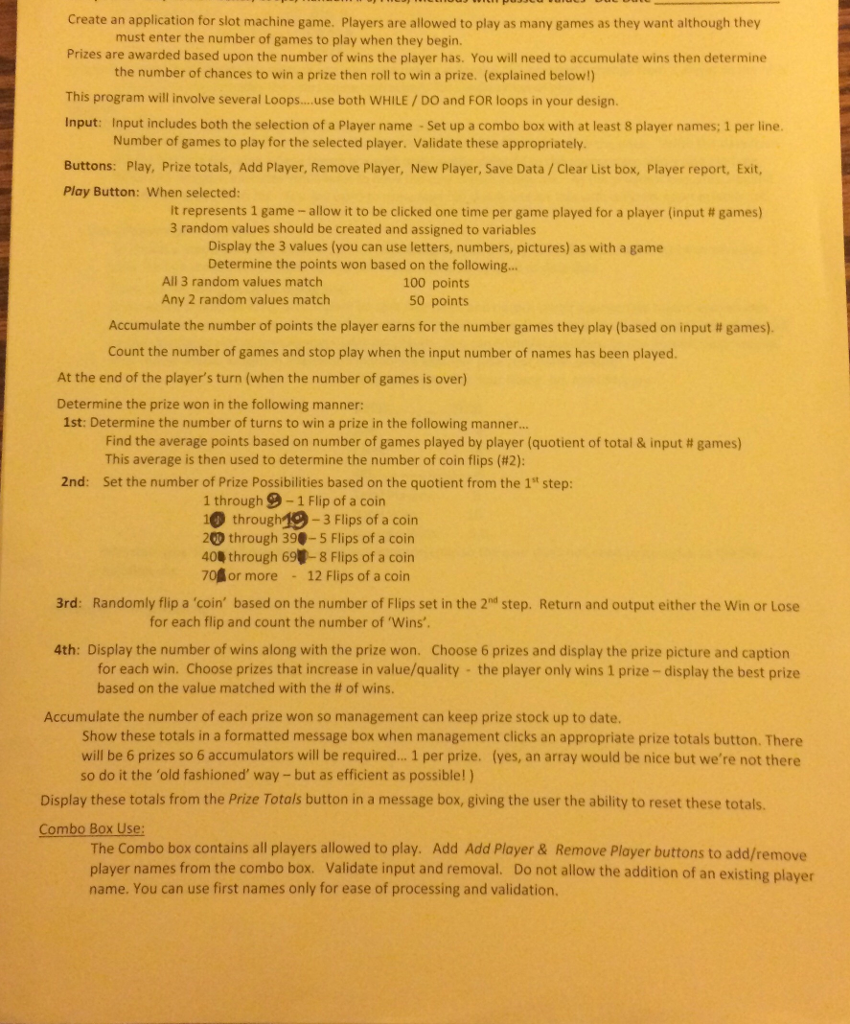
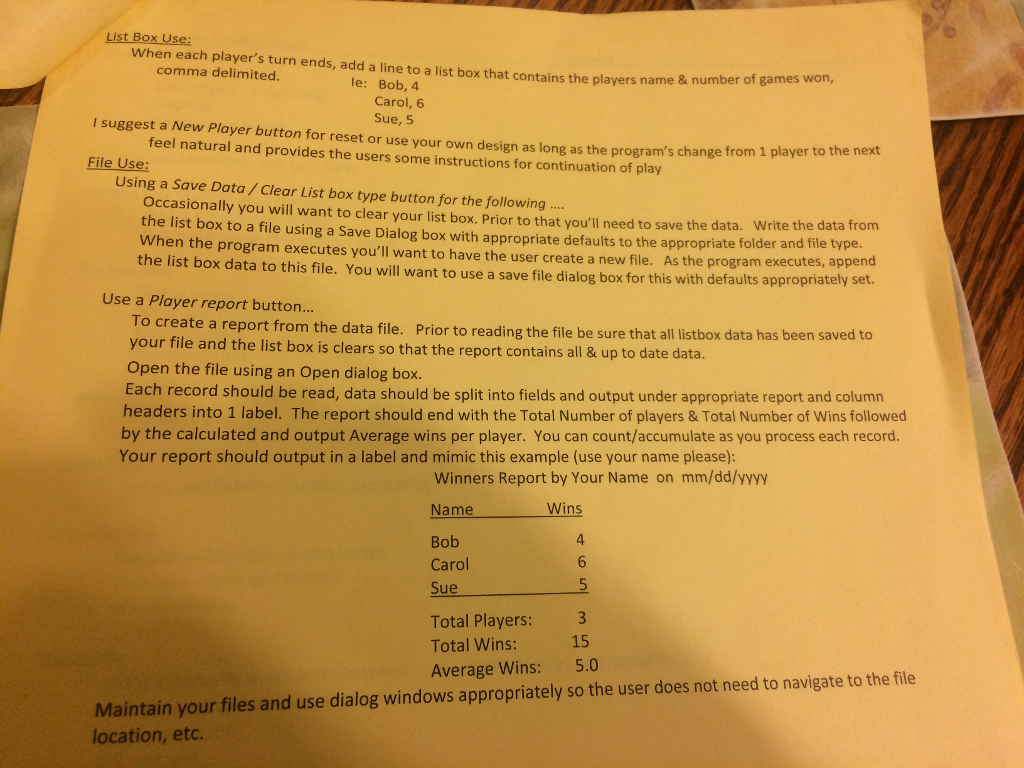
create an application for slot machine game. Players are allowed to play as many games as they want although they must enter the number of games to play when they begin. Prizes are awarded based upon the number of wins the player has. You will need to accumulate wins then determine the number of chances to win a prize then roll to win a prize. (explained belowl) This program will involve several Loops... use both WHILE DO and FOR loops in your design Input: Input includes both the selection of a Player name up a combo box with at least 8 player names; 1 per line Number of games to play for the selected player. Validate these appropriately. Buttons: Play, Prize totals, Add Player, Remove Player, New Player, Save Data Clear List box, Player report, E Play Button: When selected: it represents 1 game allow it to be clicked one time per game played for a player (input games) 3 random values should be created and assigned to variables Display the 3 values (you can use letters, numbers, pictures) as with a game Determine the points won based on the following... All 3 random values match 100 points Any 2 random values match 50 points Accumulate the number of points the player earns for the number games they play (based on input games). Count the number of games and stop play when the input number of names has been played At the end of the player's turn (when the number of games is over) Determine the prize won in the following manner 1st: Determine the number of turns to win a prize in the following manner Find the average points based on number of games played by player (quotient of total & input games) This average is then used to determine the number of coin flips (#2): 2nd: Set the number of Prize Possibilities based on the quotient from the 1st step 1 through 9-1 Flip of a coin 10 through 3 Flips of a coin 20 through 39. 5 Flips of a coin 404 through 69 8 Flips of a coin 70 or more 12 Flips of a co 3rd: Randomly flip a 'coin' based on the number of Flips set in the 2nd step. Return and output either the Win or Lose for each flip and count the number of 'Wins' 4th: Display the number of wins along with the prize won. Choose 6 prizes and display the prize picture and caption r each win. Choose prizes that increase in value/quality the player only wins 1 prize display the best prize based on the value matched with the of wins Accumulate the number of each prize won so management can keep prize stock up to date. show these totals in a formatted message box when management clicks an appropriate prize totals button. There will be 6 prizes so 6 accumulators will be required... 1 per prize yes, an array would be nice but we're not there so do it the 'old fashioned' way but as efficient as possible!) Display these totals from the Prize Totals button in a message box, giving the user the ability to reset these totals Combo Box Use The combo box contains all players allowed to play. Add Add Player & Remove Player buttons to add/remove player names from the combo box. Validate input and removal. Do not allow the addition of an existin player name. You can use first names only for ease of processing and validation
Step by Step Solution
There are 3 Steps involved in it

Get step-by-step solutions from verified subject matter experts
 Study Help