







Question: I need help 1 a,b step by steps. Thanks Create a Workshop Flyer 1. Create the flyer shown in Figure WB-U2.1 with the following specifications:
I need help 1 a,b step by steps. Thanks 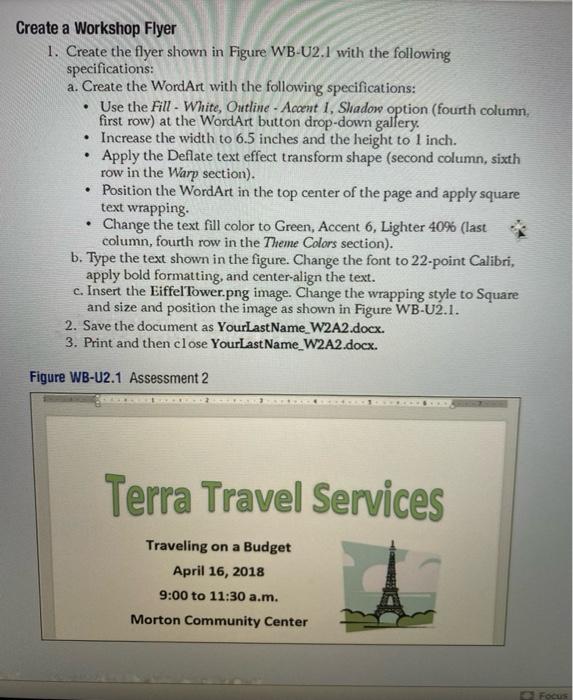
Create a Workshop Flyer 1. Create the flyer shown in Figure WB-U2.1 with the following specifications: a. Create the WordArt with the following specifications: Use the Fill - White, Outline - Accent I, Sladow option (fourth column, first row) at the WordArt button drop-down gallery. Increase the width to 6.5 inches and the height to 1 inch. Apply the Deflate text effect transform shape (second column, sixth row in the Warp section). Position the WordArt in the top center of the page and apply square text wrapping Change the text fill color to Green, Accent 6, Lighter 40% (last column, fourth row in the Theme Colors section). b. Type the text shown in the figure. Change the font to 22-point Calibri, apply bold formatting, and center align the text. c. Insert the Eiffel Tower.png image. Change the wrapping style to Square and size and position the image as shown in Figure WB-U2.1. 2. Save the document as YourLastName_W2A2.docx. 3. Print and then close Your Last Name_W2A2.docx. . Figure WB-U2.1 Assessment 2 Terra Travel Services Traveling on a Budget April 16, 2018 9:00 to 11:30 a.m. Morton Community Center Focus
Step by Step Solution
There are 3 Steps involved in it
1 Expert Approved Answer
Step: 1 Unlock

Question Has Been Solved by an Expert!
Get step-by-step solutions from verified subject matter experts
Step: 2 Unlock
Step: 3 Unlock
 Study Help