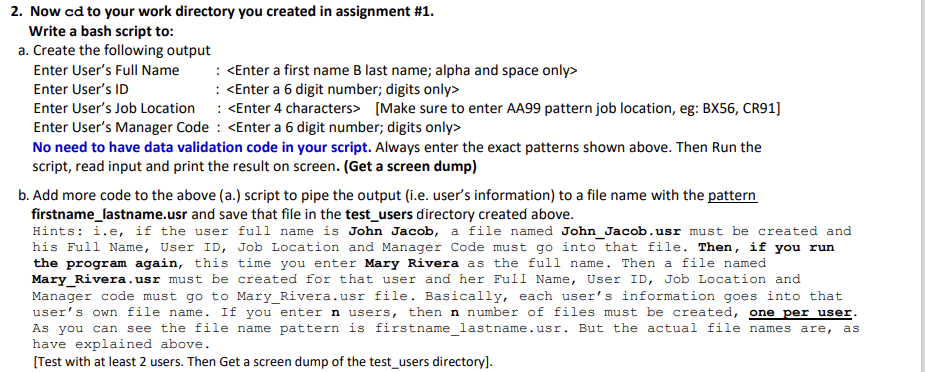
Question: I need help with 2.b, in bash script to pipe the output (i.e. users information) to a file name with the pattern firstname_lastname.usr and save
I need help with 2.b, in bash
script to pipe the output (i.e. users information) to a file name with the pattern firstname_lastname.usr and save that file in the test_users directory created above.
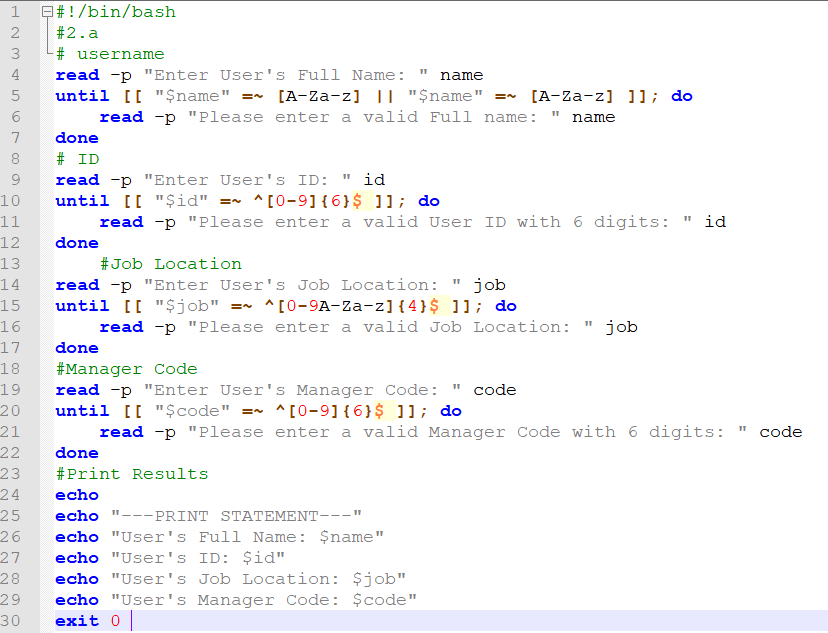
2. Now cd to your work directory you created in assignment #1. Write a bash script to: a. Create the following output Enter User's Full Name : Enter User's ID : Enter User's Job Location : [Make sure to enter AA 99 pattern job location, eg: BX56, CR91] Enter User's Manager Code : No need to have data validation code in your script. Always enter the exact patterns shown above. Then Run the script, read input and print the result on screen. (Get a screen dump) b. Add more code to the above (a.) script to pipe the output (i.e. user's information) to a file name with the pattern firstname_lastname.usr and save that file in the test_users directory created above. Hints: i.e, if the user full name is John Jacob, a file named John_Jacob.usr must be created and his Full Name, User ID, Job Location and Manager Code must go into that file. Then, if you run the program again, this time you enter Mary Rivera as the full name. Then a file named Mary_Rivera.usr must be created for that user and her Full Name, User ID, Job Location and Manager code must go to Mary_Rivera.usr file. Basically, each user's information goes into that user's own file name. If you enter n users, then n number of files must be created, one per user. As you can see the file name pattern is firstname_lastname.usr. But the actual file names are, have explained above. [Test with at least 2 users. Then Get a screen dump of the test_users directory]. as 11 " id 1 2 3 4 5 6 7 8 9 10 11 12 13 14 15 16 17 18 19 20 21 22 23 24 25 26 27 28 29 30 9#!/bin/bash #2.a - # username read -p "Enter User's Full Name: " name until [[ "$name" = [A-Za-z] || "$name" = [A-Za-z] ]]; do read -p "Please enter a valid Full name: name done # ID read -p "Enter User's ID: " id until [[ "$id" *[0-9]{6}$ ]]; do read -p "Please enter a valid User ID with 6 digits: done #Job Location read -p "Enter User's Job Location: " job until [[ "$job" *[0-9A-Za-z] {4} $ ]]; do read -p "Please enter a valid Job Location: done #Manager Code read -p "Enter User's Manager Code: " code until [[ "$code" = ^[0-9]{6}$ ]]; do read -p "Please enter a valid Manager Code with 6 digits: done #Print Results echo echo "---PRINT STATEMENT---" echo "User's Full Name: $name" echo "User's ID: $id" echo "User's Job Location: $job" echo "User's Manager Code: $code" exit 0 job code w N N N N









 Study Help