







Question: I needed help with lab, please CSCI 120 Computer Science I Fall 2018 CSCI 120 Computer Science Fall 2018 and add lines for all of
I needed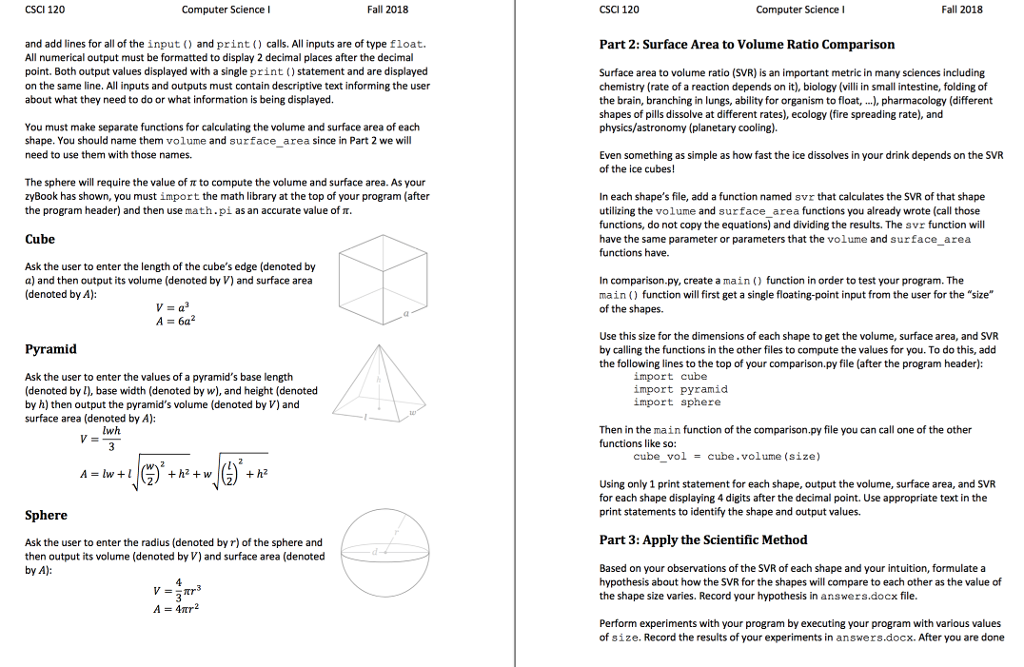 help with lab, please
CSCI 120 Computer Science I Fall 2018 CSCI 120 Computer Science Fall 2018 and add lines for all of the input and print) calls. All inputs are of type float. All numerical output must be formatted to display 2 decimal places after the decimal point. Both output values displayed with a single print)statement and are displayed on the same line. All inputs and outputs must contain descriptive text informing the user about what they need to do or what information is being displayed Part 2: Surface Area to Volume Ratio Comparison Surface area to volume ratio (SVR) is an important metric in many sciences including chemistry (rate of a reaction depends on it), biology (villi in small intestine, folding of the brain, branching in lungs, ability for organism to float,.), pharmacology (different shapes of pills dissolve at different rates), ecology (fire spreading rate), and physics/astronomy (planetary cooling). You must make separate functions for calculating the volume and surface area of each shape. You should name them volume and surface_ area since in Part 2 we will need to use them with those names Even something as simple as how fast the ice dissolves in your drink depends on the SVR of the ice cubes! The sphere will require the value of to compute the volume and surface area. As your zyBook has shown, you must import the math library at the top of your program (after the program header) and then use math.pi as an accurate value of In each shape's file, add a function named svr that calculates the SVR of that shape utilizing the volume and surface_area functions you already wrote (call those functions, do not copy the equations) and dividing the results. The svr function will have the same parameter or parameters that the volume and surface area functions have. Cube Ask the user to enter the length of the cube's edge (denoted by a) and then output its volume (denoted by V) and surface area (denoted by A): In comparison.py, create a main () function in order to test your program. The main) function will first get a single floating-point input from the user for the "size of the shapes. Use this size for the dimensions of each shape to get the volume, surface area, and SVR by calling the functions in the other files to compute the values for you. To do this, add the following lines to the top of your comparison.py file (after the program header): Pyramid Ask the user to enter the values of a pyramid's base length (denoted by I), base width (denoted by w), and height (denoted by h) then output the pyramid's volume (denoted by V) and surface area (denoted by A): import cube import pyramid import sphere Then in the main function of the comparison.py file you can call one of the other functions like so: wh cube vo1 = cube.volume (size) Using only 1 print statement for each shape, output the volume, surface area, and SVR for each shape displaying 4 digits after the decimal point. Use appropriate text in the print statements to identify the shape and output values. Part 3: Apply the Scientific Method Ask the user to enter the radius (denoted by r) of the sphere and then output its volume (denoted by V) and surface area (denoted by A): Based on your observations of the SVR of each shape and your intuition, formulate a hypothesis about how the SVR for the shapes will compare to each other as the value of the shape size varies. Record your hypothesis in answers.docx file Perform experiments with your program by executing your program with various values of size. Record the results of your experiments in answers.docx. After you are done CSCI 120 Computer Science I Fall 2018 CSCI 120 Computer Science Fall 2018 and add lines for all of the input and print) calls. All inputs are of type float. All numerical output must be formatted to display 2 decimal places after the decimal point. Both output values displayed with a single print)statement and are displayed on the same line. All inputs and outputs must contain descriptive text informing the user about what they need to do or what information is being displayed Part 2: Surface Area to Volume Ratio Comparison Surface area to volume ratio (SVR) is an important metric in many sciences including chemistry (rate of a reaction depends on it), biology (villi in small intestine, folding of the brain, branching in lungs, ability for organism to float,.), pharmacology (different shapes of pills dissolve at different rates), ecology (fire spreading rate), and physics/astronomy (planetary cooling). You must make separate functions for calculating the volume and surface area of each shape. You should name them volume and surface_ area since in Part 2 we will need to use them with those names Even something as simple as how fast the ice dissolves in your drink depends on the SVR of the ice cubes! The sphere will require the value of to compute the volume and surface area. As your zyBook has shown, you must import the math library at the top of your program (after the program header) and then use math.pi as an accurate value of In each shape's file, add a function named svr that calculates the SVR of that shape utilizing the volume and surface_area functions you already wrote (call those functions, do not copy the equations) and dividing the results. The svr function will have the same parameter or parameters that the volume and surface area functions have. Cube Ask the user to enter the length of the cube's edge (denoted by a) and then output its volume (denoted by V) and surface area (denoted by A): In comparison.py, create a main () function in order to test your program. The main) function will first get a single floating-point input from the user for the "size of the shapes. Use this size for the dimensions of each shape to get the volume, surface area, and SVR by calling the functions in the other files to compute the values for you. To do this, add the following lines to the top of your comparison.py file (after the program header): Pyramid Ask the user to enter the values of a pyramid's base length (denoted by I), base width (denoted by w), and height (denoted by h) then output the pyramid's volume (denoted by V) and surface area (denoted by A): import cube import pyramid import sphere Then in the main function of the comparison.py file you can call one of the other functions like so: wh cube vo1 = cube.volume (size) Using only 1 print statement for each shape, output the volume, surface area, and SVR for each shape displaying 4 digits after the decimal point. Use appropriate text in the print statements to identify the shape and output values. Part 3: Apply the Scientific Method Ask the user to enter the radius (denoted by r) of the sphere and then output its volume (denoted by V) and surface area (denoted by A): Based on your observations of the SVR of each shape and your intuition, formulate a hypothesis about how the SVR for the shapes will compare to each other as the value of the shape size varies. Record your hypothesis in answers.docx file Perform experiments with your program by executing your program with various values of size. Record the results of your experiments in answers.docx. After you are done
Step by Step Solution
There are 3 Steps involved in it

Get step-by-step solutions from verified subject matter experts
 Study Help