







Question: Implement Support function using only python without any librairies Transactions List [ ] #Qtitle Transactions List t1= ['Milk', 'Peanuts', 'Eggs', 'Bread', 'Cheese'] t2 =[ 'Milk',
Implement Support function using only python without any librairies
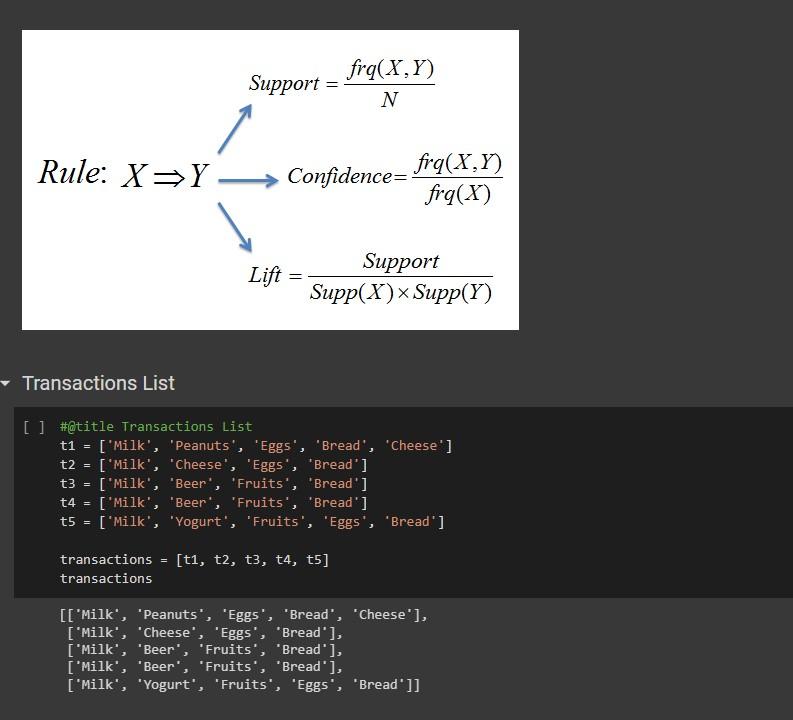
![[ ] \#Qtitle Transactions List t1= ['Milk', 'Peanuts', 'Eggs', 'Bread', 'Cheese'] t2](https://dsd5zvtm8ll6.cloudfront.net/si.experts.images/questions/2024/09/66f3aeecdd582_06066f3aeec7b013.jpg)
Transactions List [ ] \#Qtitle Transactions List t1= ['Milk', 'Peanuts', 'Eggs', 'Bread', 'Cheese'] t2 =[ 'Milk', 'Cheese', 'Eggs', 'Bread' ] t3 =[ 'Milk', 'Beer', 'Fruits', 'Bread' ] t4 = ['Milk', 'Beer', 'Fruits', 'Bread'] t5=[ 'Milk', 'Yogurt', 'Fruits', 'Eggs', 'Bread' ] transactions =[t1,t2,t3,t4,t5] transactions [['Milk', 'Peanuts', 'Eggs', 'Bread', 'Cheese'], ['Milk', 'Cheese', 'Eggs', 'Bread'], ['Milk', 'Beer', 'Fruits', 'Bread'], ['Milk', 'Beer', 'Fruits', 'Bread'], ['Milk', 'Yogurt', 'Fruits', 'Eggs', 'Bread']] \#Qtitle support In market basket analysis, support refers to the frequency with which a particular item or a set of items appear together in a given dataset of transactions. It is a measure of how often a particular itemset is purchased or how frequently an item is present in the transactions. The support of an itemset is calculated as the proportion of transactions in the dataset that contain that itemset. A high support value indicates that the itemset is frequently bought together, while a low support value indicates that the itemset is infrequently purchased. Support ranges from to 1 def support(item_set): pass \# Testing the support function item_set =[ ' Mi1k] print('Item Set: ", item_set,' Support: ', support(item_set)) item_set =[ 'Milk', 'Eggs' ] print('Item Set: ', item_set, Support: ', support(item_set)) item_set = ['Milk', "Eggs', 'Beer'] print('Item Set:', item_set, Support:', support(item_set)) [- Iem Set: ['Milk'] Support: None Iem Set: ['Milk', 'Eggs'] Support: None Iem Set: ['Milk', 'Eggs", "Beer'] Support: None
Step by Step Solution
There are 3 Steps involved in it

Get step-by-step solutions from verified subject matter experts
 Study Help