







Question: in Android Studio please its for to put in as textview and edittext when i try to type in the editview and the textview in
in Android Studio please 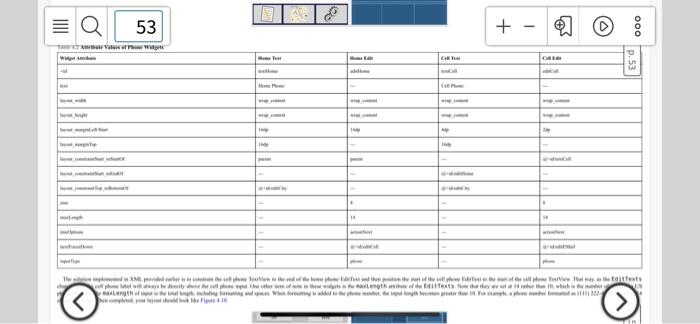
its for to put in as textview and edittext
when i try to type in the editview and the textview in the figure, I get an error on both editview 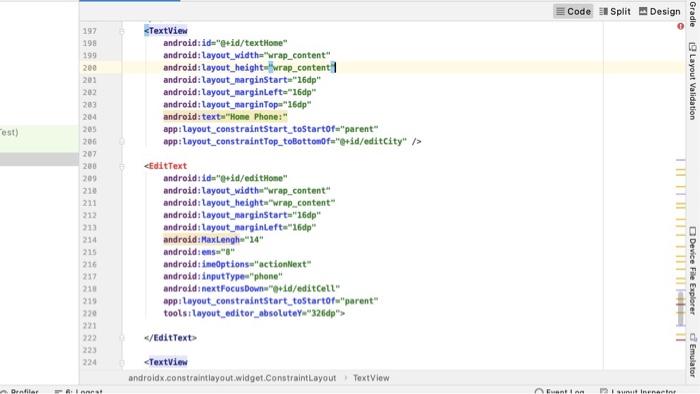 53 + - www C C p. 53 18 TM www www www.tontexts ellery www length Text Light a Mia aunty Code 1 Split Design Gradle 197 198 199 200
 Text TILITI ITT TIT Device File Explorer 216 217 230 222 225 224 d Emulator
android:id="@+id/textHome"
android:layout_width="wrap_content"
android:layout_height="wrap_content"
android:layout_marginStart="16dp"
android:layout_marginLeft="16dp"
android:layout_marginTop="16dp"
android:text="Home Phone:"
app:layout_constraintStart_toStartOf="parent"
app:layout_constraintTop_toBottomOf="@+id/editCity" />
android:id="@+id/editHome"
android:layout_width="wrap_content"
android:layout_height="wrap_content"
android:layout_marginStart="16dp"
android:layout_marginLeft="16dp"
android:MaxLengh="14"
android:ems="8"
android:imeOptions="actionNext"
android:inputType="phone"
android:nextFocusDown="@+id/editCell"
app:layout_constraintStart_toStartOf="parent"
tools:layout_editor_absoluteY="326dp">
android:id="@+id/textCell"
android:layout_width="wrap_content"
android:layout_height="wrap_content"
android:layout_marginStart="2dp"
android:layout_marginLeft="2dp"
android:layout_marginTop="16dp"
android:text="Cell Phone:"
app:layout_constraintStart_toEndOf="@+id/editHome"
app:layout_constraintTop_toBottomOf="@+id/editCity" />
android:id="@+id/editCell"
android:layout_width="wrap_content"
android:layout_height="wrap_content"
android:layout_marginStart="2dp"
android:layout_marginLeft="2dp"
android:ems="8"
android:maxLength="14"
android:inputType="phone"
android:imeOptions="actionNext"
android:nextFocusDown="@+id/editEMail"
app:layout_constraintStart_toStartOf="@+id/textCell">
Step by Step Solution
There are 3 Steps involved in it
1 Expert Approved Answer
Step: 1 Unlock

Question Has Been Solved by an Expert!
Get step-by-step solutions from verified subject matter experts
Step: 2 Unlock
Step: 3 Unlock
 Study Help