







Question: In cell E5, use the SUBTOTAL function to calculate the total spent for the records visible in the filtered 11 data. Format as Accounting with
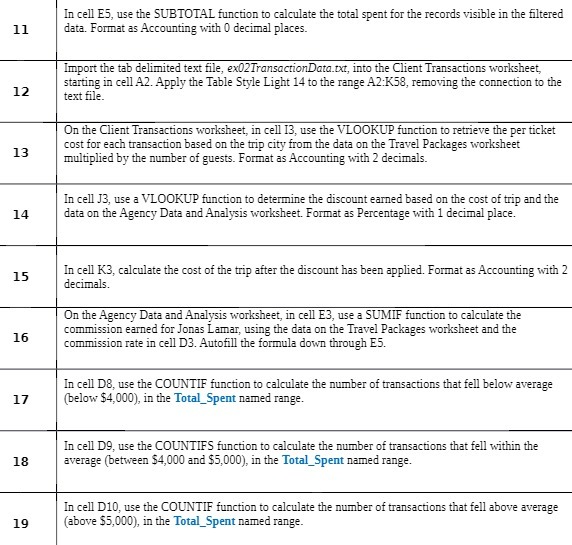
In cell E5, use the SUBTOTAL function to calculate the total spent for the records visible in the filtered 11 data. Format as Accounting with 0 decimal places. Import the tab delimited text file, ex02TransactionData.txt, into the Client Transactions worksheet, 12 starting in cell A2. Apply the Table Style Light 14 to the range A2:K58, removing the connection to the text file. On the Client Transactions worksheet, in cell 13, use the VLOOKUP function to retrieve the per ticket 13 cost for each transaction based on the trip city from the data on the Travel Packages worksheet multiplied by the number of guests. Format as Accounting with 2 decimals. In cell J3, use a VLOOKUP function to determine the discount earned based on the cost of trip and the 14 data on the Agency Data and Analysis worksheet. Format as Percentage with 1 decimal place. 15 In cell K3, calculate the cost of the trip after the discount has been applied. Format as Accounting with 2 decimals. On the Agency Data and Analysis worksheet, in cell E3, use a SUMIF function to calculate the 16 commission earned for Jonas Lamar, using the data on the Travel Packages worksheet and the commission rate in cell D3. Autofill the formula down through E5. In cell Do, use the COUNTIF function to calculate the number of transactions that fell below average 17 (below $4,000), in the Total_Spent named range. In cell D9, use the COUNTIFS function to calculate the number of transactions that fell within the 18 average (between $4,000 and $5,000), in the Total_Spent named range. In cell D10, use the COUNTIF function to calculate the number of transactions that fell above average 19 (above $5,000), in the Total_Spent named range
Step by Step Solution
There are 3 Steps involved in it

Get step-by-step solutions from verified subject matter experts
 Study Help